Real Estate Photo Editing AI: A 2026 Pro's Guide
Discover how real estate photo editing AI can save you time and money. Learn to virtually stage, declutter, and enhance listings for 47% more inquiries.

You already know the pattern. A listing is ready to go, but the photos aren’t. The editor says tomorrow. The stager needs another day. The seller wants the living room to look cleaner, warmer, and bigger, but not fake. Meanwhile, competing homes are already live with sharper visuals, cleaner lines, and stronger first impressions.
That delay costs attention.
In 2026, real estate photo editing ai isn't a nice extra for busy teams. It's part of the listing engine. It changes how quickly you launch, how polished the property looks online, and how confidently buyers can picture the space.
The New Standard for Property Marketing in 2026
The old workflow still exists. Shoot the home. Send the files out. Wait for corrections. Ask for object removal. Wait again. Then decide whether an empty room needs staging, and if it does, start another round.
That process breaks under volume.
Teams handling multiple listings need visuals that move at the speed of the market. That's one reason AI real estate photo editing expanded by approximately 9x from 2024 to 2026, and listings with AI-enhanced images saw 47% more inquiries than unedited photos, according to Pedra's analysis of over 150,000 edits across 9 countries.
Why this changed so fast
The shift wasn't driven by novelty. It was driven by workflow pressure.
Agents need to publish faster. Marketing teams need consistency across dozens of listings. Photographers need help with repetitive corrections that eat up hours. Sellers expect a polished presentation without the cost and delay of traditional staging.
AI fits that pressure because it handles the first layer of visual work well:
- Basic enhancement: Correcting exposure, color, and balance so rooms look clean and usable.
- Structural cleanup: Straightening verticals, cleaning distracting clutter, and making wide-angle shots feel more natural.
- Presentation work: Showing how empty rooms could live, not just how they look today.
Better photos don't work alone
Visuals are the front door of the listing, but they work best when the rest of the campaign keeps pace.
If you're tightening the whole funnel, not just the images, this breakdown of high-performing real estate broker ads is useful because it shows how the visual hook connects to the actual ad message and click behavior.
Good property marketing isn't one hero image. It's a system where the photo, headline, ad creative, and follow-up all support the same story.
That is a significant change in 2026. AI is no longer treated as a shortcut. It has become the default production layer for listing visuals. The teams getting the best results aren't using it to make rooms look magical. They're using it to remove friction from the path between photo shoot and market launch.
What Is AI Real Estate Photo Editing Really?
Many people bundle everything into one term. They say "AI editing" when they mean very different things.
Some tools act like a fast assistant. They fix light, correct color, and clean up perspective. Other tools behave more like an image generator. They create attractive scenes that may look impressive, but they don't always respect the room's true dimensions, the actual window light, or the way a specific furniture piece should fit.
That difference matters.
The spectrum from correction to generation
At the practical level, real estate photo editing AI sits on a spectrum.
At one end, you have enhancement tools. These improve what the camera already captured. HDR merging is a strong example. AI-driven HDR merging blends bracketed exposures to preserve shadow detail and window highlights without halos, achieving a natural dynamic range that 97% of buyers prefer in listings, according to Imagtor's overview of AI in real estate photo editing.
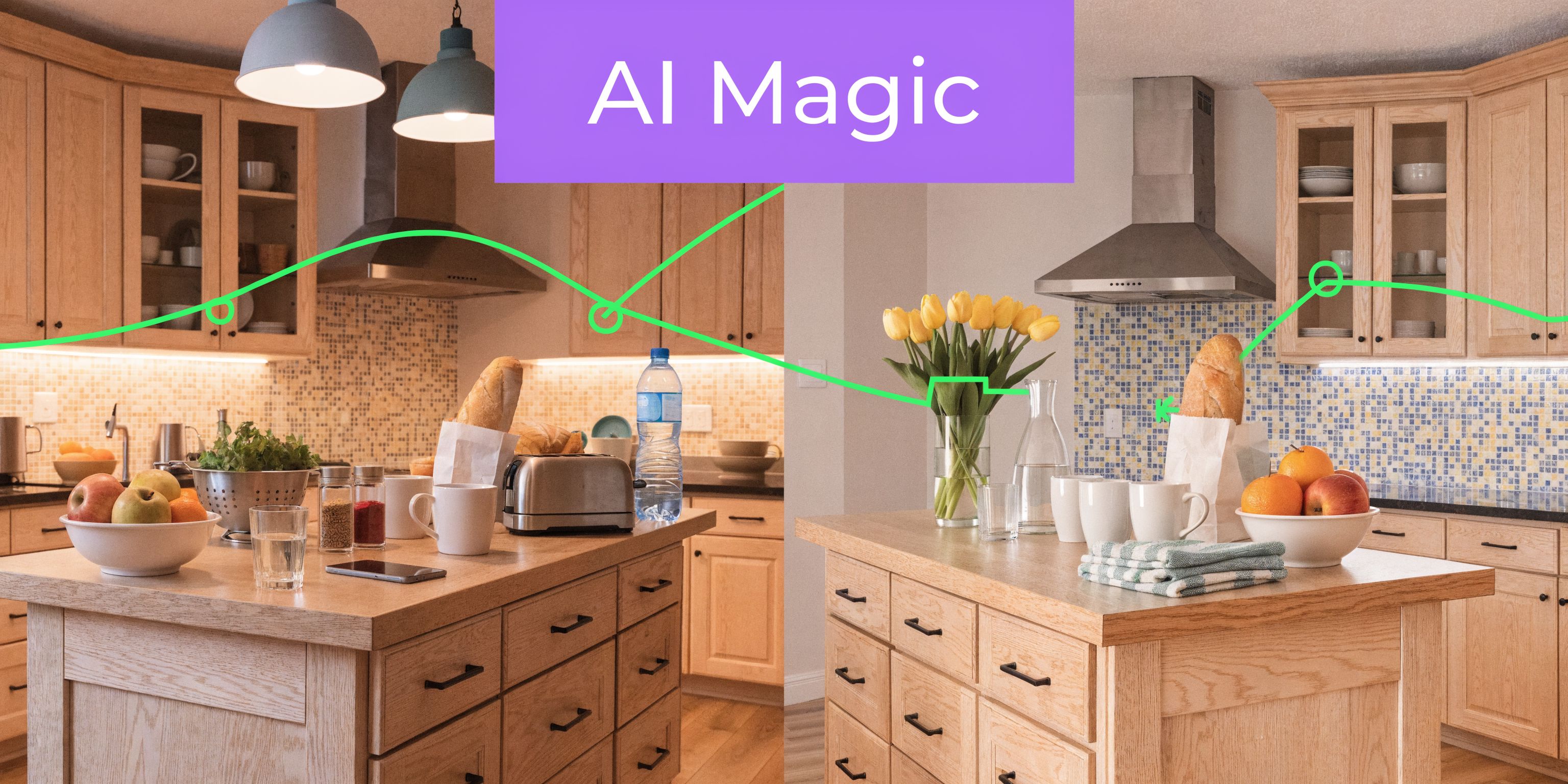
At the other end, you have generative staging, a process where the system adds furniture, decor, materials, or styling cues that were never in the original image.
Used well, that is powerful. Used badly, it creates glossy nonsense.
The key distinction professionals should care about
The key dividing line isn't "AI or no AI." It's generative AI versus dimensionally-aware AI.
Generic generative tools can produce a beautiful living room scene that wins clicks. But they often guess. A sofa may be oversized. A chair may float slightly off the floor. A coffee table may block a circulation path that would be obvious to any buyer standing in the room.
A dimensionally-aware system works differently. It doesn't just decorate the image. It places objects in relation to the room.
Critical difference: A generated room can look convincing on a screen and still be useless for real decisions. A dimensionally-aware render helps people judge fit, scale, and layout.
That matters in empty condos, awkward bonus rooms, and small urban bedrooms where every inch changes how the space feels.
What this looks like in practice
A generic tool might give you "a nice modern sofa."
A dimensionally-aware tool lets you test a specific product, in a specific finish, in the actual room photo, so the result is useful for more than marketing. It can support seller presentations, buyer discussions, furniture planning, and merchandising decisions.
That is why some outputs feel like ad art while others feel like credible listing visuals.
Use generic generation for
- Concept mood images: Early creative exploration
- Style brainstorming: Testing broad looks like minimal, warm modern, or coastal
- Fast social content: Visual ideas where exact fit isn't the point
Use dimensionally-aware visualization for
- Vacant listing staging: Showing realistic scale in real rooms
- Product comparison: Swapping one sofa, rug, or bed for another
- Client approvals: Reducing debate because everyone sees the same layout in context
The biggest mistake I see is assuming all AI staging tools are doing the same job. They're not. Some produce attractive approximations. Others create visuals you can use to make business decisions.
The Business Case for AI-Powered Property Visuals
The business case comes down to three things. Speed, cost control, and saleability.
Many teams don't adopt new tools because the interface is clever. They adopt them because the old workflow slows down listing launch, burns time on repetitive edits, and makes every visual revision feel expensive.
Speed changes listing momentum
By 2025 to 2026, 78% of professional real estate photographers were using AI-powered editing tools, and those tools cut post-processing time by at least 40%. The same source notes that homes with these high-quality photos sell 32% faster than those with average images, according to Imagtor's review of AI in real estate photography.
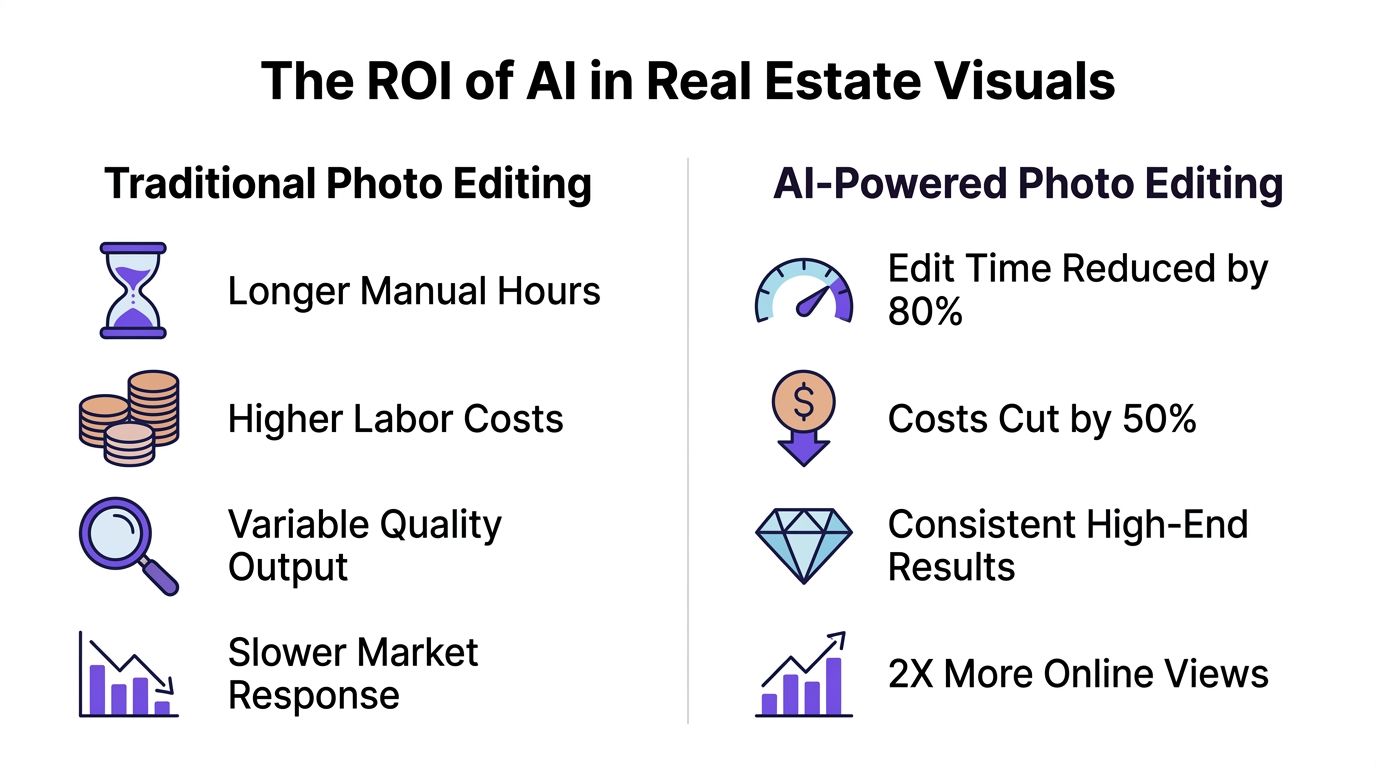
That doesn't mean every property should be fully automated. It means repetitive work should be.
Window balancing, exposure cleanup, sky fixes, decluttering passes, and first-round staging concepts are exactly the kind of tasks that shouldn't sit in a queue if the property is ready to market.
Cost isn't just what you pay per image
The visible cost is editing. The hidden cost is delay.
If a team waits on manual rounds for every listing, marketing calendars slip. Sellers get anxious. Ad campaigns start late. Social content goes out piecemeal. Leasing teams and broker teams end up working around production bottlenecks instead of around buyer demand.
Traditional physical staging can still make sense for premium listings and in-person showings. Traditional 3D rendering can still make sense for pre-construction and architectural planning. But for the majority of active listings, photo-based AI editing gives the fastest path from room photo to market-ready visual.
Quality has a direct commercial effect
The quality issue is often misunderstood. It's not about making everything look luxurious. It's about making every listing look intentional.
Strong edits fix technical problems. Better staging choices make the room easier to read. Consistency across the listing set makes the brand look more professional.
If buyers hesitate because a room feels dark, cluttered, or visually confusing, the problem isn't only the room. It's the presentation.
For agents comparing options, this roundup of AI tools for agents is a practical next step: https://www.ai-stager.com/blog/best-ai-tools-for-real-estate-agents
AI vs. Manual vs. 3D Rendering Comparison
| Metric | AI Editing (e.g., aiStager) | Manual Photo Editing | Traditional 3D Rendering |
|---|---|---|---|
| Turnaround | Fast enough for listing workflows and rapid revisions | Slower, especially with multiple rounds | Slowest, especially when built from scratch |
| Best use case | Listing photos, virtual staging, decluttering, product swaps | Premium retouching and final polish | New development, unbuilt spaces, design presentations |
| Scalability | Strong for teams handling repeated listing volume | Limited by editor availability and queue time | Limited by project complexity |
| Visual realism | Strong when the tool respects perspective and room geometry | Strong for correction-based work | Strong but can feel less photographic |
| Revision flexibility | Easy to test alternate styles and furniture options | Possible but labor-heavy | Possible, but each change can slow production |
| Decision value | High when outputs are tied to real room conditions | High for image cleanup, lower for staging ideas alone | High for planning, lower for quick listing launch |
The point isn't that AI replaces everything. It doesn't. The point is that it now handles a large share of listing production better than the old default.
Real-World AI Workflows for Real Estate Professionals
The fastest way to judge a tool is to stop reading feature pages and look at the workflow.
A useful real estate photo editing ai setup should help you do one of four things without friction: clean a room, correct the shot, stage an empty space, or test alternate products inside the same room.
Start with the camera file, not the fantasy
Every workable AI flow starts before the AI.
If the source photo has poor framing, mixed color cast, or obvious lens distortion, the result will fight you. Modern tools can rescue a lot, but they work best when the room is captured cleanly and squarely.
One of the biggest technical wins here is perspective correction. AI perspective correction uses semantic segmentation to detect architectural lines with 95%+ accuracy, automatically straightening verticals so rooms don't show the "leaning walls" effect that can subtly put buyers off, according to Autoenhance.ai's discussion of the editing workflow.
Workflow one for empty listings
A vacant room is where AI earns its place quickly.
The practical sequence looks like this:
- Upload the room photo.
- Correct perspective and exposure first.
- Choose a style direction that fits the property.
- Add only enough furniture to explain the room.
A downtown condo might need a restrained setup with a low-profile sectional, slim dining table, and minimal decor. A suburban family home may need a softer layout with a larger rug, warmer wood tones, and a more familiar seating arrangement.
Product-specific placement also becomes useful in this context. If you want to test a West Elm sofa against a similar profile from Article, the strongest workflow is one that lets you compare both in the same room rather than stage two entirely different imaginary scenes.
Workflow two for occupied homes that need editing, not reinvention
Occupied homes are different.
The job isn't to erase personality completely. It's to reduce distraction and broaden appeal. That usually means removing visible clutter, neutralizing styling that is too specific, and replacing standout furniture only when it hurts the room's readability.
A practical example:
- Living room issue: A seller has oversized recliners and bold patterned textiles.
- Editing goal: Keep the architecture, improve the read of the room.
- Useful approach: Remove excess items, simplify accessories, and test a cleaner seating setup in a quieter palette.
That can help buyers focus on the room shape, light, and circulation instead of the seller's personal taste.
The best AI edits don't shout "edited." They make the buyer spend more time looking at the property itself.
Workflow three for product and finish testing
For product and finish testing, a more specialized system earns attention.
If you're comparing three similar sofas in different fabrics, colors, or finishes, generic image generation is often the wrong tool because it tends to reinterpret the whole room. A more controlled workflow lets you keep the room fixed and change the product.
One practical example is using aiStager to upload a room photo and a product link, then place a specific piece into the image so you can compare variants in the actual space. That matters if you're deciding between a bouclé sofa, a performance-linen version of the same silhouette, or a darker leather finish for a more masculine look.
That same process works for:
- Retail comparisons: Crate & Barrel versus Joybird in the same corner
- Color testing: Warm oat, charcoal, or camel on one sofa model
- Style shifts: Minimalist versus California casual without reshooting the room
For teams that also market themselves personally online, visual consistency matters outside listing photos too. This guide to AI real estate photography tips for agent headshots is useful if you're cleaning up the rest of the brand image at the same time.
Workflow four for teams that need repeatable output
The strongest AI process is usually hybrid.
Use AI for first-pass enhancement, cleanup, and staging options. Then have a photographer, marketer, or editor do a quick review before export. That review catches style mismatches, over-editing, and any object placement that feels slightly off.
If you're comparing software stacks, this tool overview is a helpful reference point: https://www.ai-stager.com/blog/real-estate-photo-editing-software
A short demo helps make these workflows more concrete:
The teams getting the most from AI aren't using it as a gimmick. They're using it as a repeatable production layer, with clear rules about when to automate, when to review, and when dimensional accuracy matters more than visual flair.
Best Practices for Authentic and Effective AI Edits
A lot of bad AI staging comes from the wrong goal.
If the goal is "make this listing look impressive," the edits often drift into misrepresentation. Oversized windows get brighter than reality. Furniture blocks natural paths. Rooms start to feel more like design concepts than actual property photos.
That approach hurts trust.
Start with the property, not the effect
Good edits reveal what is already there. They don't invent a different home.
That means the source images need to be solid. Clean angles. Open blinds if the view matters. Remove actual clutter before the shoot when possible. AI should finish the image, not rescue a careless process.
A few rules keep the output grounded:
- Match the architecture: A clean-lined modern townhouse shouldn't be staged like a rustic lodge.
- Respect room size: Small bedrooms need believable bed sizes, realistic side table spacing, and normal walking clearance.
- Keep finishes coherent: If the home has warm oak floors and traditional trim, ultra-gloss futurist staging usually fights the structure.
Use staging styles that support the buyer's read
The style itself matters less than the fit.
Minimalist staging often works because it reduces friction. It helps buyers understand the room quickly. Modern staging can work well in newer inventory or urban units. Softer transitional looks can help broader consumer appeal in family-oriented suburbs.
The mistake is choosing style for trend value alone.
A virtual stage should answer one question clearly: what is this room for, and how could someone live here?
Watch out for scale and operating cost traps
There is another trade-off that doesn't get discussed enough. Some AI products look affordable at first and then become difficult to manage at volume because of credit structures, compute-heavy workflows, or the need for ongoing manual correction.
That isn't just a budgeting issue. It affects whether the system holds up during busy periods.
A key challenge with AI is the hidden operational cost, especially when some tools become impractical for high-volume use. That makes scalability and dimensional accuracy more important in premium visual work, as noted in Imagtor's analysis of hidden AI photo editing costs.
Build an editing policy for your team
If you manage agents, photographers, or a leasing team, don't rely on taste alone. Set editing rules.
A simple internal policy should cover:
- What can be removed: Minor clutter, cords, small distractions
- What must stay visible: Structural defects, permanent features, true room proportions
- When disclosure is required: Any staged or materially altered image
- Who approves final output: Photographer, listing coordinator, or marketing lead
That policy protects your brand. It also keeps AI from becoming a free-for-all where every listing gets treated differently.
The practical standard is simple. Use AI to clarify. Don't use it to mislead.
The Future Is Hyper-Realistic and Dimensionally True
The industry has moved through three distinct phases.
First came traditional editing. It was manual, slow, and dependent on skilled retouchers. Then came broad AI enhancement, which automated common corrections and made polished visuals easier to produce at scale. Now the more interesting phase is taking shape. The visual isn't just attractive. It is usable.
That is the fundamental shift that matters.
Attractive images are no longer enough
For years, the benchmark was simple. Does the room look bright, clean, and inviting?
That still matters, but it isn't the full standard anymore. Sellers, buyers, agents, furniture teams, and developers increasingly need images that help with decisions. They want to know whether the room can hold a sectional without feeling cramped. Whether a darker finish makes sense in that corner. Whether a product shown in the render could plausibly fit in the physical space.
Generic generation can impress. It often struggles to inform.
Why dimensional truth is becoming a primary differentiator
The next wave of real estate visuals won't be won by the flashiest output. It will be won by systems that keep realism, perspective, light, and object scale aligned with the room people will visit.
That is why dimension-aware visualization matters more than broad image invention. It connects marketing with practical use.
A visual can now do more than sell the dream. It can support:
- Listing launch decisions: Which room setup reads best online
- Buyer conversations: Which furniture layout feels most believable
- Product comparison: Which version of the same item works in the actual room
- Faster approvals: Less back-and-forth because the output is concrete
What to pay attention to next
Video will keep growing. So will interactive room previews and faster iteration inside listing workflows. But the core requirement won't change. The visuals still have to feel trustworthy.
If you're exploring where that trend is heading, this overview of virtual staging workflows is worth reviewing: https://www.ai-stager.com/blog/virtual-staging-ai
The future of listing visuals isn't fake perfection. It's believable precision delivered fast enough to match the market.
That is where the strongest tools separate themselves from the hype. Not by making rooms look impossible. By helping teams show possibility without losing credibility.
Frequently Asked Questions About AI in Real Estate Photos
Is AI photo editing legal for real estate listings
Usually, yes. The issue isn't whether AI was used. The issue is whether the image misrepresents the property.
Basic corrections such as exposure balancing, perspective cleanup, or decluttering are commonly understood as presentation edits. Virtual staging is also commonly used, but it should be disclosed when appropriate. If a change affects how a buyer interprets the actual structure, condition, or size of the property, treat that carefully.
Should agents disclose AI staging
In most cases, yes. Disclosure is the safer professional standard.
It protects trust, reduces confusion during showings, and helps buyers understand what is existing versus visualized. Even where local rules vary, a transparent approach is usually the better one.
Will AI replace real estate photographers
No. It changes their role.
Photographers still control composition, light, lens choice, timing, and the quality of the raw capture. AI improves or accelerates parts of post-production. It doesn't replace the judgment required to shoot a property well.
What kind of AI edits are usually worth doing
The most practical edits are the ones that remove friction from the buyer's reading of the home.
That often includes:
- Exposure and color cleanup: So rooms feel natural and readable
- Perspective correction: So architecture looks stable
- Object removal: So clutter doesn't dominate the image
- Virtual staging: So empty rooms communicate purpose
How do you choose the right tool
Start with the job you need done most often.
If you mainly need faster correction and batch cleanup, use a tool built for enhancement workflow. If you need staging and room visualization, be careful with generic generators. For any use case where scale, placement, and real product fit matter, choose a dimensionally-aware system over a purely imaginative one.
Can AI help with furniture and finish decisions, not just listing photos
Yes. That's one of the more useful applications.
A controlled workflow can help compare similar products, different upholstery colors, or alternate finishes inside the same room photo. That is more valuable than a generic "styled room" image because the comparison happens in context.
What is the biggest mistake teams make with real estate photo editing ai
Treating all AI outputs as equal.
Some edits improve the listing. Some only make the image look dramatic. The difference usually comes down to realism, restraint, and whether the output respects the actual room.
If you want to test a workflow built for realistic room visualization instead of generic image generation, try aiStager. It lets you work from a room photo and product link to create photoreal interior visuals that support listing marketing, product comparison, and layout decisions with less manual back-and-forth.