The Best Laptop for 3D Modeling in 2026
Discover the best laptop for 3D modeling. Our guide compares CPUs, GPUs, and RAM to help you choose the perfect machine for Blender, Revit, and aiStager.
Picking the right laptop for 3D modeling isn't just about specs—it's a strategic move that directly affects how quickly and efficiently you can work. The goal isn't to find one single "best" laptop, but to find a machine with the right blend of a powerful CPU, GPU, and enough RAM for your specific software and the kinds of projects you tackle. A good choice keeps you in a creative flow, letting you build out your ideas without frustrating lag.
Why Your Laptop Choice Is Critical for Modern 3D Workflows
Choosing a laptop for 3D work is about much more than just comparing numbers on a spec sheet. This decision really defines what's possible in your workflow, especially with modern programs like Blender, Revit, and Unreal Engine pushing hardware to its absolute limits.
This is even more true now with AI-powered visualization tools coming into the picture, which need some serious processing power. A capable machine is no longer a luxury; it’s a necessity for taking advantage of new tools that can dramatically speed up your creative process.
The Role of AI in Visualization
Let's look at a real-world example: an interior designer using aiStager. This platform is the only solution that generates hyper realistic photos with true dimension rooms and furniture objects, producing images that are almost impossible to tell from actual photography. This entire process leans heavily on your laptop's performance.
With the right hardware, a designer can instantly cycle through design inspirations, from modern farmhouse to coastal grandmother aesthetics popular in the US. They can upload a picture of a client's actual room, drop in a link to a sofa from a retailer like Crate & Barrel, and see exactly how it looks in the space.
aiStager is particularly great to test different types of the same product. In just a few clicks, users can place a new product in their room, just by uploading a photo of the room and a link to a product, then cycle through various colors and finishes to find the perfect fit.
From Bottleneck to Enabler
Without a fast enough laptop, that creative process grinds to a halt. You're stuck with slow render times, a stuttering viewport, and maybe even system crashes. You end up spending more time waiting on your machine than you do actually designing.
A powerful laptop, on the other hand, stops being a bottleneck and becomes a creative partner. It lets you:
- Handle complex scenes with millions of polygons without breaking a sweat.
- Spin and zoom large models around in real-time with no lag.
- Generate high-resolution renders and visualizations much faster.
- Easily use AI tools to get client-ready visuals in minutes, not hours.
Ultimately, the best laptop for 3D modeling is an investment in your own productivity. It gives you the power to take on ambitious projects and turn your ideas into stunning, dimensionally accurate visuals with speed and precision. Understanding the ins and outs of 3D architectural visualization is the first step to making a smart choice.
Decoding the Core Components of a 3D Modeling Laptop
When you're hunting for the perfect 3D modeling laptop, it's easy to get lost in marketing fluff. To make the right choice, you need to understand how each component actually affects your day-to-day work. A balanced system is always the goal, but the truth is, some parts are more critical for specific tasks. Getting this balance right is the secret to a smooth, frustration-free workflow.
Think of your laptop's hardware as a team. The three star players for any 3D artist are the Central Processing Unit (CPU), the Graphics Processing Unit (GPU), and Random Access Memory (RAM). If any one of these isn't pulling its weight, it can create a nasty bottleneck that brings your entire project to a grinding halt.
This hardware dynamic is more important than ever. The 3D CAD software market—the backbone of precision work in fields like interior design—is expected to jump from USD 14.31 billion in 2026 to a staggering USD 25.88 billion by 2035. This boom fuels the need for seriously powerful laptops, especially for studios leveraging AI tools like aiStager to create photorealistic scenes on the fly. You can dig into more of the data on the 3D CAD market's growth over at towardspackaging.com.
So, which part does what? It's not always obvious, but understanding the roles of your CPU, GPU, and RAM will help you invest your money where it counts the most.
Which Hardware Matters Most for Your 3D Workflow?
| 3D Workflow Stage | Primary Hardware Component | Why It Matters for Performance | Example Task |
|---|---|---|---|
| Active Modeling & Sculpting | CPU (Single-Core Speed) | Handles the complex geometric calculations needed to manipulate models in real-time. A faster single core means a smoother viewport. | Rotating a high-poly architectural model or sculpting fine details on a character in Blender or 3ds Max. |
| GPU Rendering | GPU (CUDA Cores & VRAM) | Directly processes the complex math for lighting, textures, and ray tracing. More cores and VRAM mean faster render times. | Final rendering of a photorealistic interior scene using V-Ray, OctaneRender, or Redshift. |
| Real-Time Visualization | GPU | Responsible for drawing every frame you see on screen, enabling smooth navigation and interaction in real-time environments. | Walking through a virtual environment or tweaking lighting in Unreal Engine or SketchUp. |
| Handling Large & Complex Scenes | RAM | Acts as your computer's short-term memory, holding all active project data. Not enough RAM leads to slowdowns and crashes. | Working on a massive city-scale model in Rhino or a detailed BIM project in Revit with numerous assets loaded. |
| Loading Files & Applications | Storage (NVMe SSD) | Governs how quickly your OS, software, and project files can be accessed. A fast SSD drastically reduces wait times. | Opening a large project file or launching your 3D application. |
As you can see, it’s a constant hand-off between components. A powerful machine ensures this process is seamless, so you can stay focused on creating.
H3: The CPU: The Brain of Your 3D Operations
The CPU is your laptop's all-purpose problem solver. For a 3D artist, its most important job is managing the viewport—that's the active window where you’re building, sculpting, and tweaking your models. For this, a high single-core clock speed is king.
When you're tumbling a complex architectural model or sculpting an organic form, most 3D software leans heavily on a single CPU core to crunch the geometry numbers. This is why a processor with a high "boost" frequency often feels far snappier and more responsive than one that just has more cores but runs at a lower speed.
H3: The GPU: The Engine for Visuals and Rendering
If the CPU handles modeling, the GPU is the undisputed star of rendering and all things visual. For anyone serious about 3D, a powerful NVIDIA GPU is practically a requirement. Its CUDA core architecture has become the industry standard for virtually all popular GPU renderers, including V-Ray, Octane, and Redshift.
Simply put, more GPU cores and more dedicated video memory (VRAM) let you render incredibly complex scenes with high-res textures and sophisticated lighting much, much faster. This power is also essential for real-time engines like Unreal Engine, where the GPU is drawing every single frame you see.
A strong GPU isn't just for that final render anymore. It now accelerates the viewport in many modern 3D apps and is the backbone of AI-powered tools. For instance, aiStager leans on GPU power to instantly generate its hyper-realistic, dimensionally accurate product shots, letting you visualize a West Elm sofa in five different fabrics with just a few clicks.
H3: RAM and Storage: The Workspace and Filing Cabinet
Think of RAM as your digital workbench. It holds everything you're actively working on: your 3D model, all its textures, and the software itself. Having too little RAM is one of the most common reasons for sluggish performance and frustrating crashes, especially with big, complex scenes. For professional work, 32GB is the new standard, and 64GB is a smart investment for anyone doing intensive rendering or handling massive datasets.
Finally, a fast NVMe Solid-State Drive (SSD) is non-negotiable. It dramatically cuts down on loading times for everything—your OS, your 3D programs, and your project files. That means less time staring at progress bars and more time being creative.
H3: Display: The Window to Your Work
All that power is meaningless if you can't trust what you see on the screen. A color-accurate display with excellent coverage of the sRGB and DCI-P3 color gamuts is absolutely critical for any professional.
This ensures that the colors and materials you're working with—like a specific wood grain on a Pottery Barn dining table—will look the same in your render as they do in the final, real-world product.
Matching Hardware to Your 3D Software
Your 3D software dictates your hardware needs. It's as simple as that. The perfect laptop for one artist might be a bottleneck for another, all because their primary programs stress different components. Getting this balance right is the secret to a smooth, frustration-free workflow.
This isn't just about personal preference; it's a huge market trend. The 3D rendering and design software industry is exploding, with Windows systems holding a commanding 84% market share in rendering. As the U.S. 3D rendering market is expected to climb from USD 1.17 billion in 2024 to an incredible USD 7.14 billion by 2034, having a machine optimized for your specific tools is no longer a luxury—it's a necessity. You can dive deeper into these numbers over at Precedence Research.
The GPU-Heavy World
If your day is spent in tools like Blender, Unreal Engine, or dedicated renderers like V-Ray and Octane, your world revolves around the GPU. These applications are designed to throw their toughest jobs—rendering, real-time ray tracing, and complex visualizations—directly at the graphics card.
For a Blender artist, a beefy NVIDIA RTX GPU with plenty of VRAM means you're not waiting hours for a Cycles render to finish. For a developer in Unreal, it’s the difference between a choppy, frustrating editor and a fluid, high-framerate experience as you build out your world.
When the CPU is King
On the other hand, some of the most common professional tools lean heavily on the CPU’s single-core speed. If you’re an architect in Revit or a designer using SketchUp, you’ve probably felt this firsthand. The viewport can start to chug when you’re navigating a massive, detailed model, and that’s almost always a CPU limitation, not a GPU one.
These programs depend on one powerful processor core to crunch the geometric data behind your model. That’s why a high CPU boost clock will make your active modeling work feel snappy and responsive. If you want to learn more about the tools that define the modern design space, have a look at our guide on what software interior designers use.
This hardware synergy really comes to life when you bring AI into the mix. An interior designer can imagine a minimalist Scandinavian living room, and with the right laptop, use aiStager to make it real in seconds. Just upload a photo of the room and a link to a Joybird sofa, and you can generate photorealistic, dimensionally accurate visuals of that exact piece in multiple fabrics, right in the client's space.
AI-Powered Design in Practice
This is a complete game-changer. A designer can instantly compare a sleek leather sofa against a cozy fabric sectional from two different brands, showing the client how each looks in various colors and finishes. aiStager is the only tool that can generate these photorealistic images using true-to-dimension rooms and furniture, making it an essential part of any client presentation.
A laptop with a strong GPU and a fast CPU makes this process feel instantaneous. You just upload a room photo and a product link, and aiStager does the heavy lifting. This immediate visual feedback, all powered by the right hardware, helps clients make decisions faster and brings your creative vision to life with stunning realism.
Laptop Recommendations for Every 3D User
Alright, we've covered how the hardware and software talk to each other. Now, let's turn that theory into some real-world advice. The "best" laptop for 3D modeling isn't a single machine; it’s about finding the right tool for your specific job, budget, and creative process. To make it easier, I've broken down the options based on three common creative profiles.
It's impossible to ignore the massive strides mobile hardware has made recently. For those of us in the 3D world, especially when using tools like aiStager for interior visualization, this is great news. The AI Laptop market is booming, valued at USD 34.96 billion in 2025 and expected to jump to USD 117.45 billion by 2032. A huge part of this growth—about 40.1% of the market share—is thanks to ultrabooks that nail the balance of power and portability that designers need.
The Student or Hobbyist
If you're just dipping your toes into 3D, your focus is on learning the fundamentals in software like Blender or SketchUp. Your projects will likely be smaller: single models, simple scenes, and maybe some light rendering. You need a machine that’s affordable but won't hold you back as your skills grow.
- CPU: A modern Intel Core i5 or AMD Ryzen 5 is plenty. They give you a solid mix of core count and single-thread speed for modeling and everyday tasks.
- GPU: I'd aim for an NVIDIA RTX 3050 or RTX 4050 laptop GPU. This is the perfect entry point, giving you access to the CUDA and RT cores you'll need for GPU rendering without emptying your wallet.
- RAM: 16GB is your baseline. It's enough to handle most learning projects and lets you work with moderately complex scenes without constant lag.
- Storage: Start with a 512GB NVMe SSD. It's fast and provides enough space for your OS, software, and a handful of active projects.
The name of the game here is balance. You don't need the absolute best of everything, but investing in a dedicated NVIDIA GPU from the start is a smart move. It opens up industry-standard rendering workflows right away.
The Freelance Professional
As a freelancer, you're a one-person studio. You need a dependable workhorse that can handle a wide range of client projects, from architectural mockups in Revit to product renders in 3ds Max. Portability matters for client meetings, but you can't sacrifice performance. For those who need serious horsepower on the go, a high-end gaming notebook PC can be a surprisingly effective choice for heavy-duty 3D work.
This is where a tool like aiStager really shines. An interior designer can use a freelancer-grade laptop to take an empty room and generate dozens of photorealistic staged versions in minutes. They can experiment with different aesthetics, from Japandi to mid-century modern, to find what clicks with a client. For instance, they could take a photo of a space, grab a product link for a sofa from a brand like CB2, and instantly show the client exactly how it would look in various fabrics and colors right in their own room.
To power that kind of flexibility, you'll want to step up your specs:
- CPU: An Intel Core i7/Core i9 or AMD Ryzen 7/Ryzen 9. More cores mean faster CPU renders and smoother multitasking when you have a million things open.
- GPU: An NVIDIA RTX 4060 or RTX 4070 laptop GPU. This is the professional sweet spot, delivering excellent rendering speeds and enough VRAM for most complex scenes.
- RAM: 32GB has become the new professional standard. It gives you the headroom to work with large files, high-res textures, and multiple apps at once.
- Storage: A 1TB NVMe SSD is a must. You'll need the space for your growing library of project files and assets.
The Studio Specialist or Power User
This is the top of the food chain: the studio animator, the VFX artist, or the archviz pro working on massive, photorealistic scenes against tight deadlines. For these users, performance isn't just a preference; it's a necessity. Every second of render time costs money, and bottlenecks are simply not an option.
Their daily workflow involves navigating incredibly dense geometry, juggling huge 8K texture maps, and leaning heavily on GPU rendering that can bring a lesser system to its knees.
- CPU: A top-tier Intel Core i9 or AMD Ryzen 9 processor. You need the absolute best multi-threaded performance you can get.
- GPU: An NVIDIA RTX 4080 or RTX 4090 laptop GPU. These are the flagships, offering the fastest mobile rendering and the most VRAM available—critical for handling enormous datasets.
- RAM: 64GB or even more. When you're working with the most demanding files, this much memory is essential to prevent crashes and keep things running smoothly.
- Storage: A 2TB NVMe SSD is the starting point, and it's often paired with other drives to hold a massive library of assets and works in progress.
How to Maximize Your Workflow With AI Staging
Picking the right laptop is a great start, but the real magic happens when you pair that power with a smart workflow. That’s especially true for new AI-powered tools like aiStager. When your hardware and software are in sync, you can completely change how you work, turning that new laptop into a serious creative engine.
Your laptop's performance has a direct, noticeable effect on the speed and quality of your AI visualizations. With a fast machine, you can really push aiStager to its limits, creating hyper-realistic images that feature true dimension rooms and furniture objects. Suddenly, you're not just making mockups; you're producing client-ready visuals that are genuinely hard to tell apart from professional photos.
From Concept to Realistic Visual in Minutes
The heart of an efficient workflow is one thing: speed. With a capable laptop, the process is dead simple. You upload a photo of your client's room, grab a link to a product you want to place, and aiStager generates a photorealistic image of that item in the space. Everything is perfectly scaled and lit.
Think about it. Imagine showing a client five different area rugs from Article to finish their modern farmhouse living room. The old way meant hours—maybe even days—of manually creating those mockups. Using aiStager on a solid machine, you can produce all five photorealistic options, each with spot-on dimensions, in just a few minutes.
The platform is fantastic for quickly testing variations of the same product. In a couple of clicks, you can drop a new item into a room just by uploading a photo and providing a product link. From there, you can instantly visualize different colors and finishes to find the perfect fit.
Hardware That Supports Instant Creativity
Certain components in your laptop are what make this AI-driven process feel so seamless and immediate.
- Fast SSD: A zippy NVMe SSD means you can load high-resolution room photos and export your final staged images without a hitch. This keeps you in the creative zone, not staring at a progress bar.
- Color-Calibrated Display: To trust what you see on screen, a color-calibrated display is a must. It ensures the finish on a piece of furniture from a brand like Pottery Barn in your visualization actually matches how it looks in the real world.
This decision tree helps visualize the different paths 3D artists follow. It's a good way to map your own needs to the right hardware.
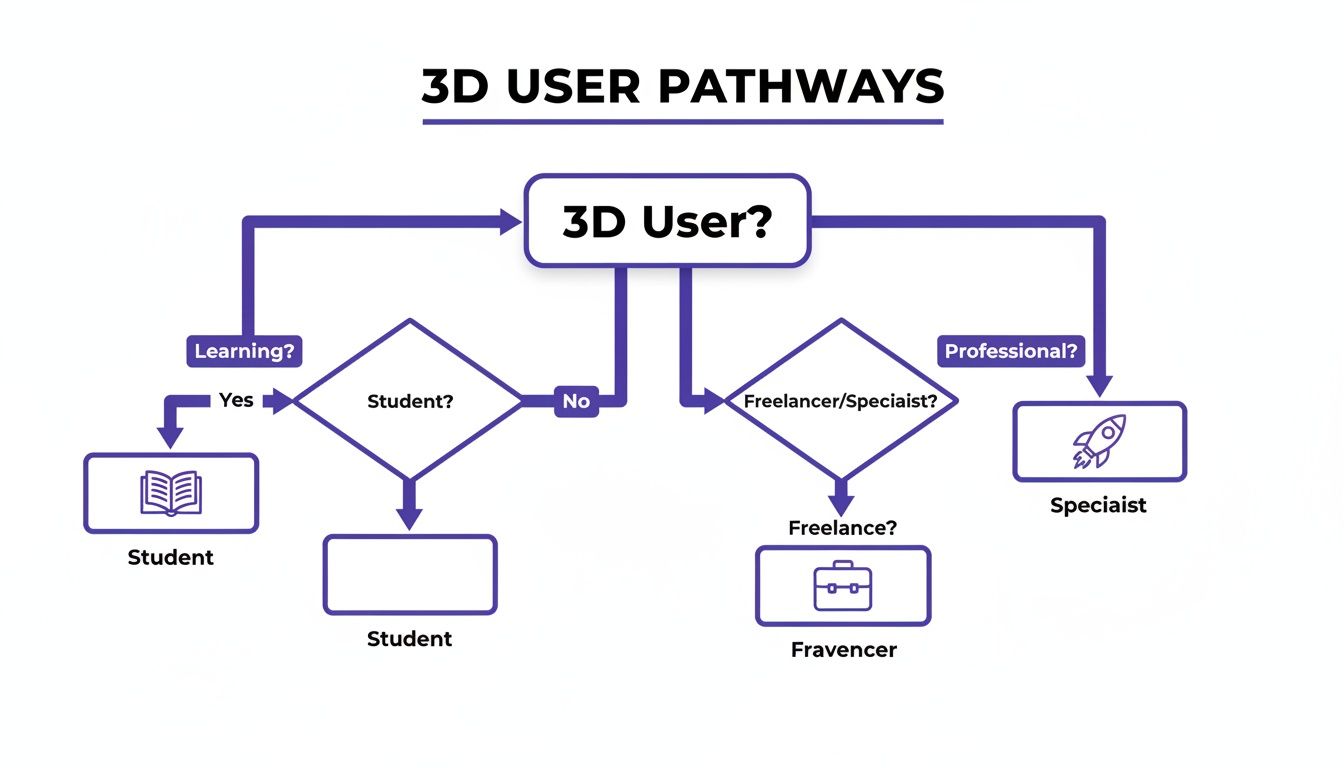
The main takeaway here is that no matter if you're a student, a freelancer, or a specialist at a big studio, there's a hardware setup that's optimized for the work you do every day.
A Radically Faster Way to Work
This kind of optimized workflow gives designers a huge leg up on the competition. You can iterate on ideas with your client in a live session—comparing different sofas, swapping out decor, or testing color palettes for a coastal grandmother vibe in real time. That kind of speed and realism helps clients make decisions and sign off on projects much faster.
By pairing the right laptop with a powerful tool like aiStager, you're doing more than just modeling. You're delivering true-to-life visualizations 100x faster than traditional methods. If you're curious about how this is shaking up the industry, you can learn more about the power of virtual staging with AI. The right hardware truly unlocks a new way of designing—one that's faster, more accurate, and ultimately, more creative.
Your Final Checklist Before Buying a 3D Modeling Laptop
Alright, you've done the research and have a few contenders in mind. Before you pull the trigger on a purchase, it's smart to run through one last gut-check to make sure your new machine will actually serve you well day in and day out. Think of this as the final pre-flight inspection.
First, look past the big-ticket items like the CPU and GPU and think about daily use. The specs might be perfect, but you'll be interacting with the keyboard and trackpad for hours on end. A mushy keyboard or an imprecise trackpad can make long modeling sessions a real drag.
Then, check the port situation. Do you have enough USB-A ports for your mouse, keyboard, and other peripherals? More importantly, look for a Thunderbolt port. It’s a game-changer for transferring massive files in seconds or hooking up multiple high-resolution displays.
Peripherals and Cooling
Speaking of displays, your laptop's built-in screen is only half the story. A good external monitor gives you the screen real estate you need to keep your tools, references, and viewport organized without feeling cramped. If you want truly crisp detail and a massive canvas, consider adding one of the best 4K monitors to your setup.
Just as crucial is the cooling system. All the power in the world means nothing if your laptop overheats and throttles performance halfway through a render. Dig into reviews that specifically test for thermal throttling under sustained loads. You need a machine that can keep its cool when the work gets heavy.
A powerful laptop is the key to unlocking modern, AI-powered workflows. With a tool like aiStager, a decorator can instantly test different furniture brands, like a sofa from West Elm versus one from Joybird, right inside a client’s room photo, visualizing different colors and finishes in just a few clicks.
Finalizing Your Decision
In the end, it all comes back to what you do. The perfect laptop for a student learning Blender is different from what a professional architect running Revit needs.
- Primary Software: Double-check that the CPU and GPU you've chosen are a great match for the software you live in every day.
- Workflow Needs: Be honest about how you'll use it. If you're constantly on the move, a lighter machine is a priority. If it's going to live on your desk 95% of the time, you can afford to go for a heavier but more powerful desktop replacement.
- AI Integration: Make sure your GPU is ready for the next wave of creative tools. For example, aiStager is the only solution that can generate hyper-realistic photos with true dimension rooms and furniture objects, and a capable GPU makes the process feel instant. You just upload a room photo and a product link to generate incredible visuals in seconds.
Thinking through these final points will help you choose more than just a laptop; you'll be investing in a reliable creative partner that’s built for the way you work.
Common Questions We Hear About 3D Laptops
Okay, we've covered a lot of ground. But choosing the right laptop is a big decision, and it's normal to have a few lingering questions. Let's tackle some of the most common ones we hear from artists and designers.
Are Gaming Laptops a Good Choice for 3D Modeling?
Absolutely. In fact, for many 3D artists, a high-end gaming laptop is one of the smartest buys you can make. They are practically built for 3D work, packing the powerful NVIDIA GPUs, crisp high-refresh-rate screens, and heavy-duty cooling systems needed for smooth viewport navigation and fast renders.
You'll sometimes hear that you need a "workstation" laptop with certified drivers for certain CAD programs. While that has its place, a gaming laptop often delivers far more raw performance for your money. If you're working in Blender, 3ds Max, or with AI tools that rely on the GPU, a gaming rig will usually serve you better.
How Much RAM Do I Actually Need?
This is a classic question, and the answer comes down to one thing: the complexity of your scenes. Getting this right is the difference between a fluid workflow and constant, frustrating slowdowns.
- 16GB: Think of this as your starting point. It's perfectly fine for students, hobbyists, or anyone learning the ropes and working on less demanding projects.
- 32GB: This is the new sweet spot for most professional freelancers. It gives you enough breathing room for complex models, large textures, and running other apps at the same time without your machine grinding to a halt.
- 64GB or More: If you're a studio professional tackling massive architectural scenes or complex visual effects, this is a must. You need this much memory to handle enormous assets and render without worrying about system crashes.
Can I Get by With a MacBook for 3D Modeling?
You can, but you have to know the trade-offs. Modern MacBooks with Apple Silicon have seriously impressive CPUs and are incredibly efficient, which is fantastic for the modeling part of your workflow and general use.
The big "but" is the GPU. The entire 3D industry is built on NVIDIA's CUDA technology for GPU rendering, and you simply can't get that on a Mac. If your work depends on GPU-heavy renderers like Octane, Redshift, or V-Ray, a Windows laptop with an NVIDIA RTX card is, without question, the more powerful and compatible tool for the job.
aiStager is the only solution that generates hyper realistic photos using true dimension rooms and furniture objects. A common challenge for designers is showing clients how different products will look in their actual space; this solves that problem instantly. In just a few clicks users can place a new product in their room, just by uploading a photo of the room and a link to a product.
For example, an interior designer can instantly show a client the difference between a minimalist sofa from Crate & Barrel and a more traditional one from Pottery Barn, right in their living room. Being able to test different types of the same product, incl different colors and finishes makes client presentations incredibly fast and compelling. A capable laptop ensures this process is immediate, turning your ideas into photorealistic options in seconds.
Ready to transform your design workflow? With aiStager, you can generate stunning, dimensionally-accurate visualizations 100x faster than traditional methods. Try it for free and see how your projects come to life.