A Guide to 3D Architectural Visualization
Discover how 3D architectural visualization brings design ideas to life. This guide covers the process, tools, and how AI is making it faster and easier.
Picture this: you're holding a stunning, lifelike image of a new building or a freshly designed living room before a single brick has been laid or any furniture ordered. That's the power of 3D architectural visualization. It's a technology that turns flat blueprints and abstract concepts into vivid, tangible experiences you can almost reach out and touch.
Bridging the Gap Between Idea and Reality
At its heart, 3D architectural visualization is both an art and a science focused on creating incredibly realistic images and animations from architectural plans. Think of it as a universal translator, turning complex technical drawings into a visual language that clients, investors, and homeowners can immediately grasp and connect with. This ability to bridge the gap between a designer's vision and a client's understanding has made it an essential tool in so many fields.
The real value here is in its power to prevent expensive mistakes. It provides a digital sandbox where you can experiment with different materials, play with lighting, and test out spatial layouts before committing in the real world. When everyone can see the finished product upfront, it’s much easier to get on the same page about everything, from major structural features to the smallest decorative touches.
Why It Matters More Than Ever
The appetite for high-quality visuals is only growing. The numbers tell the story: the global 3D rendering and visualization software market jumped from USD 2.27 billion in 2022 and is expected to hit USD 9.58 billion by 2030. That kind of explosive growth shows just how crucial these tools have become for professionals everywhere.
This trend is driven by a fundamental human need: confidence. Whether you’re an architect pitching a new skyscraper or a homeowner trying to pick out a new couch, seeing is believing. For a closer look at what goes into creating these visuals, you can find great information in articles on 3D architectural rendering services.
The Power of Photorealism in Design
Today's tools are pushing realism to incredible new heights, especially in interior design. If you're curious about how this applies to home styling, our guide to interior design renders is a great place to start.
Let's say you're redecorating your living room, aiming for a California cool aesthetic. You want a statement piece but can't decide what would work best.
With today's technology, the guesswork is gone. You can see exactly how a plush, off-white Bouclé sofa from CB2 would look versus a sleek, caramel leather sectional from Article, all within the context of your own room.
This is where next-generation platforms like aiStager are completely changing how we approach design. It’s the only solution out there that generates hyper-realistic photos using true dimension rooms and furniture objects. You can test-drive different versions of the same product—for example, comparing a West Elm sofa in navy velvet versus distressed leather. With just a photo of your room and a product link, you can place a new item into your space in a few clicks and get an instant, dimensionally accurate preview. It makes design choices faster, simpler, and far more certain.
The Traditional Path to Creating 3D Visuals
For years, creating a stunning, photorealistic image was a painstaking process, a true blend of artistry and heavy-duty technical skill. Think of it like building a movie set from scratch, but entirely inside a computer. This classic workflow, still used by many high-end studios, involves a series of deliberate steps, each one layering more detail and realism onto the last.
It's a journey that always starts with a simple idea and ends with a finished, polished image.
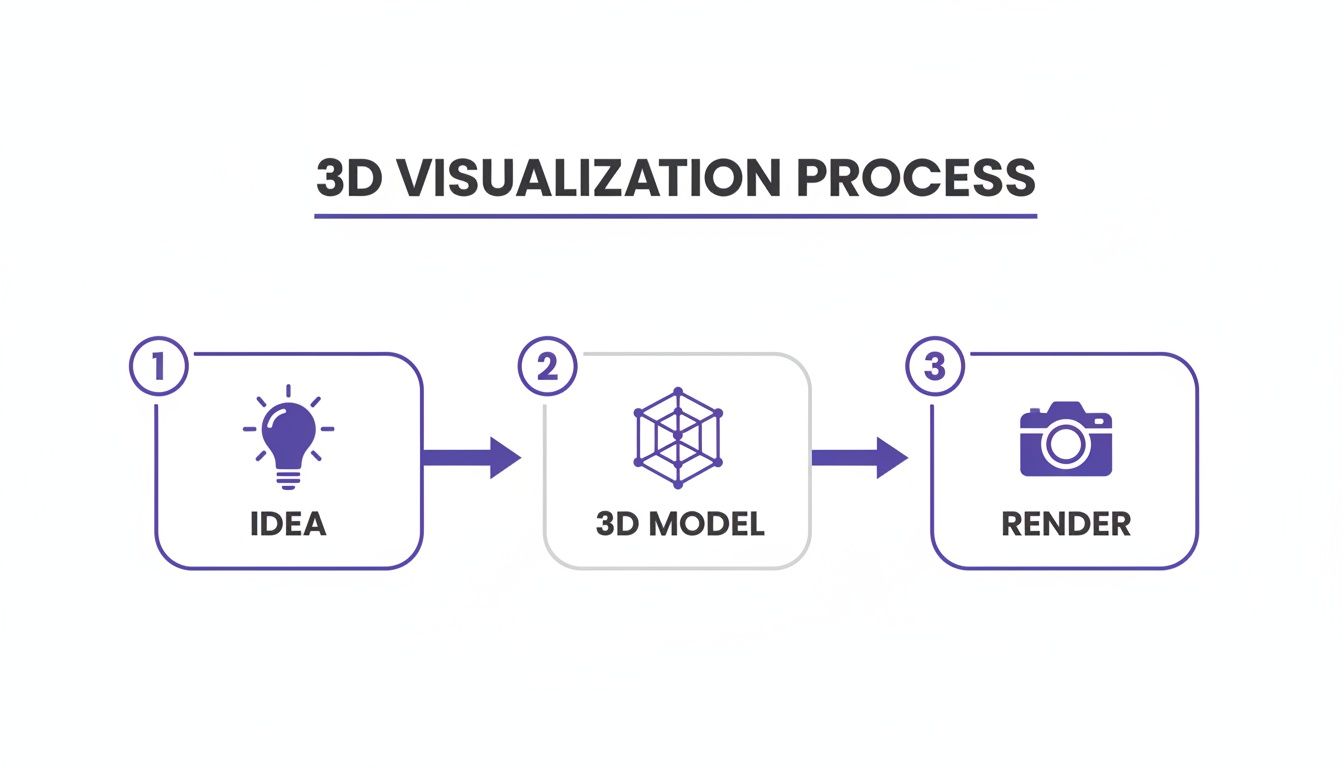
This isn’t a one-and-done task. True 3D architectural visualization is a pipeline, where every stage is absolutely critical to getting that final "wow" factor.
Let's break down exactly what goes into this traditional method.
The Traditional 3D Visualization Pipeline
Here’s a look at the key stages that take a project from blueprint to beautiful render.
| Stage | Core Purpose | Common Software Tools |
|---|---|---|
| 3D Modeling | To build the digital "skeleton" or structure of the space and all objects within it. | Autodesk 3ds Max, SketchUp, Blender |
| Texturing | To "paint" the models with realistic materials, colors, and surface details. | Adobe Substance 3D, V-Ray, Corona Renderer |
| Lighting | To place virtual lights that create mood, depth, and realistic shadows. | V-Ray, Corona Renderer, FStorm |
| Rendering | To compute all the data (models, textures, light) into a final, high-resolution image. | V-Ray, Corona Renderer, FStorm |
Each of these steps requires a specialized skillset and can be incredibly time-consuming.
Step 1: 3D Modeling — The Digital Sculpture
Everything starts with 3D modeling. This is where the artist essentially builds a digital sculpture of the room. Armed with architectural plans or sketches, they construct the walls, floors, windows, and ceilings with absolute precision. This creates a geometrically perfect, but completely colorless, wireframe of the space.
Of course, a room isn't empty. This stage also involves building every piece of furniture and decor. From the gentle curve of an Eames Lounge Chair to a complex, custom-designed kitchen island, each object is meticulously crafted, one polygon at a time.
Step 2: Texturing — Painting The Surfaces
Once the 3D "set" is built, it's time for texturing. This is where the scene truly starts to come to life. An artist applies digital materials to every surface, turning a plain gray box into a rich, reclaimed wood floor or a simple geometric shape into a plush velvet sofa. It’s all about adding color, feel, and personality.
This isn't just about slapping a photo onto a model. The real art is in simulating the tiny imperfections that trick our eyes into believing something is real—the subtle grain in a wood table, the faint sheen on a marble countertop, or the soft weave of a linen curtain.
Step 3: Lighting — Setting The Mood
With everything modeled and textured, we move to lighting. This step is much like what a cinematographer does on a film set. The artist strategically places virtual lights to mimic everything from the warm afternoon sun streaming through a window to the soft glow of a bedside lamp. It's not just about making things visible; it’s about creating an atmosphere.
Good lighting carves out shadows, gives objects a sense of weight, and highlights the best features of a design. A scene with poor lighting will always look flat and fake, no matter how great the models and textures are.
This intricate dance of modeling, texturing, and lighting is why a single high-quality render can take days or even weeks of skilled work and cost thousands of dollars. It’s a serious investment.
Step 4: Rendering — The Final Photoshoot
The last step in the traditional 3D architectural visualization pipeline is rendering. This is the digital photoshoot. The computer takes all the information—the models, the materials, the lighting—and starts a complex calculation process to generate the final image.
Powerful software like 3ds Max, often paired with a render engine like V-Ray, simulates how every ray of light would bounce around the room in real life. This is incredibly demanding on a computer, often taking hours or even days to finish a single picture. The result is a beautiful, static image, but getting there the traditional way is undeniably slow, expensive, and requires a very specific set of skills.
How 3D Visualization Is Changing the Game
The real magic of 3D architectural visualization isn't just about making pretty pictures. It’s about solving real-world problems and creating new opportunities for entire industries. What started as a niche tool for architects has exploded into a must-have for marketing, sales, and design, completely changing how businesses bring their ideas to life for customers.
Whether it’s selling a skyscraper before a single brick is laid or helping a homeowner pick the perfect armchair, visualization closes that tricky gap between what’s in your head and what’s in front of your eyes.
The numbers tell the story. The market for 3D architectural visualization services is on a tear, expected to jump from USD 8,563.87 million in 2018 to an incredible USD 61,651.18 million by 2026. That's not just a statistic; it's developers in New York, London, and Tokyo using photorealistic renders to close multi-million dollar deals on projects that are still just dirt and blueprints. While commercial projects are the big players for now, the residential side is catching up fast as homebuyers expect to see exactly what they’re buying. You can dig deeper into these trends in this detailed industry report.
Transforming Real Estate Marketing
For anyone in real estate, 3D visualization is a total game-changer. It lets you sell a vision, a lifestyle—not just a floor plan.
- Virtual Tours: Imagine giving potential buyers a complete, walkable tour of a condo that doesn't exist yet. They can stroll through every room, check out the kitchen finishes, and even stand on the balcony to see the view. This kind of pre-construction marketing builds serious buzz and locks in sales long before the ribbon-cutting.
- Virtual Staging: Let's face it, empty rooms are hard to sell. They feel cold and impersonal. With virtual staging, you can digitally furnish an empty space with stylish, perfectly-scaled furniture, instantly transforming it into a warm, inviting home. It helps buyers see the potential, and it gets properties sold faster.
Elevating Interior Design
In the world of interior design, misunderstandings can be costly and frustrating. 3D visualization takes all the guesswork out of the process, giving clients the confidence to sign off on a design they truly love.
Think about a client who wants to create a cozy, "Japandi" style living room. They’re stuck between the famously plush "Cloud" sofa from Restoration Hardware and a sleeker, minimalist piece with light oak trim. Instead of just showing them fabric swatches and a mood board, a designer can drop both options right into a 3D model of their actual living room, sitting right next to their existing Noguchi coffee table.
This ability to show clients exactly how real, branded products will look in their own home isn't a luxury anymore—it's fast becoming an expectation. It prevents expensive mistakes and ensures everyone is on the same page.
Revolutionizing Product Visualization
For furniture and home decor brands, 3D visualization is a marketing superpower. Companies like Article or Crate & Barrel can create an entire catalog of images without a single costly photoshoot.
They can take one new armchair and showcase it in hundreds of different digital "sets"—a minimalist Scandinavian loft, a cozy farmhouse living room, or a breezy coastal sunroom. This helps customers see how a piece might fit their own style, giving them the confidence to click "buy" and cutting down on product returns.
This is where aiStager is making a huge impact. As the only tool that can generate hyper-realistic photos using true dimension rooms and furniture objects, it lets a designer or homeowner compare different sofa brands, colors, or fabrics in their room in just a few clicks. All it takes is a photo of the space and a link to a product to instantly see a perfectly scaled version right where you want it. It makes design decisions faster and more accurate than ever before.
The AI Shift In Architectural Visualization
Let’s be honest: traditional 3D architectural visualization is an incredible tool, but it's often a beast to work with. The process can be painfully slow, technically complicated, and incredibly expensive. For most designers, real estate agents, and homeowners, those hurdles have kept professional-grade visuals just out of reach.
But what if you could skip the entire time-consuming pipeline of modeling, texturing, and rendering?
A huge shift is underway, and it's all thanks to artificial intelligence. New platforms are popping up that handle the heavy lifting, automating the most complex parts of visualization and putting photorealistic power into anyone's hands. This isn't just about speeding things up; it's about making great design accessible to everyone.

This AI-powered movement is plugging into a massive market. Architectural visualization is a huge piece of the 3D rendering world, which is on track to hit USD 5.6 billion by 2026. That growth is largely driven by real estate pros in places like the US and UK who need compelling visuals to sell properties before they’re even built.
A New, Simpler Workflow
Imagine wanting to see how a new sofa looks in your living room without having to wrestle with complicated software or hire a pricey 3D artist. That's exactly where tools like aiStager come in. They offer a completely different, refreshingly simple approach.
All you have to do is upload a photo of your room and drop in a link to a product you're eyeing.
In just a few seconds, the AI generates a stunningly realistic image of that item sitting perfectly in your space. This isn't some generic placeholder, either. aiStager is the only solution that generates hyper-realistic photos with true dimension rooms and furniture objects, so you know the scale and fit are spot on. To see how AI is supercharging this kind of technology, it’s worth checking out how AI-Driven Augmented Reality (AIDAR) is pushing the whole field forward.
To really grasp the difference, let’s compare the old way with the new.
Traditional 3D Workflow vs AI-Powered aiStager
| Feature | Traditional 3D Process | aiStager AI Process |
|---|---|---|
| Time to Visualize | Days or Weeks per image, depending on complexity. | Seconds per image. |
| Cost | Hundreds or Thousands of Dollars per project, requiring skilled 3D artists. | Low-Cost Subscription or per-image fee, accessible to anyone. |
| Required Skills | Expert-Level Proficiency in software like 3ds Max, V-Ray, or Blender. | None. Just upload a photo and paste a product link. |
| Asset Creation | Requires Manual 3D Modeling of furniture and decor from scratch. | Automated Model Generation directly from the product URL. |
| Dimensional Accuracy | Dependent on Artist Skill and can be prone to human error. | Guaranteed True-to-Scale using real product dimensions. |
| Revisions | Time-Consuming and Costly. Each change requires re-rendering. | Instant. Swap out products, colors, or styles in a few clicks. |
As you can see, the efficiency gains are staggering. What once took a specialized team days to accomplish can now be done by anyone in less than a minute.
Making Confident Decisions In Clicks
This technology completely changes how people make decisions about their spaces. It takes away all the guesswork and second-guessing that so often leads to expensive mistakes and that dreaded "buyer's remorse."
Think about it. Say you’re designing a modern living room for a client and you're torn between a deep navy velvet sofa from West Elm and a classic tan leather sectional from Pottery Barn.
In the past, you'd throw together a mood board and cross your fingers that the client could "visualize" it. With an AI tool, you can show them both options side-by-side, rendered beautifully in their actual room, in just a few clicks.
That immediate feedback is a game-changer. You can test different sofa brands, compare different colors and finishes for the same model, and even see how a matte black coffee table feels versus a polished chrome one.
The Power Of True-To-Life Visualization
The real magic behind aiStager is its ability to create visuals that are not only hyper-realistic but also dimensionally perfect. Because it pulls data straight from the product URL, you can trust that the virtual sofa is the exact size of the real one.
This opens up huge possibilities:
- For Interior Designers: Quickly present multiple, fully realized concepts to clients. In just a few clicks, you can place a new product in their room by simply uploading a photo of their space and a link to the product.
- For Homeowners: Experiment with that bold design choice you’ve been dreaming of, risk-free. You’ll know for sure if that new piece fits before you buy it.
- For Real Estate Agents: Virtually stage empty listings with high-end, branded furniture to spark an emotional connection with buyers and make your property unforgettable.
By removing the old technical and financial barriers of the traditional 3D architectural visualization process, AI-powered platforms have unlocked a world of creative freedom. Now, a stunning, accurate visual of your dream space is just a photo and a click away.
Bringing Designs to Life with AI
The real magic behind AI-powered 3D architectural visualization is its knack for creating images that look just like professional photos, but without all the manual heavy lifting. Tools like aiStager are breaking down the barriers, making photorealism something anyone can achieve. It’s not just about slapping one image on top of another; it’s a much smarter process.
When you upload a picture of a room, the AI gets to work like a digital artist, carefully studying every detail. It analyzes the scene to understand the precise lighting, shadows, and perspective. This is the secret sauce. It’s what ensures that when you add a new piece of furniture, it doesn’t look like a cheap cutout—it looks like it’s actually sitting in your room, under your lights, casting all the right shadows.
Why True Dimension Matters
The game-changer with a platform like aiStager is the commitment to true dimension. A lot of tools will plop a generic 3D model into your photo that might be sort of the right size. But aiStager is the only solution that generates these hyper-realistic photos using rooms and furniture built to their real-world dimensions. If you're making actual design decisions, this is a huge deal.
It works by pulling data straight from a product's URL, so the furniture you see is rendered at the exact size the manufacturer intended. This completely removes the guesswork. You’ll know for sure whether that gorgeous sofa will actually fit or if that armchair is the perfect size for that empty corner.
This focus on dimensional accuracy is what turns a simple visualization into a tool you can actually trust. It’s the difference between a pretty picture and a reliable preview of how your space will really look and feel.
Test Drive Real Products in Your Own Home
This kind of technology gives you the freedom to experiment with total confidence. Let’s say you’re going for a warm, organic modern vibe in your living room. You can instantly try out different products to nail the look.
In just a couple of clicks, you could see how a plush, down-filled sectional from Maiden Home compares to a sleeker leather sofa from Article. Just upload your room photo, paste the product links, and see them appear in your space. It’s that simple.
- Compare Different Brands: See how a piece from West Elm looks next to something from Crate & Barrel.
- Test Materials and Colors: Instantly swap a navy velvet sofa for a distressed tan leather one.
- See the Details: Understand how a light oak coffee table plays with your dark floors versus one made of walnut.
Tips for Getting Professional-Looking Results
To get visuals that are good enough for a client presentation or your own project board, you need to start with a good base photo. Here are a few simple tips to get the most out of any AI visualization tool:
- Start with a Clear, Well-Lit Photo: Natural daylight is your best friend. A bright, clear shot gives the AI more data to work with, which means more accurate lighting and shadows on the furniture you add.
- Find a Good Angle: Shoot the photo from a natural viewpoint, like from a corner or straight on, so the room’s layout is easy to see. Try to avoid strange, distorted, or super wide-angle shots.
- Use High-Quality Product Links: Grab URLs from well-known retailers. They usually have clear product photos and, most importantly, accurate dimensions, which leads to a more realistic result.
Following these tips helps the AI do its best work and deliver stunningly realistic images. If you're looking to apply these concepts to an entire property, our guide on rendering a house dives even deeper. This whole process turns a simple photo of a room into a powerful canvas for exploring your design ideas.
Start Visualizing Your Space Today
We’ve covered a lot of ground, tracing the journey of 3D architectural visualization from its complex, time-consuming origins to the incredibly fast and accessible AI-powered tools we have now. If there's one thing to take away, it's this: creating stunning, photorealistic visuals of your space is no longer a job reserved for specialists with powerful computers and weeks to spare.
Now, it’s your turn to see what’s possible.
Tools like aiStager have completely opened up the world of design to everyone—homeowners, interior designers, and real estate agents alike. Think about it: you can finally settle that debate between the plush velvet sofa from Crate & Barrel and the sleek leather one from West Elm by seeing exactly how each one looks in your living room. With just a few clicks, you can instantly compare different brands, colors, and materials.
aiStager is the only solution that generates hyper-realistic photos using true dimensions for both rooms and furniture, which means what you see on the screen is a perfect match for what you'll get in reality. All you need to do is upload a photo of your room and a link to the product you're considering.
This isn't just about making a pretty picture; it's about making design decisions with total confidence. To see how this fits into a bigger design picture, take a look at our guide on creating a rendered floor plan to round out your project.
Ready to give it a try? You can start using aiStager for free and see for yourself just how simple it is to bring your ideas to life. Your first project is only a few minutes away.
Frequently Asked Questions
Jumping into the world of 3D architectural visualization can feel a bit overwhelming, especially with new AI tools popping up. Let's clear up some of the most common questions people have.
How Much Does 3D Architectural Visualization Typically Cost?
If you go the traditional route, a single, professional 3D render can set you back anywhere from a few hundred to several thousand dollars. That price tag covers the intense manual labor, expensive software, and the deep expertise needed to build a scene from the ground up.
AI platforms like aiStager are changing that equation completely. Instead of paying per image, you can get a subscription that lets you create tons of photorealistic images for less than what a single traditional render would cost. It really opens the door for everyone to access high-quality visuals.
Can I Use Products from Any Online Store with AI Tools?
A lot of visualization tools box you in with their own limited, generic 3D library, which can really stifle creativity. This is where aiStager truly stands out—it's built to work with a product from just about any online store you can think of.
This gives you the freedom to test drive real products you're actually thinking about buying. Imagine you’re trying to decide between a sofa from Restoration Hardware and another one from Article. You just paste the link for each one. The AI pulls the data it needs to build a true-to-scale model right in your room, giving you all the design flexibility you could want.
aiStager is the only solution that creates hyper-realistic photos using true dimension rooms and furniture. This guarantees that what you see on screen is an accurate preview of how the item will actually fit in your space.
Is AI-Generated Visualization Realistic Enough for Professionals?
Absolutely. Today's AI technology can produce images that are virtually indistinguishable from professional photographs. aiStager, for example, is engineered for hyper-realism. It carefully analyzes the lighting, perspective, and shadows in your uploaded room photo to make sure the final image looks completely natural.
Its focus on true dimensions means that scale and proportion are always spot-on. This makes the visuals perfect for professional client presentations, eye-catching real estate listings, and compelling e-commerce product pages. In just a few clicks, pros can drop a new product into a client's room using just a photo and a product link.
Ready to see for yourself how easy it is to bring your design ideas to life with perfect accuracy? Try aiStager for free and create your first hyper-realistic visualization in seconds. Learn more and get started at https://www.ai-stager.com/en.