Home Staging Software: The Ultimate Guide to Selling Faster
Explore home staging software to sell properties faster. Our guide covers AI-powered, dimension-true rendering, ROI for agents, and workflows for 2026.

An empty listing can lose a buyer before the second photo loads.
You know the type. Good light. Clean walls. Nice floors. Maybe even a strong location. But the rooms are vacant, the scale is hard to read, and the listing feels cold on a phone screen. Buyers don’t always say, “I can’t visualize this space.” They just keep scrolling.
That’s why home staging software has moved from a nice extra to part of the core listing workflow. For agents, photographers, designers, and retailers, it closes the gap between what a room is and what a buyer thinks it could become.
From Empty Rooms to Irresistible Listings
A vacant room asks the buyer to do too much work.
They have to judge scale without furniture. They have to guess whether a sectional fits, whether a dining table crowds the path to the patio, whether the bedroom can hold more than a bed and two lamps. Most won’t do that mental work. They’ll move on to the next listing that feels easier to understand.

Home staging software solves that exact problem. Instead of bringing in movers, renting furniture, scheduling a second shoot, and hoping the style matches the target buyer, you start with the listing photo and build the presentation digitally.
That shift is happening at the same time the category itself is expanding. The global virtual home staging software market was valued at USD 0.31 billion in 2026 and is projected to reach USD 1.35 billion by 2035, growing at a CAGR of 17.8%, according to Business Research Insights. That projection tracks with what people in real estate marketing already feel on the ground. Presentation now starts online, not at the front door.
Why empty photos underperform
A blank room rarely communicates:
- Function: Buyers can’t tell if the corner fits a reading chair, desk, or crib.
- Scale: Ceiling height and room depth are harder to judge without reference objects.
- Lifestyle: Empty photos don’t suggest who the home is for.
A strong staged image does all three at once.
For many teams, the first win isn’t even aesthetic. It’s speed. A photographer finishes the shoot, the marketer selects the strongest frames, and the listing goes live with images that feel complete instead of unfinished. If you want a closer look at why vacant photos often struggle, this breakdown on empty room photo examples is useful.
Empty rooms don’t fail because they’re unattractive. They fail because they ask buyers to imagine too much on their own.
Where the software fits in the workflow
The practical use cases are straightforward:
| Situation | What home staging software helps you show |
|---|---|
| Vacant condo | Seating layout, dining capacity, traffic flow |
| Dated but clean room | A fresher style direction without renovation |
| Builder inventory | Different buyer-targeted looks from the same base image |
| Rental or furnished resale | Cleaner alternate concepts after decluttering |
The result is a listing that reads faster online. That matters because most decisions now start with a swipe, not a showing.
What Exactly Is Home Staging Software
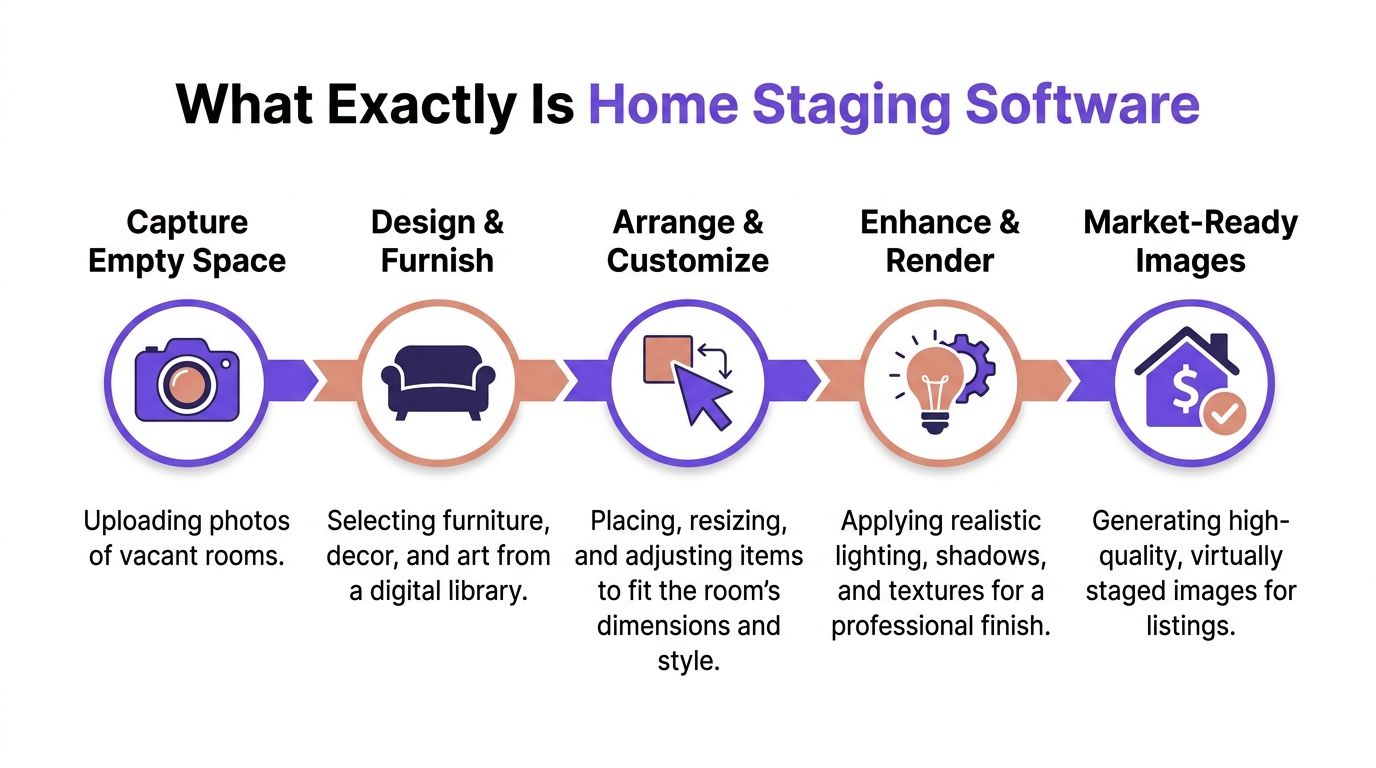
Home staging software is a digital visualization tool that turns room photos into market-ready images by adding furniture, decor, lighting adjustments, and style direction.
That definition is accurate, but it’s too flat for how people use it. In practice, good home staging software acts like a compact production team. It gives you some of what an interior designer, a furniture crew, and a listing photo editor would each contribute, but inside one workflow.
What it does that a photo editor doesn’t
A basic photo editor changes pixels. It can brighten an image, remove a cord, correct white balance, or sharpen details.
Home staging software does something else. It creates a spatial proposal. That means it helps answer questions such as:
- What belongs in this room
- Where it should sit
- How the layout should feel
- Which style fits the likely buyer
That’s a different job.
If you drop random furniture cutouts into a room, you haven’t staged it. You’ve decorated a photo. Staging only works when the image explains the room more clearly than the empty original did.
What it does that CAD tools don’t
At the other end, CAD and advanced 3D design software can produce detailed interior concepts, but they usually demand more training and more setup. They’re useful when you’re designing from scratch, documenting millwork, or building out a renovation plan.
For listing marketing, that’s often too much friction.
A marketer or agent usually needs a faster path:
- Upload the room photo.
- Choose a design direction.
- Place furniture or test product options.
- Render an image that looks natural enough to publish.
That’s why modern home staging software sits in a very useful middle ground. It’s more spatially intelligent than photo editing and much lighter than full 3D production.
What the buyer sees
The buyer isn’t evaluating software. They’re reacting to clarity.
A strong staged image tells them:
- This living room can hold a real sofa and still breathe
- This bedroom can feel calm rather than cramped
- This awkward nook can become a home office or breakfast area
Practical rule: If the staging makes the room easier to understand in two seconds, it’s doing its job. If it only looks decorative, it probably isn’t.
The best work also respects the architecture. A coastal-inspired room in a bright Florida condo reads differently than a darker, refined look for a Chicago townhouse. The software is just the engine. The operator still needs taste, buyer awareness, and restraint.
The Leap to Dimension-True Photorealism
Early virtual staging often looked polished at first glance and wrong at second glance.
The sofa sat too high. The rug floated. A coffee table looked toy-sized in one image and oversized in the next. Buyers might not have had the language for the problem, but they felt it. The room didn’t read as believable.

Modern systems are much better when they handle dimensional accuracy well. According to Saleswise, dimensional accuracy is what separates newer tools from older ones, and without it, distorted renders can reduce buyer trust by up to 40% in listing effectiveness studies.
That point matters more than most software comparisons admit. Photorealism isn’t just about pretty textures. It depends on proportion.
Why scale changes trust
A buyer doesn’t need technical training to notice when the room feels off.
They notice it when:
- A dining set blocks circulation in a room that should feel open
- A king bed leaves unrealistically wide walkways
- Lighting and shadows don’t match the window direction
Dimension-true rendering changes the experience. Instead of approximating room scale, the software reads the photo and places objects so they match the space more convincingly.
If you’re planning listing visuals alongside layout materials, a guide to using a floor plan creator can help teams align room imagery with spatial documentation. That combination is especially useful for new builds, remodels, and listings with unusual geometry.
The shift from library furniture to real products
One of the biggest changes in home staging software is the move away from closed furniture catalogs.
Older systems often forced users to choose from generic digital assets. That made speed possible, but it also limited realism and buyer relevance. You could create “a sofa,” but not the sofa that matched the design intent or retail direction you wanted.
Newer tools can work from actual product pages. In practical terms, that means a user can upload a room image and test a walnut media console, a boucle accent chair, or a linen sectional using real product references instead of a generic placeholder. One example is aiStager’s home design AI workflow, which centers on staging from a room photo and product URL rather than a locked internal catalog.
That matters for more than looks. It lets you compare similar items from different brands, swap finishes, and show alternative style directions without rebuilding the scene from scratch.
The trade-off nobody should ignore
URL-based placement is useful, but it isn’t magic.
Retail product pages aren’t structured the same way. Some include clean dimensions and multiple views. Others are inconsistent, variant-heavy, or missing details. So the best results usually come from larger furniture categories with clearer product information, while trickier items may need extra review.
If a product page is messy, the render can still be useful. But it deserves a visual check before it goes into an MLS feed or client deck.
That’s the significant leap in modern home staging software. Not just better rendering. Better confidence in what the room is showing.
The Tangible ROI of Virtual Staging
The return on virtual staging starts with one simple question. Does the image help a buyer move from curiosity to intent?
In practice, that intent shows up as better attention, faster conversations, and fewer moments where the listing needs a long explanation. Good staging reduces friction. It helps the image sell the room before the agent has to.
The strongest hard numbers still come from industry staging data. According to the National Association of REALTORS® statistics summarized here, 81% of buyer’s agents say staging helps buyers visualize a property as their future home. The same data set reports that staged homes sell 73% faster than non-staged ones, and 23% of seller’s agents report offers that are 1% to 5% higher.
For agents and brokers
For agents, the ROI isn’t abstract.
It shows up in a few places:
- Stronger first impression: Buyers understand the listing faster.
- Better listing presentation: Sellers see a more complete marketing plan.
- Cleaner brand standard: Your portfolio looks intentional across vacant and occupied properties.
The agents who get the most from home staging software usually don’t use it on every image. They use it on the frames that carry the listing. The main living area, the primary bedroom, and the kitchen-adjacent open space often do the heavy lifting.
Staging doesn’t need to cover the whole house to change the perception of the whole listing.
For interior designers
Designers use the same tools differently.
For them, staging software works as rapid concept communication. Instead of describing a “softer California casual look” or a “warmer modern organic scheme,” they can show it on the client’s actual room photo. That shortens approval cycles and exposes weak ideas early.
It’s especially useful when the client is deciding between adjacent looks rather than opposite ones. For example:
| Client decision | What the software helps compare |
|---|---|
| White oak vs walnut | Mood, contrast, and warmth |
| Leather vs fabric sofa | Texture, tone, and formality |
| Black metal vs brass accents | Sharpness versus softness |
That kind of side-by-side testing can prevent expensive indecision later.
For furniture retailers and product marketers
Retailers care about fit, confidence, and returns.
When a shopper can see a product inside a believable room, the product becomes easier to understand. It also becomes easier to compare. A modular sofa in ivory performance fabric reads one way in a bright open-plan room and another way in a tighter urban space.
The practical gain is straightforward:
- Merchandising improves when products appear in varied, realistic environments.
- Sales support gets easier when staff can show options rather than describe them.
- Pre-purchase confidence rises when shoppers can preview scale and finish in context.
What doesn’t work is using staging software as a gimmick. If the render looks fake or the layout ignores circulation, it can hurt trust instead of helping it. The ROI comes from believable images tied to plausible design choices.
Example Workflows That Get Results
The easiest way to judge home staging software is to stop thinking about features and look at actual work.
A useful workflow should reduce decision time, not add another layer of design theater. It should let you test ideas quickly, keep the room believable, and produce an image you’d publish.

Workflow one for an empty living room listing
A common example is a vacant Mid-Century Modern living room with strong windows, good floor tone, and no furniture to define scale.
The agent starts with one clean image. Then the goal is to create a lived-in look that still feels broad enough for buyers with different tastes.
A practical sequence looks like this:
- Upload the original room photo. Choose the angle that best shows depth and natural light.
- Pick a style direction. For this kind of space, keep lines clean and the palette restrained.
- Test products. A user might compare an Article Burrard sofa against another sofa with a similar footprint but a different arm profile, then check how each reads with a Room & Board Foshay bookcase.
- Swap finishes and colorways. Charcoal upholstery may sharpen the room. Oatmeal linen may make it feel larger and softer.
- Render two or three versions. One can lean warmer, one more architectural.
URL-based product placement becomes practical here, not just flashy. You can compare product families without rebuilding the whole design concept each time.
The trade-off is worth stating clearly. According to this explanation of URL-based placement and its fallback logic, results depend partly on how retailers structure their product data. Some pages are clean. Others need software fallback logic to maintain true-to-scale output.
If you’re not sure what arrangement will make the room feel calm instead of crowded, this guide on how to arrange living room furniture for optimal flow and comfort is a practical reference before you render.
Workflow two for a bedroom redesign presentation
Designers often use the software earlier in the decision cycle.
Say a client has a bedroom that feels visually noisy. The photo includes mismatched furniture, heavy bedding, and awkward accessories. The designer wants to simplify the room and present two clean directions before anyone starts shopping.
One approach:
- First pass: Remove visual clutter and keep only the architecture.
- Second pass: Create a rustic direction with a Pottery Barn-style wood bed, softer bedding, and warmer lamps.
- Third pass: Build a leaner option using a Floyd-style low-profile bed and fewer accents.
That side-by-side comparison usually gets better feedback than a moodboard alone, because the client sees each direction in their own room.
A tool such as aiStager fits this kind of workflow by letting users upload a room photo and place products from a web URL, then test different versions of the same category, such as sofas or beds, in different colors and finishes while keeping the room proportions consistent.
Later in the process, motion can help sell the concept internally or to a client. A short visual explainer is often enough:
What tends to work and what usually fails
Field note: The best renders don’t show everything the room could hold. They show the few things that make the room make sense.
A few practical rules:
- Use fewer hero pieces: One strong sofa, one rug, one storage piece usually beats overfurnishing.
- Match the home’s architecture: A Spanish-style house and a glassy condo shouldn’t get the same furniture language.
- Keep edits believable: If a room barely fits a queen bed, don’t fake a king.
- Render alternatives with a purpose: Compare layout, finish, or buyer appeal. Don’t generate options just because you can.
That’s where results usually come from. Not from novelty. From faster, clearer decisions.
How to Choose the Right Staging Software
Most buyers of home staging software compare tools the wrong way. They start with pricing, or with style presets, or with how polished the homepage looks.
The better approach is to ask what kind of problem you need the software to solve every week.
Questions that expose key differences
Start with the output, not the feature list.
Ask these questions:
- Does it handle scale convincingly? If proportions drift, the render may look fine in a thumbnail and fall apart at full size.
- Can you use real web products, or only a built-in library? Closed catalogs are faster to control, but they limit specificity.
- How fast is the path from upload to final image? Some teams need instant drafts. Others are fine with a slower review loop.
- Can non-designers use it well? A strong result should not depend on one power user in the office.
- What happens when product data is messy? This matters if you plan to stage from retailer URLs often.
If you’re comparing the category broadly, this roundup of 12 best virtual home staging software gives a useful overview.
A practical selection filter
Use this simple framework:
| If you need | Prioritize |
|---|---|
| Fast listing turnaround | Simple upload flow and quick render cycle |
| Designer-level concepting | Better product flexibility and cleaner realism |
| Retail product visualization | URL-based placement and believable scale |
| Team adoption | Easy approvals, consistent output, low training overhead |
Essential Features
Some features sound secondary until a live project exposes the gap.
For professional use, the tool should support:
- Believable room proportions
- Clean lighting and shadow handling
- Easy version testing
- An efficient revision process
- Exports that are ready for real marketing use
What doesn’t age well is a tool that makes flashy demo images but slows down the team using it. Home staging software should remove friction from listing marketing, client approvals, and product visualization. If it creates more review work than it saves, it isn’t the right fit.
The Future of Property and Product Visualization
Home staging software has changed what buyers expect from listing photography.
A vacant room used to be acceptable if the home itself was strong enough. That’s no longer the standard. Buyers expect help reading the space. Agents need faster marketing cycles. Designers need quicker approvals. Retailers need more convincing product context.
The big shift isn’t only visual polish. It’s the removal of uncertainty.
When software can show a room with believable scale, coherent styling, and realistic products, people make decisions faster. They don’t have to imagine as much. That matters in real estate, but it matters just as much in interior design and furniture sales.
The next step is easy to see. Room images become more personalized, more shoppable, and more responsive to the person viewing them. A buyer won’t just see a staged living room. They’ll see a version aligned to the look, furniture type, and level of warmth they already prefer.
That’s why home staging software isn’t a niche visual trick anymore. It’s becoming part of the standard language of property and product presentation.
If you want to test this workflow in practice, aiStager lets you upload a room photo and use product URLs to generate dimension-true, photoreal interior visuals for listings, design proposals, and product merchandising. It’s a practical option for teams that want to compare layouts, colors, and finishes without physical staging or manual mockups.