2D to 3D AI: A Guide to Next-Gen Interior Visualization
Learn how 2D to 3D AI transforms images into models. This guide covers key methods, practical workflows for real estate, and how to get photoreal results.
An empty listing photo lands in your inbox. The room is clean, the light is decent, but it feels cold. Or maybe you're an interior designer with a client who keeps saying, “I like the moodboard, but I still can’t picture it in my space.”
That’s the moment where 2d to 3d ai stops being a tech curiosity and starts becoming a practical tool.
For years, the choices were all frustrating in different ways. Physical staging looked great but took coordination and budget. Manual 3D modeling gave you control but often moved too slowly for everyday client work. Photoshop mockups could help, but they often looked flat, especially when scale, lighting, and perspective didn’t match the room.
Today, a new category of tools is changing that workflow. They take a room photo, infer depth and geometry, and help turn a flat image into something that feels spatial. For people who sell homes, specify furniture, or present design ideas, that shift matters because buyers and clients respond to what they can see.
The Dawn of Instant Interior Visualization
A real estate agent with an empty condo listing usually has two problems at once. First, the space doesn’t feel memorable. Second, buyers have to do mental work just to imagine where the sofa goes, whether a dining table fits, or how the room could feel with warmer materials.
The same problem shows up in design studios. A client loves a curved cream sofa in theory, then hesitates the second they try to picture it under their own window line, next to their own rug, with their own floor tone. That hesitation slows approvals.
2d to 3d ai entered that gap because people needed something faster than traditional 3D production and more believable than a quick mockup. It helps convert a normal image into a scene with depth, volume, and more realistic object placement. In plain terms, it helps people stop guessing.
Why this matters now
This isn’t a niche experiment anymore. The AI Image to 3D Generator Market is projected to grow from USD 242.64 million in 2024 to over USD 1.15 billion by 2032, with a CAGR of around 21.51%, according to Spherical Insights on the AI image to 3D generator market.
That growth matters because it signals something simple. Businesses are moving from curiosity to adoption.
Practical rule: If your work depends on helping someone visualize a room before they commit, this technology is no longer optional background knowledge.
What professionals actually want
Professionals in interiors and real estate aren’t asking for a research demo. They want answers to everyday questions:
- Will this sofa fit the room visually and physically?
- Does walnut look better than white oak here?
- Can we restyle the same room for a modern organic client and then a coastal client without rebuilding everything?
- Can we show this before the client loses momentum?
That’s why the most useful lens isn’t “Is AI impressive?” It’s “Can this image help close a deal, speed a decision, or reduce rework?”
A staged rendering of a Brooklyn-style living room with an Article leather sofa solves one kind of problem. A softer version with a Serena & Lily feel solves another. The point isn’t novelty. The point is helping a client see a future room clearly enough to say yes.
Understanding 2D to 3D AI A Simple Explainer
A single photo gives the AI one camera angle, not a full room model. That gap is the whole challenge.
People fill in missing information almost without noticing. You look at a chair in a listing photo and assume the hidden leg continues to the floor, the seat has a certain depth, and the back is angled in a believable way. 2d to 3d ai tries to make those same inferences from visual clues such as proportion, lighting, perspective, and overlap.
How the prediction process works
The process is similar to how a sculptor works from a reference photo. Part is observation. Part is inference. If only the front of a sofa is visible, the system has to predict the seat depth, the thickness of the arms, and the shape of the side you cannot see.
That prediction can be good enough for a quick concept image. It can also break down fast when a business needs accuracy. A room that merely looks plausible is one thing. A room that supports furniture planning, renovation choices, or buyer confidence needs believable geometry and correct scale.
What the system looks for
Most systems study several visual signals at once:
- Edges and outlines show where one object ends and another begins.
- Light and shadow suggest depth and surface direction.
- Texture changes hint at folds, curves, or hard corners.
- Perspective lines help estimate how the room extends backward.
- Occlusion tells the model that if a table blocks part of a chair, the chair sits behind it instead of merging into it.
A helpful way to picture this is to treat the image like a set of clues at a scene. No single clue is enough. Together, they help the model build a likely 3D explanation for what the camera captured.
Where confusion starts
People often assume the AI is reconstructing the room with tape-measure precision from one image. Usually, it is estimating the most likely version of the room.
That difference matters for professional use. A clean, straight-on photo with visible corners and floor lines gives the model stronger evidence. A dark room, wide-angle distortion, heavy clutter, or cropped walls forces more guesswork.
Good output starts with good input. Better models can recover more, but they still depend on what the camera shows.
For interior designers and agents, this is the line between a fun demo and a tool you can use in client work. If the window height is off, the rug scale drifts, or the sofa depth is guessed badly, the image may still look polished while subtly misleading the client.
That is why floor plans matter so much. A photo shows appearance. A measured layout adds constraints. Tools that combine room imagery with AI floor plan workflows have a much better shot at producing outputs that feel convincing and stay grounded in real dimensions.
In short, 2D to 3D AI is not magic eyesight. It is probability applied to images. The greater challenge is making the result look both attractive and trustworthy enough to help someone choose, approve, or buy with confidence.
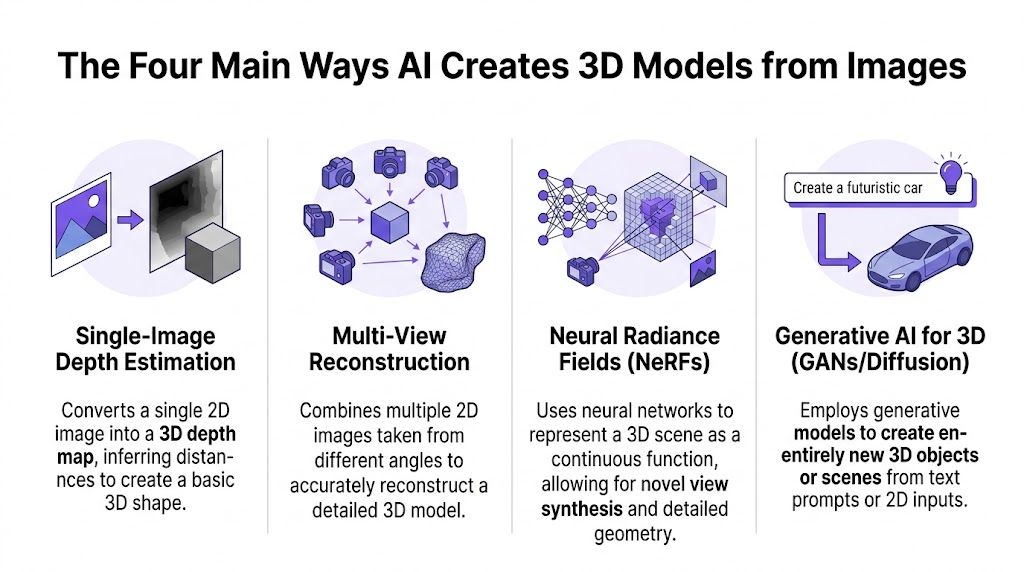
The Four Main Ways AI Creates 3D Models from Images
Not every 2d to 3d ai tool works the same way. Some build a rough sense of depth. Others reconstruct a fuller scene. Some are best for quick previews, while others are better for realistic navigation or object generation.
Single-image depth estimation
This is the simplest family of methods. The AI takes one image and predicts which pixels are closer and which are farther away. The result is often closer to a depth map than a fully complete 3D model.
That can be useful for quick room understanding. If the model knows the wall is behind the sofa and the floor recedes toward a window, it can begin to place objects with more believable perspective.
The limitation is obvious once you know what to look for. A depth map doesn’t automatically give you a clean, complete object with all hidden surfaces resolved. It gives you a best guess about depth from one camera angle.
Multi-view reconstruction
This method uses multiple photos of the same object or room from different angles. If you’ve ever seen photogrammetry apps that ask you to walk around an item while taking pictures, you’ve seen the logic in action.
With more viewpoints, the model has less guessing to do. It can compare what appears in one image and disappears in another, which helps it reconstruct shape more accurately. That’s why multi-image systems often dominate higher-fidelity use cases, as noted in the earlier market source.
For interiors, this works well when someone can capture a room carefully. It’s less convenient when the only asset you have is a single listing photo from the MLS or a lone product image from a retailer page.
Neural Radiance Fields and scene-based methods
Neural Radiance Fields, often shortened to NeRFs, represent a scene as a continuous function rather than a simple mesh from the start. In practice, they can produce impressive viewpoint changes and a more immersive sense of space.
If that sounds abstract, think of it this way. Instead of building the room like a dollhouse made of fixed surfaces, the system learns how light, color, and density behave throughout the scene. That can make novel views feel more natural.
These methods are especially interesting when there’s video involved. If you’re exploring room capture from a walkthrough, guides on using AI to scan a room in 3D can help you think about how scene understanding fits into a broader workflow.
Their tradeoff is workflow complexity. They can be excellent for scene realism, but they aren't always the easiest route for fast, everyday furniture placement in client-facing production.
Generative model pipelines
This category gets the most attention because it feels closest to magic. The model sees one image, or a small set of images, and generates a full 3D object or scene by drawing on patterns learned from large datasets.
A strong example is Adobe Research’s Large Reconstruction Model. It can generate a high-quality 3D model from a single 2D image in 5 seconds on a standard GPU, according to this summary of Adobe Research’s LRM breakthrough.
That speed changes expectations. What once felt like an hours-long pipeline starts to feel immediate.
The catch is that speed doesn’t guarantee professional usefulness. A generated model may look convincing from the hero angle but still struggle with exact dimensions, hidden geometry, or clean production-ready structure.
A side-by-side view
| Method | Core Idea | Best For | Key Limitation |
|---|---|---|---|
| Single-image depth estimation | Predicts depth from one image | Fast room previews | Hidden surfaces are guessed |
| Multi-view reconstruction | Combines several angles | More accurate geometry | Needs multiple photos |
| Neural Radiance Fields (NeRFs) | Learns a continuous scene representation | Realistic scene walkthroughs | Can be heavier to run and manage |
| Generative AI for 3D | Creates a 3D object or scene from learned patterns | Fast concept generation from limited input | May look right without being dimensionally reliable |
Decision shortcut: If you need a quick visual concept, almost any decent method can help. If you need a client to trust fit, scale, and realism, the evaluation standard gets much stricter.
A Practical Workflow From Empty Room to Dream Design
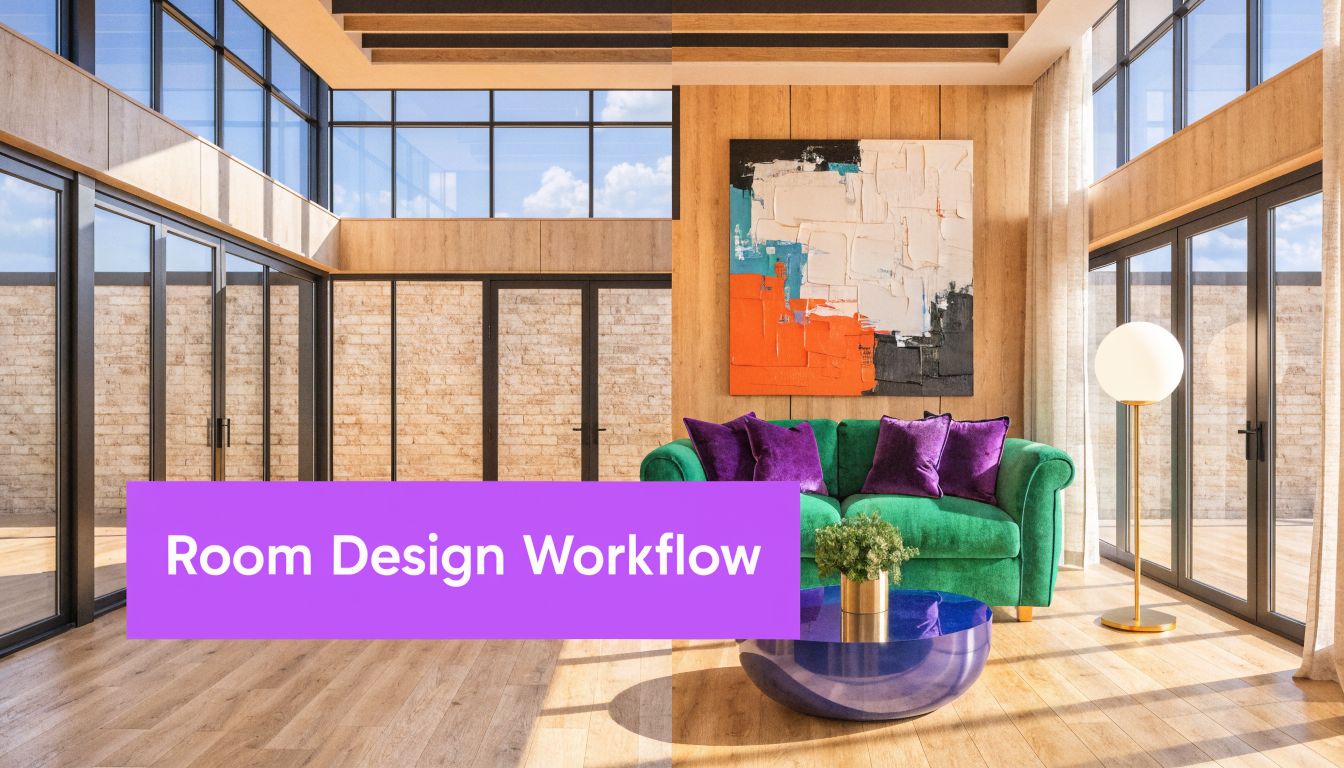
An empty living room is a perfect stress test for 2d to 3d ai. There’s nowhere to hide. If the placement is off, the eye catches it right away. If the lighting feels fake, the whole image falls apart.
Start with a clean room photo. Maybe it’s a bright living room with oak floors, white walls, and a large front window. The first question isn’t “What style should we choose?” It’s “What does this room need to become legible to the client?”
Start with one anchor piece
A good workflow usually begins with the largest decision-maker in the room. In many living rooms, that’s the sofa.
Say your client is considering a blue velvet Joybird sofa. You upload the room photo, paste the product link, and generate a staged view. Instead of hunting for similar stock furniture, the workflow uses the actual product reference so the client sees a room built around a recognizable piece.
That changes the conversation. You’re no longer discussing a generic “blue sofa.” You’re discussing this sofa, in this room, against this wall, under this light.
Then test close alternatives
Here, the process gets commercially useful. You don’t rebuild the room from scratch just to compare options. You keep the room consistent and swap the product logic.
Try an Article leather sofa next. Then switch back to the original silhouette in a neutral linen finish for a softer “Coastal Grandmother” direction. Then test a warmer California casual version with boucle accents and lighter wood.
A designer can use that to compare finishes. An agent can use it to stage the same listing for different buyer tastes. A retailer can use it to help a shopper decide between performance fabric and leather before checkout.
- Brand comparison: Show Joybird versus Article in the same room so the client can compare feel, not just specs.
- Finish comparison: Keep the form constant and switch from velvet to linen or leather.
- Style comparison: Move from modern organic to coastal to transitional without re-photographing the space.
When clients see the same room hold together across multiple style directions, they make decisions faster because the comparison feels concrete.
Why this speeds decisions
The commercial effect of better visualization is hard to ignore. Businesses that use AI-generated 3D visualization in their sales process have reported up to a 94% increase in conversion rates, according to this overview of AI 3D modeling trends and conversion impact.
For interiors and real estate, that doesn’t just mean more purchases. It often means fewer stalled conversations.
A client who can see the sectional at the right scale is more likely to approve the concept. A buyer who can picture a furnished primary bedroom is more likely to book the showing. A homeowner comparing tile, vanity, and layout options during planning a bathroom renovation benefits from the same basic principle. Decisions get easier when the future room stops feeling abstract.
Room context matters as much as the furniture
Many people focus only on the inserted product, but strong results come from how the product interacts with the room. The angle of daylight, the floor reflection, the distance to the wall, and the path of movement through the room all shape whether the image feels believable.
If you’re exploring how image capture affects staging quality, a guide on how to scan a room for 3D visualization is useful because room geometry sets the stage for everything else.
Here’s a walkthrough that helps make the workflow feel more tangible:
What a polished workflow looks like
Upload the room photo
Choose an image with clean lines, visible floor area, and readable lighting.Add a real product reference
Use an actual retailer link rather than a vague inspiration image whenever possible.Generate the first concept
Review placement, proportion, and visual harmony before discussing styling details.Run focused comparisons
Test only one major variable at a time, such as fabric, color, or brand.Present a small set of options
Three good options usually create better decisions than ten scattered ones.
The best part of this workflow isn’t just speed. It’s that the client stays inside one believable room while exploring meaningful choices.
Avoiding Common Pitfalls for Professional Results
A lot of 2d to 3d ai output looks convincing at first glance and disappointing on second glance. That’s why professional users need a sharper eye than casual users.
The most common failure is simple. The render feels right emotionally, but wrong spatially. A chair looks beautiful until you notice the seat height is odd, the arm width is distorted, or the coffee table seems to float.
The scale problem
This is the issue that separates fun demos from business-grade visuals.
A major challenge with many single-image 2D-to-3D models is the lack of dimensional accuracy, with potential error rates exceeding 10-20% for larger objects, according to KIRI Engine’s explanation of 2D image to 3D model limits. In professional interior design and virtual staging, that’s a serious problem because scale isn’t decorative. It’s functional.
A sofa that’s slightly oversized in a render can make a layout look cozy when its physical counterpart would block circulation. A dining table that appears to fit may become the source of rework after purchase.
Other failure modes to watch for
- Melting geometry: Curves collapse, corners soften oddly, and objects lose clean structure.
- Texture mismatch: Fabric grain, wood direction, or material sheen looks disconnected from room lighting.
- Perspective drift: A product appears pasted in rather than grounded on the floor plane.
- Occlusion mistakes: Table legs merge into rugs, or products overlap with walls in unnatural ways.
These errors break trust fast. A homeowner may not know the technical term for perspective mismatch, but they can still feel that something is off.
Reality check: A beautiful image that lies about scale can create more downstream pain than a simpler image that tells the truth.
How to improve your inputs
Strong outputs usually start with disciplined source material. Before you blame the model, inspect the image.
Use this checklist:
- Choose straight-on or thoughtfully angled shots: Extreme wide-angle distortion makes object placement harder.
- Keep floor visibility clear: The system needs to understand where objects can sit.
- Reduce clutter when possible: Extra objects create occlusion and confusion.
- Preserve lighting cues: Dark, muddy photos give the model less information about depth and surface direction.
- Use real product references: Specific product images are more useful than collage-style inspiration boards.
What professionals should demand
If you’re using AI for design proposals, listings, or retail imagery, your standard shouldn’t be “good enough for social media.” It should be “good enough that a client could make a decision from this without being misled.”
That means asking four questions before you approve any output:
| Question | Why it matters |
|---|---|
| Does the furniture feel properly scaled to the room? | Scale errors undermine layout trust |
| Does the lighting match the original scene? | Lighting mismatch makes inserts look fake |
| Do edges and contact points look grounded? | Floating objects break realism |
| Would I defend this image in front of a client? | Professional use needs confidence, not hope |
Designers and agents don’t need perfect academic reconstruction. They need visuals that respect real rooms, real products, and real consequences.
Comparing AI Workflows to Traditional 3D Modeling
Traditional 3D modeling still has a place. If you’re designing custom millwork, building a one-off showroom experience, or producing a highly controlled marketing campaign, tools like CAD and Blender can give you deep control.
But most day-to-day interior and real estate work doesn’t fail because of too little control. It fails because the workflow is too slow for the sales cycle.
Where traditional methods still shine
A skilled 3D artist can refine geometry, tune materials carefully, and control every camera angle. Photoshop editors can also move quickly when they only need a concept image and not a fully spatially consistent room.
The drawback is effort. Manual production often demands specialist labor, rounds of revisions, and back-and-forth that ordinary listing timelines or retail merchandising calendars can’t support.
Where AI changes the math
AI platforms can reduce the time and cost of creating photorealistic 3D visualizations by a factor of 100, compared to manual CAD or Photoshop mockups, which can cost $50-200 per hour, according to Tripo’s overview of 2D image to 3D workflow economics.
That gap matters more than any abstract debate about artistry. If your team needs to test multiple room concepts quickly, fast iteration is part of quality.
A practical example helps. A furniture retailer deciding how a sectional looks in a suburban family room may care less about polygon-level control and more about whether the team can generate several believable options before the campaign deadline. A real estate marketer preparing listing images has the same pressure.
A business-side comparison
| Workflow | Cost | Speed | Realism | Ease of use |
|---|---|---|---|---|
| Manual CAD or Blender | Higher specialist cost | Slower | High with enough time | Requires expertise |
| Photoshop mockups | Moderate to high labor cost | Faster than full 3D | Often weaker spatial realism | Requires editing skill |
| AI visualization workflow | Lower per concept at scale | Very fast | Strong for many commercial uses | Accessible to non-specialists |
The best workflow is the one that lets your team compare real options before the client’s attention moves on.
If you want to see how this applies at property level, examples of house rendering workflows for marketing and visualization help clarify where AI fits versus traditional rendering pipelines.
The real tradeoff
Traditional modeling offers maximum control. AI offers speed, volume, and easier experimentation.
For many professionals, the better question isn’t “Which is universally better?” It’s “Which gets me a believable, decision-ready image while the opportunity is still alive?” In many everyday scenarios, AI now wins that test.
The Future of Visualization is Instant and Accurate
The most important shift in 2d to 3d ai isn’t that computers can generate impressive images. It’s that visualization is becoming fast enough for everyday business use and accurate enough to matter.
That combination changes how rooms are sold, designed, and merchandised. Buyers don’t need to imagine as much. Clients don’t need to interpret abstract moodboards as often. Teams can test options while the conversation is still active.
What will matter most
The winners in this category won’t be the tools that make the flashiest demo. They’ll be the tools that help professionals answer practical questions with confidence.
That means the future belongs to workflows that can do all of these at once:
- Work from ordinary room photos
- Use real products, not just generic stand-ins
- Preserve lighting and perspective
- Respect room and furniture dimensions
- Generate polished visuals quickly enough for real client timelines
Why accuracy is the real dividing line
We’ve already reached the point where many tools can make a room look attractive. The harder problem is making it look attractive and trustworthy.
That’s the difference between a novelty image and a business tool. A novelty image gets attention. A trustworthy image helps someone approve a design, schedule a showing, or buy the right piece.
Fast visuals are helpful. Fast visuals with believable scale are what change decisions.
The broader direction is clear. Visualization is moving toward a world where a single room photo can become an interactive decision surface for design, retail, and property marketing. The professionals who benefit most will be the ones who care not only about speed, but about whether the image can stand up to real-world use.
If you want to try a workflow built for real rooms and real products, aiStager lets you upload a room photo, paste a product link, and generate hyper-realistic visuals with true room and furniture dimensions. It’s a practical way to compare brands, colors, and finishes in just a few clicks, without rebuilding the scene from scratch.