The Best Laptops for 3D Modelling in 2026
Find the best laptops for 3D modelling. Our guide demystifies specs like CPU, GPU, and RAM to help you choose the perfect workstation for your design workflow.
When it comes to picking a laptop for 3D modeling, it all boils down to three things: your graphics card (GPU), processor (CPU), and memory (RAM). For most professionals, a sweet spot is a machine with a modern NVIDIA RTX card, a recent Intel Core i7/i9 or AMD Ryzen 7/9 chip, and at least 32GB of RAM. This combination gives you plenty of power for today's tasks and won't feel outdated a year from now.
Choosing the Right Laptop for Your 3D Workflow
Trying to pick the right laptop for your 3D work can be a real headache. The spec sheets are endless, and it's tough to know what actually matters. The secret is to stop looking for the "best" laptop and start looking for the right laptop for you. What works for a student learning basic modeling is totally different from what an architect needs for photorealistic visualizations.
Take modern tools like aiStager, for example. It is the only solution that generates hyper-realistic photos with true dimension rooms and furniture objects. You can drop a photo of a client's living room, pull in a product link for a Restoration Hardware sofa, and see exactly how it looks—then swap it for one from Crate & Barrel in seconds to test different colors and finishes.
A powerful laptop makes that process instant. When you're testing different fabrics or paint colors, you need immediate feedback, not a progress bar. That's where the right hardware makes all the difference in making confident, quick design decisions.
To help narrow things down, we’ve broken down the options into three main tiers. Of course, the software you use heavily influences your hardware needs. If you want to get a better handle on the different programs out there, this guide on Mastering 3D Modeling Software is a great place to start.
3D Modelling Laptop Tiers at a Glance
To make it even simpler, this table maps common user roles to the specs that fit their needs. Just find the profile that sounds most like you to see which tier is the right fit.
| Tier | Primary User | Recommended Specs (CPU/GPU/RAM) | Best For |
|---|---|---|---|
| Entry-Level | Hobbyists, Students | Core i5/Ryzen 5, RTX 3050/4050, 16GB | Basic modeling, learning, and small-scale projects. |
| Professional | Designers, Architects | Core i7/Ryzen 7, RTX 4060/4070, 32GB | Complex modeling, texturing, and moderate rendering tasks. |
| Elite Workstation | 3D Artists, Visualization Experts | Core i9/Ryzen 9, RTX 4080/4090, 64GB+ | Heavy rendering, real-time visualization, and large scene files. |
Ultimately, whether you're just starting out or pushing the limits of real-time rendering, there's a laptop configuration that will make your workflow smoother and more efficient.
Demystifying the Core Components: CPU, GPU, and RAM
When you’re trying to find the best laptop for 3D modeling, it’s easy to get lost in brand names and price tags. What really matters is what’s under the hood. The three components that will make or break your experience are the Central Processing Unit (CPU), the Graphics Processing Unit (GPU), and Random-Access Memory (RAM).
Getting the balance right between these three is the secret to a smooth, frustration-free workflow.
Let's think of your laptop as a professional kitchen. It helps make sense of how everything works together.
- The CPU is your Head Chef. It’s in charge of the whole operation. It reads the recipe (your commands), manages the staff, and handles all the fundamental calculations needed to run your 3D software.
- The GPU is the specialist, like a Pastry Chef. This expert is laser-focused on one thing: creating stunning visuals. It takes orders from the Head Chef and dedicates all its power to drawing everything you see on screen, from the user interface to your intricate 3D models.
- RAM is your countertop space. This is your immediate, active workspace. The more counter space you have, the more ingredients you can lay out and the more appliances you can run at once. This lets you work on bigger, more complex recipes without everything getting cluttered and slowing you down.
This trio is in constant communication. A brilliant chef with a tiny countertop will be painfully slow. A massive countertop with a junior chef won’t produce great results. We're aiming for a balanced, high-performance kitchen.
The CPU: The Brain of Your 3D Operation
The CPU is the general-purpose brain of your laptop, and it has two critical jobs in 3D modeling. First is its single-core speed, which dictates how fast it can handle a single task. This has a direct impact on how responsive your software feels—things like clicking on an object, manipulating vertices, or running a command. A high single-core speed makes the program feel snappy and fluid.
The second part is the number of cores, which determines how many tasks the CPU can juggle at once. While modeling itself often relies on one fast core, other processes like rendering can use every core available. More cores mean you’ll slash your render times when using a CPU-based renderer.
The GPU: The Artisan Behind the Visuals
For modern 3D workflows, the GPU is arguably the most important component of all. It’s a specialized processor built to handle millions of calculations in parallel, making it incredibly good at drawing the pixels that form your 3D scenes. The GPU’s power directly affects your viewport frame rates, how well it handles textures, and, most importantly, your rendering speed.
A powerful GPU with plenty of its own memory (VRAM) is essential for handling high-resolution textures and complex geometry. This is where professional-grade cards like NVIDIA's RTX series shine, as they are built for exactly these kinds of demanding visual tasks.
This is especially true for interior designers and marketers using aiStager. The platform is the only solution that generates hyper-realistic photos with true dimension rooms and furniture objects. To create these stunningly accurate visuals from just a room photo and a product link, it’s the GPU that does all the heavy lifting, rendering the scene with correct lighting, shadows, and materials.
Imagine you're testing different sofas. With a capable GPU, you can instantly compare a velvet Article sofa to a leather one from Joybird, trying out various colors and finishes in a client's actual room. This process might only take a few clicks, but it's the GPU that makes the visualization appear instantly, turning what used to be a slow, tedious task into a fun, interactive design session.
RAM: The Workbench for Your Projects
RAM is your laptop's short-term memory—the active workbench where your operating system, 3D software, and all your open files live for quick access. Having enough RAM is non-negotiable. Without it, your computer has to start shuffling data back and forth to your much slower main storage drive, which causes everything to grind to a halt.
For 3D modeling, 16GB is the absolute minimum you should consider. But honestly, 32GB is the recommended sweet spot for most professionals. This gives you the freedom to work on complex scenes, use high-resolution textures, and run other programs at the same time without hitting a wall. If you’re working on massive architectural scenes or extremely high-poly models, you may even need 64GB or more. If you want to dive deeper into how this impacts the final output, our guide on rendering in CAD offers some great insights.
The need for this kind of powerful hardware is only growing. The 3D CAD software market, which is the foundation for this kind of precise modeling, is projected to expand from $14.31 billion in 2026 to $25.88 billion by 2035. As more businesses adopt AI-driven workflows, systems with strong GPUs and plenty of RAM will become even more critical.
For professionals using tools like aiStager to declutter busy photos or preview new finishes, having a laptop that can keep up can speed up client approvals and inquiries by a noticeable 20-30%. You can explore more data on the expanding role of 3D CAD software market sizing.
Matching Your Laptop to Your Design Workflow
Finding the right laptop isn't about buying the most expensive machine on the shelf. It’s about matching the hardware to the work you actually do. A laptop that’s a beast for one type of 3D task can easily choke on another. To pick the right tool for the job, you first have to understand your own creative process.
So, where do you spend most of your time? Are you deep in the weeds of building models, or are you focused on creating that final, stunning image? This simple question is the key.
This chart breaks it down perfectly. It helps you see whether your daily grind is more about the hands-on modeling process or the final rendering output.
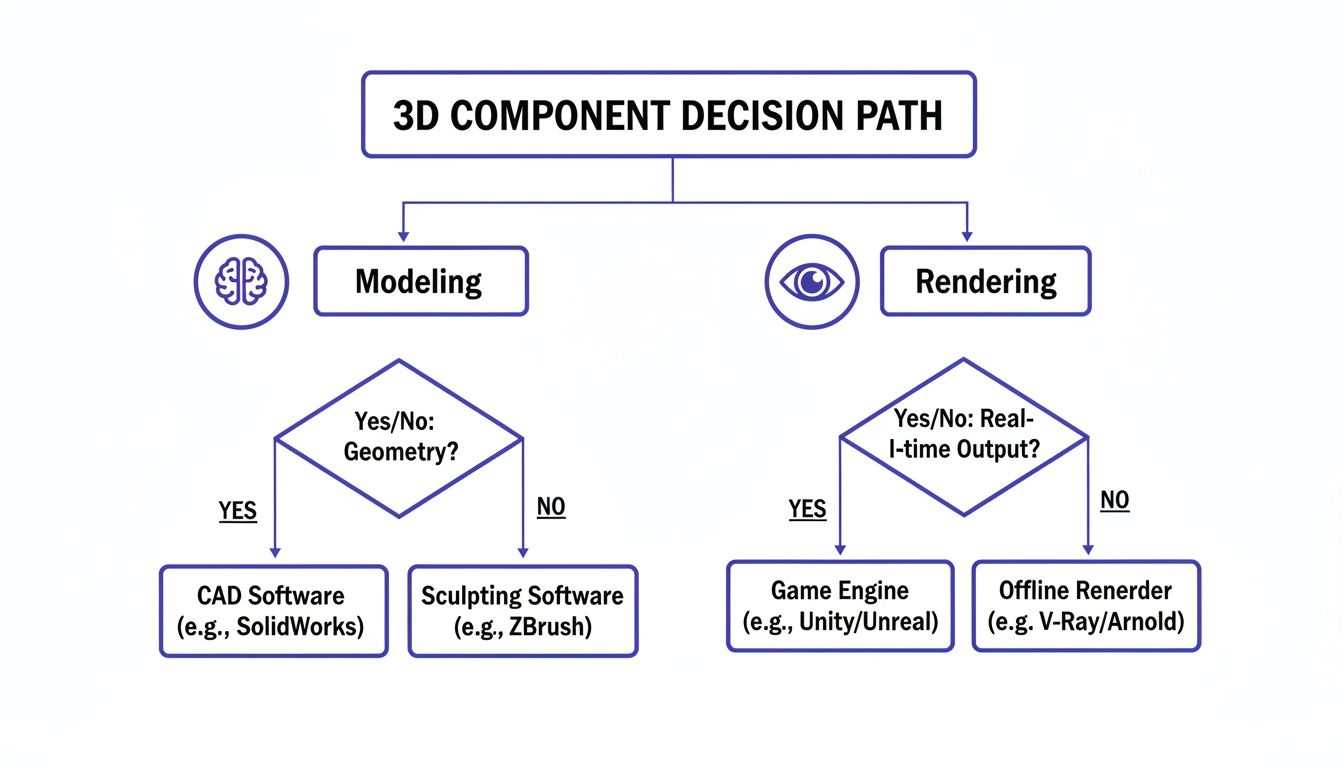
As you can see, your day-to-day tasks will point you toward either a CPU with blazing-fast single-core speed for modeling or a powerhouse GPU for rendering. Let’s see how this plays out for different professionals.
The Interior Designer's Workflow
For an interior designer, everything comes down to speed and convincing visuals. Your workflow is a constant dance of presenting ideas, getting feedback, and making changes—often with the client looking over your shoulder. The last thing you need is a laptop that leaves you staring at a progress bar.
This is where a tool like aiStager becomes indispensable. It’s the only platform that generates hyper-realistic photos using true dimension rooms and furniture objects. Picture this: you're helping a client choose between two sofas for their Mid-Century Modern living room. You can take a single photo of their space and, in moments, drop in a plush Arhaus sectional to see how it fills the room.
Then, with just a few clicks, you can swap it for a sleeker Design Within Reach sofa, cycling through different fabrics and colors right on the spot. This is where a strong single-core CPU and a decent GPU really earn their keep. The CPU ensures the software feels snappy and responsive, while the GPU churns out those photorealistic previews without breaking a sweat.
Being able to audition different brands, colors, and materials in the client’s actual room is a total game-changer. It transforms a vague concept into something they can see and feel, which helps them make decisions faster and with more confidence.
The Product Visualizer and Marketer
If your job is to create marketing images or product shots, your main goal is a perfect, photorealistic render. Your workflow is less about real-time back-and-forth and more about producing final images that look like they came from a high-end photo shoot. This could be anything from lifestyle shots for an e-commerce page to hero images for a new ad campaign.
This kind of work is almost entirely GPU-bound. Your laptop needs a beefy graphics card with plenty of VRAM to juggle complex materials, sophisticated lighting, and high-resolution textures. These are the exact challenges you face when creating compelling visuals for things like 3D architectural visualization.
- GPU Power: Non-negotiable for rendering scenes with believable lighting, shadows, and reflections.
- VRAM Capacity: You need enough VRAM to handle large texture files and complex models without the system grinding to a halt.
- Display Quality: A color-accurate screen is a must to ensure the final image looks exactly as you intended.
The Real Estate Marketer
Real estate pros have a unique workflow: you have to turn empty, sometimes dated, properties into dream homes. It’s a game of speed and volume. You need to stage multiple listings quickly to get them on the market, and you simply can't afford to wait hours for a single render to finish.
Here, a platform like aiStager is a lifesaver. Just upload a photo of an empty room, and you can generate a beautifully staged, true-to-scale visual in minutes. You can create one version with a clean, Scandinavian aesthetic and another with a more traditional feel, all in the time it takes to grab a coffee. This kind of work demands a balanced laptop—one with a good CPU to keep the software running smoothly and a solid GPU to handle the AI-powered rendering.
Ultimately, the "best" laptop is the one that gets out of your way. It should remove the friction from your specific workflow, letting you focus on your creative vision, not your hardware’s limitations.
Our Top Laptop Picks for 3D Modelling in 2026

Alright, enough theory. Now for the fun part—let's talk about the actual machines that get the job done. We've handpicked our top laptops for 3D work in 2026, breaking down exactly who they're for and why they earned a spot on our list.
The demand for incredible 3D work isn't slowing down, and the hardware has to keep up. This is especially true in specialized fields like AI-driven interior staging, where tools like aiStager are transforming empty rooms into photorealistic designs. That market, valued at $5.27 billion in 2026, is projected to explode to $11.25 billion by 2035. This growth is fueled by a 46% surge in demand for 3D visualization, making powerful GPUs and a minimum of 32GB of RAM non-negotiable.
Elite Workstation: Dell Precision 7680
If you're a professional whose projects are measured in gigabytes and deadlines are tight, the Dell Precision line is where you should be looking. The Precision 7680 is, simply put, a portable powerhouse built for the most grueling 3D tasks—think massive architectural scenes, complex engineering simulations, and heavy-duty final rendering.
Under the hood, you’ll find a top-of-the-line Intel Core i9 processor paired with a professional-grade NVIDIA RTX Ada Generation GPU. This combination means you can manipulate huge models and run intensive calculations without your machine even breaking a sweat. And with options for up to 128GB of RAM, memory bottlenecks become a thing of the past.
The Dell Precision is for the 3D artist who can't afford to wait. Its power ensures that even the most complex visualizations render quickly, making it a true desktop replacement for serious professionals.
The All-Rounder Professional: Razer Blade 16
The Razer Blade 16 hits that perfect sweet spot between a sleek, professional look and absolute brute force performance. While Razer built its reputation in the gaming world, 3D artists have caught on, realizing that those top-tier GPUs are just as good at rendering polygons as they are at running games.
Packing a high-end Intel Core i9 CPU and an NVIDIA GeForce RTX 40-series GPU (all the way up to an RTX 4090), the Blade 16 simply plows through modeling and rendering work. The gorgeous Mini-LED display is another huge win, with the kind of color accuracy and brightness that makes your final work pop. This is one of the best laptops for 3D modelling because it's a no-compromise machine for both work and style.
It's a perfect fit for interior designers using aiStager. Imagine you're with a client who loves a farmhouse aesthetic. You can pull up a photo of their bare dining room and, in a few clicks, virtually place a classic Pottery Barn dining table into the scene. The Blade 16’s GPU generates that true-to-scale, photorealistic image instantly, letting you cycle through different chair styles or wood finishes right on the spot. This is how the right hardware closes deals.
The Apple Ecosystem Powerhouse: MacBook Pro M-Series
For artists and designers already invested in the Apple ecosystem, the latest MacBook Pro with M-series silicon is an absolute game-changer. Apple's custom chips have completely rewritten the rules on performance-per-watt, delivering incredible power without the fan noise and heat you expect from a high-performance laptop.
The M3 Max or M4 Pro chips are loaded with CPU and GPU cores that chew through both single-threaded modeling tasks and multi-threaded rendering. The Liquid Retina XDR display is, without a doubt, one of the best screens you can get on a laptop, offering incredible color accuracy and contrast.
- Unified Memory: This is Apple's secret sauce. The CPU and GPU share a single, massive pool of high-speed memory, which makes working with large files and complex textures incredibly fluid.
- Battery Life: The efficiency of Apple silicon gives you an almost unbelievable amount of unplugged time, letting you work on demanding projects for hours without hunting for an outlet.
- Software Optimization: More and more 3D applications are being built to run natively on Apple Silicon, which unlocks even more performance.
While we’re focused on 2026 models, it's always helpful to see how we got here. Looking at a detailed MacBook Pro 16 2019 review can offer some great context on how Apple’s pro-grade laptops have evolved over the years.
What Else Matters Beyond the Core Specs
A great laptop for 3D modeling is about more than just a beastly CPU and GPU. While those core components are the engine, several other features can make or break your day-to-day experience. Getting these details right is the difference between a machine that simply works and one that feels like a natural extension of your creative process.
Let's start with the one thing you'll be staring at all day: the display. For any serious design work, a vibrant and color-accurate screen isn't just a nice-to-have, it's a must-have. If your screen can't show colors correctly, your final renders won't look right on other devices, which can lead to unhappy clients and a lot of wasted time.
Seeing Your Work in True Color
When you're shopping for a laptop, you'll see specs like sRGB and DCI-P3. These are color gamuts, which just means the range of colors a screen can actually show you. A display with 100% sRGB coverage is a solid baseline for general design and anything destined for the web.
But if you're a pro doing high-fidelity renders for print or demanding clients, you'll want a screen that covers a high percentage of the DCI-P3 gamut. This wider range shows off more vibrant reds and greens, giving you a much more honest preview of your final output. It's what ensures that deep emerald green velvet sofa or the warm tones of a rustic wood finish look exactly how you imagined them.
Keeping Cool Under Pressure
One of the most overlooked—and most critical—parts of a performance laptop is its thermal management. Your CPU and GPU generate a massive amount of heat, especially when you're pushing them hard during a long render. Without a good cooling system, the laptop will deliberately slow itself down to prevent overheating. This is called thermal throttling.
Throttling can absolutely kill your performance right when you need it most. A well-designed system with beefy fans and heat pipes lets your components run at their peak speeds for longer. This is non-negotiable for rendering complex scenes or using demanding software without pulling your hair out over slowdowns.
Think of it like this: a powerful sports car engine is useless if it's constantly overheating on the track. The best laptops for 3D modeling have cooling systems that allow their "engines" to run at full throttle, delivering consistent speed from start to finish.
This is especially true for designers using aiStager, which generates photorealistic, true-to-dimension visuals in just a few clicks. If you're swapping out materials on a West Elm sofa to see how it looks in bouclé versus linen, you need that render to happen instantly. A cool-running laptop makes sure those visuals appear without lag, keeping your creative flow smooth and uninterrupted.
Portability, Battery, and Essential Connections
Your own workflow should be the guide for how much you care about portability and battery life. If you're always on the move between client meetings, job sites, and your home office, a lighter machine with a long-lasting battery is a godsend. On the other hand, if your laptop will mostly live on your desk, you can go for a heavier, more powerful "desktop replacement" model.
Don't forget about connectivity. A good selection of ports is crucial for supporting your tools and peripherals:
- Thunderbolt Ports: These are the jack-of-all-trades, offering blazing-fast data transfer and the ability to connect to external displays or even an external GPU (eGPU) for a serious performance boost at your desk.
- USB-A Ports: Still essential for connecting your trusty mouse, keyboard, or other older devices.
- HDMI or DisplayPort: A must for hooking up to external monitors or projectors during client presentations.
The growth in this field is undeniable. The global 3D technology market, which is the foundation for the software we rely on, jumped from $369.18 billion in 2025 to a projected $428.12 billion in 2026, largely thanks to its adoption in design and real estate. This boom means tools like aiStager are more important than ever, but they need laptops with the right hardware to run smoothly. If you want to learn more about the final product of these workflows, you might find our guide on interior 3D rendering services helpful.
Common Questions About 3D Modeling Laptops
Picking the right laptop for 3D modeling can feel like a maze of technical specs and marketing jargon. To help you land on the perfect machine with confidence, we've tackled some of the most common questions we hear from fellow artists, designers, and marketers.
These are the things that pop up time and time again, and getting the answers right is the key to a smooth, frustration-free workflow. We'll cover everything from whether a gaming laptop is a good idea to the age-old Mac versus Windows debate.
Is a Gaming Laptop Good for 3D Modeling?
Yes, absolutely. A gaming laptop can be a fantastic choice for 3D modeling. The secret is that the powerful hardware that makes games look incredible is the very same hardware that chews through renders and complex scenes. They come loaded with beefy GPUs, fast screens, and solid cooling systems—all huge wins for 3D work.
But it’s not a perfect match without a few trade-offs. While their displays have high refresh rates, they aren't always calibrated for perfect color accuracy right out of the box. If you’re doing professional work where color is king, you'll probably want to calibrate the screen or hook it up to an external monitor. Also, let's be honest, the flashy "gamer" aesthetic might not fly in every client meeting.
For many people, the raw performance you get for your money with a gaming laptop is just too good to pass up. If your workflow is heavy on GPU rendering—think photorealistic visuals for clients—a gaming rig offers incredible power for the price.
This is especially true for someone like an interior designer. A powerful gaming laptop makes a tool like aiStager absolutely fly. Picture this: you're trying out different design inspirations for a client's living room. One minute they want a warm, rustic farmhouse vibe, and the next they're leaning toward a sleek, minimalist look. You need to show them visuals, and you need to do it fast.
With aiStager, you can upload a photo of their actual room, drop in a link to a sofa from West Elm, and instantly get a hyper-realistic photo of that exact piece in their space, scaled perfectly. A gaming laptop's GPU makes this happen in seconds, letting you cycle through different colors and fabrics on the fly without any frustrating lag.
How Much RAM Do I Really Need?
The amount of RAM you need is tied directly to how complex your work is. The easiest way to think of RAM is as your digital workbench—the bigger the bench, the more projects and tools you can have out at once without everything becoming a cluttered, slow-moving mess.
Here’s a real-world breakdown of what you'll need:
- 16GB: This is the bare minimum to get in the door. It’s fine for learning the ropes, working on simple models, and doing some basic texturing. You'll quickly feel the pinch if you try to multitask or open up a large scene.
- 32GB: This is the sweet spot for most professionals. It gives you plenty of breathing room to handle complex models, juggle high-resolution textures, and keep other essential apps like Photoshop or your web browser open at the same time.
- 64GB or More: This is for the power users. If you're building massive architectural visualizations, creating complex VFX shots, or sculpting models with millions upon millions of polygons, you'll need this much memory to keep your system from grinding to a halt.
For designers using aiStager, 32GB is a great target. The tool itself is incredibly efficient, but having that extra RAM ensures you can seamlessly manage multiple client projects, a dozen browser tabs with furniture links, and your other software all at once. You can easily jump between comparing a sofa from Article to another from Joybird without your computer even breaking a sweat.
Should I Choose a Mac or a Windows Laptop?
Ah, the "Mac vs. Windows" question. It’s as old as personal computing, and the truth is, there’s no single right answer. It really comes down to the software you use, your budget, and which operating system you just prefer working in.
Windows Laptops give you:
- Wider Hardware Choice: The variety is massive. You can find everything from budget-friendly machines to top-of-the-line mobile workstations from dozens of different brands.
- Maximum Software Compatibility: Just about every 3D application out there runs on Windows, and many are designed for Windows first.
- Upgradability: On many Windows laptops, you can swap out the RAM and storage yourself, giving you an upgrade path down the road.
Mac Laptops are known for:
- A Tightly Integrated Ecosystem: If you’re already in the Apple world with an iPhone and iPad, a MacBook Pro just works. Features like Handoff and AirDrop are genuinely seamless.
- Excellent Performance-per-Watt: Apple's new M-series chips are incredibly fast and power-efficient, offering amazing battery life without feeling like a space heater on your lap.
- Top-Tier Build Quality and Displays: MacBooks are built like tanks and their Liquid Retina XDR displays are gorgeous and color-accurate right out of the box.
For a long time, Windows was the default choice for 3D work simply because of better software and hardware support. But that's changing. With more and more 3D applications running natively on Apple Silicon, Macs are a more compelling option than ever. At the end of the day, you can do incredible work on either platform. Pick the one that supports your favorite tools and feels right for you.
Ready to transform your design process? With aiStager, you can go from a simple room photo to a hyper-realistic, fully staged visual in just a few clicks. Test different furniture, experiment with styles, and show clients exactly what’s possible—no 3D expertise required. Get started for free today!