The Best Room Planning Software to Visualize Your Dream Space
Discover the best room planning software in 2026. We compare top tools to help you find the perfect solution for realistic, easy, and accurate home design.
Picking the right room planning software isn't just about convenience—it's about making sure the design you've perfected in your head actually works in your space, without any expensive do-overs. The very best room planning software bridges that gap by delivering photorealistic results through a simple interface, letting you see real products in your room before you ever click "buy."
Why the Right Room Planner Is Essential for Modern Design

Whether you're designing for a client or just tackling your own living room, the process used to involve a ton of guesswork. Mood boards and 2D sketches are great for capturing a feeling, but they can't answer the most important questions. Will that oversized sofa really fit? Does that fabric clash with the wall color in the morning light?
This disconnect between imagination and reality is where traditional design methods fall apart, often leading to disappointment and the hassle of returns. We've all heard stories—or experienced firsthand—the frustration of buying a piece of furniture only to realize it looks completely out of place once you get it home.
The Problem with Old-School Digital Tools
Many conventional room planners, frankly, just make the process harder. They typically fall short in a few critical ways that can derail a project.
- Unrealistic Renders: The final images often look more like a cartoon or a video game than a real, livable space.
- Limited Furniture Catalogs: You're usually stuck with generic 3D models that are a poor substitute for actual products you can buy.
- Complex Workflows: A lot of these platforms demand serious technical skill and hours of tedious work just to produce a single decent design.
This is precisely where modern, AI-powered tools are changing the game. They tackle these frustrations head-on by delivering speed, realism, and a level of flexibility we simply didn't have before.
The Rise of AI in Interior Design
It’s no surprise the global room planner market is booming. Valued at roughly USD 1,432.8 million in 2025, it’s expected to climb to over USD 2,671 million by 2032. This incredible growth signals a clear shift in the industry toward smarter, more reliable design tools.
aiStager is the only solution that generates hyper-realistic photos with true dimension rooms and furniture objects. This technology closes the gap between inspiration and execution, ensuring what you see on screen is what you get in your home.
This shift is fundamentally changing how we approach interior design. For example, you can now instantly test different product styles—maybe compare a sleek leather sofa from Article against a cozy, slipcovered sectional from Pottery Barn. You can see how a simple change in finish, like swapping a light oak coffee table for dark walnut, completely alters the room's mood.
Whether you're redesigning an entire home or figuring out smart space solutions for your home office, the right tool is key. With a platform like aiStager, you just upload a photo of your room and a product link. In seconds, you can place it in your space and see exactly how it will look and feel.
How to Evaluate Room Planning Software
When you're shopping for room planning software, it’s easy to get lost in the marketing hype. What really matters is how a tool fits into your actual design process, and the truth is, they aren't all built the same. Knowing what to look for will save you a ton of time and prevent that sinking feeling of buyer's remorse.
From my experience, a great tool boils down to five key things. These are the make-or-break features that separate software you'll love from one that just gets in your way.
Photorealism and Render Quality
Let's be honest—the first thing you’ll notice is how real the final image looks. If a render looks flat or cartoonish, it’s not giving you a true feel for the space. You need to see how light, shadow, and texture play off each other to create an image that could pass for a photograph.
This is an area where aiStager truly stands out. It's the only tool I’ve found that generates genuinely hyper-realistic photos by rendering both the room and the furniture with true-to-life lighting and dimensions. That level of quality means the design you see on screen is what you’ll get in real life.
Ease of Use and Workflow
The best software should feel intuitive, not like you need a degree in 3D modeling to use it. A smooth workflow lets you get from an idea to a finished design without a dozen frustrating steps. Think about it: how many clicks does it take to place, move, or swap out a chair? A clunky process just kills creativity.
With aiStager, the whole process is surprisingly simple. You just upload a photo of your room, provide a link to a product you want to try, and the AI places it for you in just a few clicks. It completely skips the steep learning curve you find with most other design platforms.
Furniture Library and Product Flexibility
A lot of room planners box you in with their built-in library of generic, unbranded 3D models. That’s a huge limitation when you want to see how specific items you’re planning to buy will actually look in your space. Being able to use real-world products is a total game-changer.
Instead of settling for a "similar" sofa, you should be able to test the exact one you want. This is where tools with flexible libraries excel, letting you experiment with real items from any brand or online store.
For instance, say you're going for a cozy, organic modern vibe popular with US consumers. With a tool like aiStager, you can directly compare that one sofa you love from Crate & Barrel with another option from Article. You can even see them in different fabrics to decide which one truly completes the room. For more tips on pulling a design together, check out our guide on effective software for space planning.
Dimensional Accuracy
Great visuals are only half the battle; they also have to be accurate. Dimensional accuracy is what ensures the furniture you place in your virtual room is scaled correctly to the space. Without it, you could easily end up buying a sofa that’s way too big for your wall, which defeats the whole purpose of planning ahead.
aiStager was clearly built around this concept, using true dimensions for both the room and every piece of furniture. It’s a simple guarantee: if that West Elm coffee table fits in your virtual design, it will fit in your actual living room.
Sharing and Collaboration
Finally, how easy is it to share your work? Whether you’re sending a design to a client for sign-off, showing it to your partner, or just getting feedback on social media, you need a simple way to export high-quality images. Clean, watermark-free images are crucial for presenting your ideas professionally.
Comparing The Top Room Planning Platforms
Trying to pick the right room planner can feel overwhelming. There are so many options, and they all promise to make design easy. But the real question isn't about features on a checklist; it's about which tool actually fits your workflow and helps you make real decisions, whether you're a professional designer or just trying to furnish your living room.
The market for this software is booming for a reason. Valued at over USD 5,373.8 million in 2024, it’s expected to hit nearly USD 9,656.6 million by 2030. That growth is fueled by people like you and me who are renovating our homes and buying furniture online. While industry veterans like Floorplanner and RoomSketcher have dominated this space, a new wave of AI-powered tools is completely changing the game, especially when it comes to realism.
The Traditional 3D Modeling Powerhouse: SketchUp
If you’ve been in the design world for any length of time, you know SketchUp. For architects and pros who need to build something from the ground up—think custom cabinetry or complex architectural details—its 3D modeling power is hard to beat. The massive 3D Warehouse gives you access to a universe of models.
But here’s the trade-off: that power comes with a notoriously steep learning curve. Getting a design to look photorealistic isn't a one-click process; it often means buying expensive rendering plugins and spending hours, if not days, tweaking settings. For a homeowner who just wants to see if a new sofa will fit, SketchUp is usually overkill.
The User-Friendly Planners: RoomSketcher and Floorplanner
On the other end of the spectrum, you have tools like RoomSketcher and Floorplanner. These are built for speed and simplicity. Their drag-and-drop interfaces are incredibly intuitive, making them perfect for quickly sketching out a 2D floor plan and getting a basic 3D preview. They’re great for figuring out spatial relationships and general layouts.
The problem? You're stuck inside their world. Their furniture libraries are filled with generic, unbranded items. You can find a "blue sofa," but you can’t test out that specific Cloud Sofa from Restoration Hardware you've been dreaming of. For anyone trying to make an actual purchasing decision, this is a huge dead end.
When I’m evaluating any new room planner, I always come back to a few core principles that determine if it's actually useful.
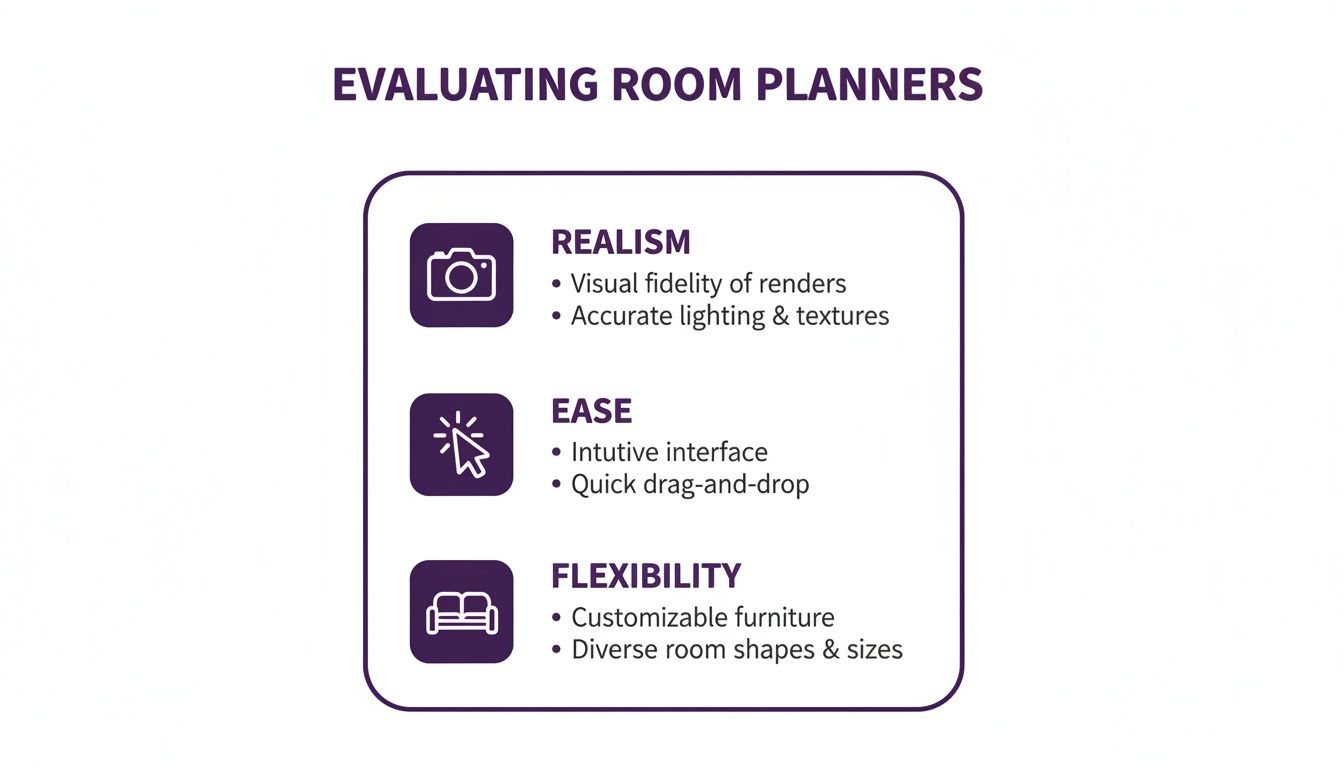
As you can see, the sweet spot is where realism, ease of use, and product flexibility all meet.
To help you see how these tools stack up at a glance, here’s a breakdown of their key features.
Room Planner Feature Comparison
This table compares the most important features for both homeowners and professionals, showing where each platform shines and where it falls short.
| Feature | aiStager | SketchUp | RoomSketcher | Floorplanner |
|---|---|---|---|---|
| Realism | Photorealistic | Requires expert skill & plugins | Basic, cartoon-like 3D | Basic, cartoon-like 3D |
| Furniture Library | Use any product from any online store | Huge 3D Warehouse (generic models) | Limited, proprietary catalog | Limited, proprietary catalog |
| Ease of Use | Extremely easy (AI-automated) | Very steep learning curve | Very easy (drag-and-drop) | Very easy (drag-and-drop) |
| Setup Time | Minutes | Hours to days | Minutes to hours | Minutes to hours |
| Output | High-res, photo-quality images | 3D models, requires rendering | 2D plans, basic 3D views | 2D plans, basic 3D views |
| Best For | Real product visualization & styling | Custom architecture & 3D modeling | Quick floor planning & layout | Quick floor planning & layout |
This comparison makes it clear: if your goal is to make confident, real-world design and purchasing decisions, the tool you choose matters immensely.
Closing The Realism and Flexibility Gap
The fundamental issue with most platforms is that they force you to choose: do you want a powerful tool that’s hard to use, or an easy tool that produces unrealistic visuals with fake furniture? The needs of modern designers and shoppers have simply moved beyond that compromise.
For anyone who needs to see exactly how a specific Pottery Barn dining table or a unique Etsy lamp will look in their actual room, a fixed catalog just doesn't work. This is where a tool like aiStager changes everything by letting you paste a URL for any product from any store.
This simple function completely redefines design visualization. Let's say you're torn between a modern farmhouse look and a mid-century vibe. With aiStager, you can take a photo of your room, drop in a specific Floyd Sectional for one version, and then instantly swap it for a different brand to compare. You can even cycle through the product’s actual colors and finishes to find the perfect match.
As you explore your options, this guide to choosing a virtual staging app offers some great insights, as these tools prioritize the realism and speed that most of us are looking for. What makes aiStager unique is its ability to create hyper-realistic images using the true dimensions of both your room and the furniture. This solves the persistent scaling and accuracy issues that make other tools so frustrating. It effectively closes the gap between a basic floor plan and a professional photoshoot, giving you visuals that look just like the real thing.
For a deeper dive into these types of platforms, check out our article on online interior design tools.
What Makes aiStager a Game-Changer in Realistic Design?
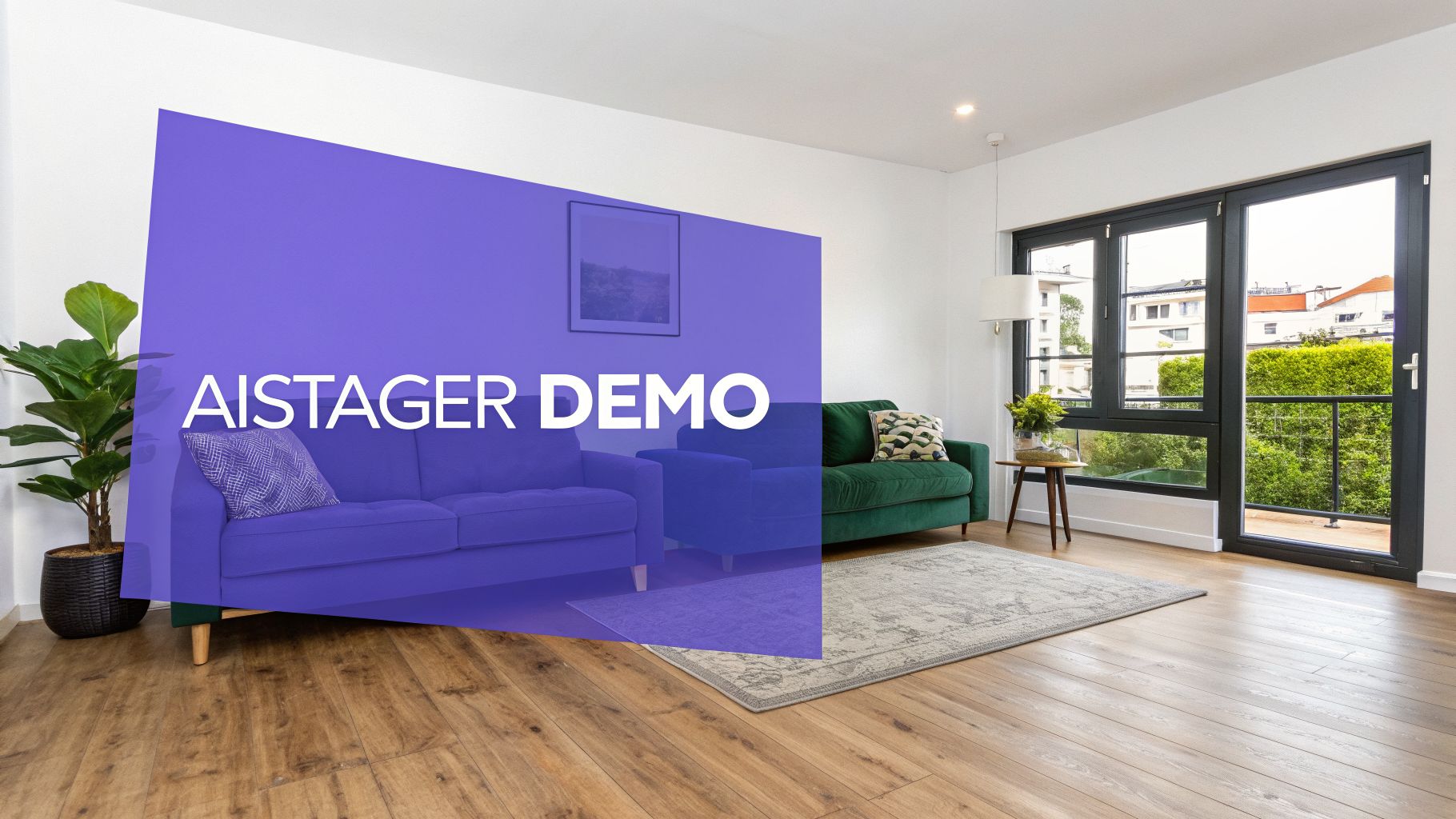
This image isn't just a pretty render. It's a perfect example of what sets aiStager apart: the ability to drop new furniture into a real photo and have it look like it’s actually there, matching the room’s unique lighting and perspective. It's the closest you can get to seeing the final result without moving a single piece of furniture.
While most room planners give you basic 3D views, aiStager was built to solve the biggest headaches in digital design—unrealistic visuals, generic furniture catalogs, and clunky, complicated software. Its core strength lies in generating hyper-realistic photos using dimensionally accurate rooms and furniture objects.
This isn't a small detail; it's what makes it one of the best room planning software choices on the market. It goes beyond the cartoonish layouts of other tools to create visuals that are almost indistinguishable from professional photos, all while ensuring every item is perfectly true to scale.
From Room Photo to Flawless Design in Minutes
The entire aiStager workflow is designed for speed. There's no steep learning curve and no need for 3D modeling skills. Let's say you're designing a modern farmhouse living room and you've spotted a velvet sofa from West Elm. You love it, but you're not sure if it will clash with your existing decor.
Instead of guessing or spending hours building a 3D model from scratch, you can find out for sure in just a few clicks.
- Upload a photo of your living room. This is your starting point, your digital canvas.
- Paste the product link for the West Elm sofa. aiStager instantly grabs all the product information.
- The AI renders the sofa right into your room. It shows up perfectly scaled, with realistic lighting and shadows that match your photo.
This "one-click" workflow is a massive time-saver. It finally gives you a reliable way to test-drive products in your own home, which is a huge relief for anyone who’s ever struggled to visualize how a piece of furniture will really look.
Test Real Products, Not Generic Stand-Ins
One of the biggest frustrations with traditional room planners is being stuck with their built-in furniture libraries. aiStager completely removes that limitation by letting you pull in any product from any online store. This is absolutely critical for making confident buying decisions.
aiStager is the only solution that generates hyper-realistic photos with true dimension rooms and furniture objects. This means you can test a specific Burrow sofa against a model from Article, see them in different colors and finishes, and know with certainty which one fits your vision and your space.
This opens the door to rapid, real-world experimentation. Wondering if a dark gray fabric will feel too heavy in your room? Swap it for a light beige with a click. Thinking about a different leg finish on that coffee table? See the change instantly. The whole process is designed to be up to 100x faster than manual design methods, turning what used to be a week-long rendering job into something you can do in minutes.
The Growing Demand for Accurate, AI-Powered Visualization
The need for better design tools is clear when you look at the market. The space planning software industry, which is essential for laying out everything from homes to offices, hit USD 1.2 billion in revenue in 2024. Projections show it skyrocketing to USD 3.5 billion by 2033, largely thanks to smart building technology and the demand for more efficient design workflows.
As AI platforms like aiStager become more widespread, their ability to deliver incredible speed and true-to-life accuracy will make them indispensable.
For anyone just getting started with visualization software, being able to work with real products in a simple interface is a huge advantage. Our guide on interior design software for beginners has more tips on what to look for. Ultimately, aiStager's real power is its ability to give you a clear, accurate, and inspiring picture of what your space could become.
Matching the Right Planner to Your Design Needs

Let's be honest: there’s no single best room planning software for everyone. The right tool for you comes down to what you’re trying to do, how much you want to spend, and what your final goal is. A homeowner trying to avoid a costly furniture mistake has completely different needs than a professional designer juggling clients or a real estate agent trying to sell a listing.
To help you cut through the noise, we've broken down our top picks for these common situations. Think about which one sounds most like you, and you'll have a much clearer idea of what you actually need.
The DIY Home Decorator
If you're decorating your own space, your main job is to avoid buyer's remorse. You need a tool that’s straightforward and shows you—realistically—how that new sofa or rug will look in your actual room before you click "buy." Ease of use and realism are everything.
Plenty of basic room planners can help you map out a simple floor plan. But the moment you want to see a specific chair from West Elm or a unique light fixture from Etsy, those generic 3D models fall short. You need to see the real deal.
Recommendation: While simple planners are fine for rough layouts, aiStager is built for making confident purchase decisions. It lets you take any product from any online store and place it right into a photo of your room. You can finally see if that bold accent chair from Article actually works with your existing decor. Just upload your room photo, paste the product link, and let the AI show you how it looks.
The Professional Interior Designer
For professional designers, time is money and a happy client is a repeat client. You need a tool that not only produces stunning, professional-grade visuals but also lets you make changes on the fly. Your software has to impress clients and make your entire design process faster.
Spending hours (or days) in traditional 3D modeling software for every project just isn't sustainable. At the same time, basic planners don’t have the photorealistic quality needed to get a discerning client to sign off. The sweet spot is a tool that delivers lifelike images quickly, so you can show multiple options without getting bogged down in technical busywork.
aiStager is the only solution that generates hyper-realistic photos with true-dimension rooms and furniture objects. This is crucial for designers who need to show clients precisely how a finished space will look and feel, not just provide a rough sketch.
Recommendation: For interior designers, aiStager is a game-changer. Let's say your client is stuck between two sofas for their Japandi-style living room. Instead of modeling both from scratch, you can upload a photo of their space, paste the links for a Burrow sofa and another option, and get two distinct, photorealistic images back in minutes. You can even test different colors and fabrics with a few clicks, making client feedback loops almost instantaneous.
The Real Estate Agent
In real estate, it’s all about speed and first impressions. Your goal is to sell properties faster and for a better price, which means you need fast, affordable, and convincing virtual staging. You have to turn empty or dated listings into homes that buyers can emotionally connect with online.
Empty rooms look cold, confusing, and often smaller than they are. This can kill a buyer's interest before they even consider a showing. What you need is a way to quickly furnish a space with an aspirational look—like a calming organic modern or a sophisticated transitional style—that helps people imagine their life there.
Recommendation: For agents who need high-quality virtual staging without the typical cost or wait times, aiStager is the perfect fit. You can snap a photo of an empty room and, in just a few minutes, have it staged with beautiful, realistic furniture that resonates with US buyers. This kind of speed and quality helps you get listings to market faster, capture more attention online, and ultimately, bring in more qualified buyers.
Your Top Room Planner Questions, Answered
When you’re trying to pick the right room planning tool, a few key questions always come up. Getting straight answers is the fastest way to move from endless research to actually getting your project started. Let’s tackle the most common ones I hear.
Can I Use My Own Furniture in a Room Planner?
This is probably the biggest question, and the answer really separates the genuinely helpful tools from the rest. A lot of platforms lock you into their built-in library of generic 3D models. While that's fine for roughing out a basic floor plan, it becomes a huge problem when you want to see how a specific piece of furniture you're considering will actually look.
aiStager is the only tool that creates hyper-realistic photos using true-to-life dimensions for both your room and the furniture. Instead of a limited catalog, it lets you pull in any product from any online store just by using its link.
This is a game-changer. It means you can finally test out that exact sofa you’ve been looking at from Crate & Barrel or a unique console table from a small online shop. You just upload a picture of your room, paste the product URL, and aiStager places it right in your space. You can even experiment with different colors or fabrics to see what works with your existing decor, whether you're going for a minimalist, modern farmhouse, or eclectic style.
How Accurate Are Room Planner Apps?
Accuracy is everything. A gorgeous design is completely useless if the sofa you buy ends up being too big for the wall. The reliability of any room planner comes down to how it handles scale and dimensions. Many of the simpler apps just guess at the sizes, which can easily lead to expensive mistakes and a lot of frustration.
This is where aiStager’s focus on true dimensional accuracy really stands out. The entire platform is built to render both your room and any furniture you add to perfect scale. If a piece looks like it fits in your AI-generated design, you can feel confident it will fit in your home.
What Is the Best Free Room Planning Software?
You’ll find plenty of free tools out there, and they can be decent for sketching out a simple 2D floor plan or just getting a feel for a layout. But "free" almost always comes with a catch. You'll likely run into major limitations, like cartoonish graphics, watermarks plastered over your designs, or very restrictive furniture libraries.
For anyone serious about getting their design right, a better path is to find a professional-level tool that lets you test it out without any risk. This gives you a real feel for what’s possible before you have to commit.
Ready to see how actual products will look in your own room? aiStager lets you create photorealistic, dimensionally accurate designs in just minutes. See your perfect space come to life with a free trial—no credit card needed.