Cloud Computing Rendering: AI for Interior Design
Cloud computing rendering revolutionizes interior design. Learn its tech, benefits, and how AI tools like aiStager create photoreal visuals instantly.
You’re probably reading this with a deadline hanging over you.
A listing goes live tomorrow. A client wants to compare two sofa options before lunch. A homeowner likes the room, but can’t picture whether a cream performance fabric will look elevated or risky in the actual space. You have the photo. You have the product link. What you don’t have is time to build a full 3D scene from scratch or wait all night for a local render.
That’s where cloud computing rendering changes the workflow. Instead of asking your laptop to do all the heavy lifting, you send the job to powerful remote machines built for rendering. For interior designers and real estate teams, that shift matters less as a technical upgrade and more as a business one. Faster visuals mean quicker approvals, fewer back-and-forth revisions, and better presentations while the client is still engaged.
From Hours to Seconds The Power of Cloud Computing Rendering
A designer finishes a late afternoon client call. The client wants to see one open-concept living room staged in two directions. One version should feel California casual with a pale oak coffee table and a linen sofa. The second should lean more refined, maybe with a darker finish and a more structured silhouette. The room photo is ready, but the render isn’t.
On a local machine, that kind of wait can drag into the evening. According to cloud computing market and rendering statistics compiled by Codegnan, a rendering job that takes 8 to 12 hours on a single machine can finish in 10 to 30 minutes in the cloud, cutting turnaround by up to 96%. The same source notes that platforms built on this approach can create photorealistic visualizations up to 100x faster than manual 3D or CAD mockups.
That speed changes behavior. You stop treating each visual like a precious final draft and start using it as a working tool. You test the ivory version and the camel leather version. You try a slimmer arm profile. You swap a boucle chair for a cleaner walnut-frame lounge chair because the first option crowds the walkway.
Practical rule: When visuals arrive fast enough to review during the decision window, clients make choices with more confidence.
This is why cloud rendering matters in everyday property marketing and design work. It doesn’t just save time on the backend. It helps you keep momentum with people. A buyer who can see the room styled before they leave the office is more likely to stay engaged than one who has to wait until tomorrow for a draft.
For real estate teams, the same logic applies to empty listings and awkward spaces. A blank room becomes easier to understand once it’s staged with realistic scale, believable light, and furniture that looks like it belongs there. The value isn’t the technology by itself. The value is that the image arrives fast enough to move the deal forward.
Understanding the Core Concept of Cloud Rendering
Think of local rendering as one chef cooking a banquet alone in a home kitchen. That chef might be talented, but there’s only one oven, one prep table, and one pair of hands. A big meal takes time.
Cloud rendering works more like a professional kitchen with a whole team. One person chops vegetables, another plates desserts, another runs sauces, and several cooks handle the main course at the same time. The meal gets done faster because the work is split up.
What a render farm actually does
The “team” in cloud computing rendering is usually called a render farm. These are networks of specialized computers working together on rendering tasks. As explained in Cloud4Y’s overview of cloud rendering and render farms, these farms can scale from dozens to several thousand individual nodes, and a single complex rendering job can run across dozens of nodes simultaneously.
That sentence sounds technical, but the idea is simple. Instead of one machine processing the whole room scene by itself, many machines take slices of the work. One handles part of the image calculation. Another tackles lighting data. Others work on textures, shadows, reflections, or separate frames.
Why parallel work matters for interiors
Interiors are heavy scenes. A room isn’t just four walls and a chair. It includes soft shadows under a console table, daylight bouncing off a pale rug, reflective hardware on a cabinet, texture on boucle, grain direction in walnut, and small perspective cues that make the whole image feel believable.
When a local computer handles that alone, you wait.
When a render farm handles it, the workload spreads out. That’s why cloud rendering feels so different in practice. It’s not magic. It’s organized parallel effort.
A good mental model is this. Your laptop sends the assignment out to a temporary studio full of specialists, then receives the finished image back.
For non-technical users, that’s the part worth remembering. You don’t need to own a giant workstation to get high-end rendering power. You borrow it when you need it.
Where people often get confused
Many people assume the cloud is just online file storage. It isn’t. In rendering, the cloud is also compute power. It’s the difference between storing a room photo online and generating a finished, photoreal scene using remote hardware.
That distinction matters when you’re comparing tools. If a service only stores assets, it won’t transform your workflow much. If it performs the rendering remotely, it can.
Choosing Your Engine CPU vs GPU Rendering
Once people understand that cloud rendering uses remote machines, the next question is usually, “What kind of machine work are we talking about?”
The short answer is CPU and GPU rendering. Both matter. They just do different jobs well.
Think architect versus painting crew
A CPU is like the methodical architect. It’s careful, structured, and good at handling complex instructions step by step. A GPU is more like a large painting crew working in parallel. It’s built to process huge amounts of visual information at the same time.
For interior visualization, that difference is important. Rooms contain a lot of visual detail. Fabric texture, brushed metal, edge highlights on cabinetry, daylight gradients across a plaster wall, and realistic shadows under a sectional all add up fast. GPUs are designed for that kind of visual workload.
Why GPUs matter so much for photoreal rooms
Modern cloud systems rely heavily on GPU-based methods to keep visual quality high without slowing everything down. Magnopus explains GPU-accelerated Level-of-Detail rendering as a way to process massive datasets efficiently, using compute shaders and intelligent point rejection so platforms can render billions of points in real time.
If that phrase sounds abstract, translate it like this. The system gets very smart about what visual data needs full attention and what can be simplified without hurting the image. That allows a platform to handle complex furniture geometry and room information quickly while still producing a result that looks polished.
For designers, that means you can test a curved sofa against a boxier alternative, compare matte black versus warm brass finishes, or see whether a textured cream upholstery reads soft or flat in the room. If you want a broader look at software options used in built-environment workflows, this guide to 3D rendering software for architecture is a useful companion.
The faster the system can process visual complexity, the more naturally you can design by comparison instead of by guesswork.
Which one should you care about
If you’re buying hardware for a studio, the answer may be nuanced. If you’re choosing a cloud rendering service, the practical answer is simpler. You care less about owning the hardware and more about whether the service can deliver believable materials, clean lighting, and fast previews without making you wait.
Here’s the plain-language breakdown:
- CPU rendering: Better for structured computation and jobs that benefit from methodical processing.
- GPU rendering: Better for visually dense scenes and real-time or near-real-time image generation.
- Cloud platforms: Often combine both behind the scenes, so you use the output without managing the mechanics.
For interior design and real estate visuals, GPUs are often the workhorse behind the speed people notice.
Navigating Cloud Rendering Services IaaS PaaS and SaaS
Most professionals don’t need to know every layer of cloud infrastructure. They do need to know what they’re buying.
The easiest way to think about IaaS, PaaS, and SaaS is with a car analogy. One option gives you parts. One gives you a vehicle platform to customize. One hands you the keys to a finished car.
The three models in plain English
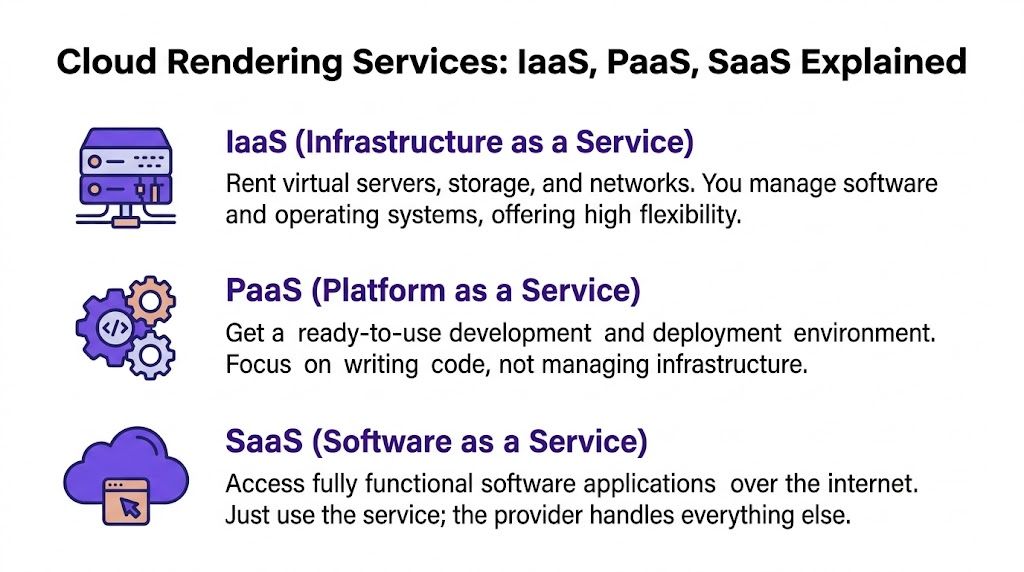
- IaaS gives you raw infrastructure. You rent servers, storage, and networking, then set up the rendering environment yourself.
- PaaS gives you a prepared platform. You still configure parts of the workflow, but someone else handles more of the underlying setup.
- SaaS gives you finished software you can use right away in a browser or app.
If you want a clean backgrounder on cloud as a service models (IaaS, PaaS, and SaaS), that overview is helpful because it frames the tradeoff between control and convenience in plain language.
Cloud Service Models Compared
| Model | What You Manage | Best For | Example |
|---|---|---|---|
| IaaS | Servers, software setup, rendering pipeline, maintenance | Technical teams with custom workflows | A studio building its own render environment |
| PaaS | App logic and workflow configuration | Teams that need flexibility without full infrastructure management | A custom visualization workflow on a managed platform |
| SaaS | Mostly your inputs and project choices | Designers, real estate teams, retailers, non-technical users | A browser-based staging and rendering tool |
The right choice depends on your day-to-day work.
What works for interior and real estate teams
If you’re an architect with an in-house pipeline team, infrastructure control may matter. If you’re a design studio manager, a listing coordinator, or a furniture marketer trying to move quickly, SaaS is usually the most practical fit.
Why? Because your actual job isn’t maintaining render nodes. Your job is showing a room clearly, testing options, and helping clients decide. That’s why many teams prefer software that lets them upload a room image, set design intent, and get usable output without wrestling with setup.
A useful example is interior 3D rendering services, where the distinction isn’t just image style. It’s how much technical burden the provider removes from your workflow.
Decision shortcut: If you want to think about fabrics, layouts, and buyer response instead of infrastructure, you probably want SaaS.
That doesn’t mean IaaS or PaaS are bad. It means they solve different problems. For most interior design and real estate professionals, simpler access wins.
Putting Cloud Rendering to Work in Interior Design
Here’s where cloud computing rendering stops being an abstract concept and becomes a very practical design tool.
A client sends you a photo of their living room. They like the scale of their current layout, but the room feels flat. They want to compare two sofa directions before ordering. One is a bespoke piece from Restoration Hardware in a lighter fabric. The other is a Joybird sectional in a deeper tone that leans more Mid-Century Modern.
Instead of building the whole room manually in CAD, you start with the actual photo.

What happens behind the screen
Modern AI workflows distinguish themselves from older rendering pipelines. The hard part isn’t only creating a nice image. The hard part is understanding the room from a single photo well enough to place a new object at the right scale, from the right angle, under the right light.
The research on hybrid edge-cloud spatial computing points to this as the challenge. The system has to interpret a single 2D photo, infer the room’s geometry, and render a 3D object with accurate scale and lighting. That’s what allows true-to-scale virtual staging without needing full CAD models upfront.
For an interior designer, that means the software has to “read” the room well enough to know whether a low-slung sofa would block the window line, whether a dining table is oversized for the floor area, or whether the new product should catch cool daylight from the left side of the room.
A simple workflow you can picture
One practical workflow looks like this:
Upload the room photo.
This could be a listing photo, a client snapshot, or a showroom scene.Paste a product link.
You use the actual product page, not a rough placeholder.Let the system interpret the scene.
It detects perspective, spatial relationships, and how the object should sit in the room.Review variations.
Try different colors, finishes, or even different brands of similar products.Share the output.
Use the image in a client proposal, listing gallery, moodboard, or product presentation.
That workflow is why tools like AI for interior design have become so relevant. They reduce the distance between inspiration and decision.
One example in this category is aiStager, which takes a room photo and a product URL, pulls product imagery and dimensions, and renders dimensionally accurate, photoreal visuals in the actual space. For designers and agents, that’s useful when comparing variants of the same item, such as trying two sofa brands or switching between fabric colors and wood finishes without rebuilding the room from scratch.
Why this matters to the client
Clients rarely struggle to choose because they lack taste. They struggle because they can’t visualize fit. A flat cutout doesn’t answer the important questions. Will the sofa look too bulky under that artwork? Will the walnut finish warm up the room or make it feel heavy? Does the cream upholstery feel sophisticated in daylight and too cold at night?
A realistic staged image helps because it closes the gap between abstract product data and lived reality. That’s also why content teams are paying more attention to rich media services for engaging shoppers, especially when buyers need more context before they commit.
Later in the process, video can help explain the transformation even more clearly:
When people can compare options inside the real room instead of imagining them in isolation, decisions get easier.
For real estate, the same principle helps empty listings feel legible. For retail, it helps shoppers judge fit before purchase. For designers, it turns product comparison into a fast visual conversation instead of a long production project.
Evaluating Cloud Rendering Performance Cost and Security
Speed gets attention first. The fundamental buying decision usually comes down to three questions. Will it stay fast when my workload spikes? Will costs stay predictable? Can I trust it with client work?
Performance means consistency, not just top speed
A cloud rendering service should handle busy periods without making every project feel fragile. Real estate teams often batch work. A brokerage may need multiple rooms staged at once when several listings hit the market together. A design studio may need fast rounds of revision before a client presentation.
That’s why performance isn’t only about whether a platform can render one attractive image. It’s about whether it can keep delivering when demand jumps and whether the workflow stays smooth for non-technical users.
Cost should be understandable before the bill arrives
Many small teams often encounter difficulties. CoreWeave’s discussion of cloud-agnostic rendering notes that cost unpredictability with single-cloud IaaS solutions is a real risk for small studios and real estate teams, often leading to expensive overprovisioning. The same source argues that cloud-agnostic platforms and SaaS models with credit-based pricing can be more resilient and financially predictable, especially during periods of heavy demand.
That matters if you’re staging several listings in one week or preparing multiple client alternatives for a furniture presentation. You don’t want the bill to feel like a surprise tied to technical details you never intended to manage.
A practical checklist:
- Ask about pricing logic. Is it usage-based in a way you can forecast, or does cost fluctuate with infrastructure variables?
- Check scaling behavior. What happens when you submit many jobs at once?
- Look for workflow fit. Predictable credits or packaged usage often suit non-technical teams better than raw infrastructure billing.
Security should match the sensitivity of your work
Interior design files often include floorplans, private homes, renovation concepts, and proprietary product imagery. Real estate projects include pre-market photos and marketing assets. Even when a provider doesn’t ask you to manage the infrastructure, you still need confidence that the service handles project data responsibly.
Don’t evaluate cloud rendering like a toy app. Evaluate it like a client-facing production system.
For most firms, the best choice is the one that balances speed, understandable pricing, and a workflow people will use correctly under pressure.
Embrace the Future of Effortless Interior Visualization
Cloud computing rendering used to sound like something reserved for film studios and specialist 3D teams. It doesn’t anymore. For interior designers, brokers, marketers, and furniture sellers, it has become a practical way to get better visuals without building a technical department around them.
The biggest shift isn’t only faster rendering. It’s faster decision-making. When you can show a room with believable scale, real product context, and polished light while the conversation is still active, your work becomes easier to approve and easier to sell. Clients feel more certain. Buyers understand rooms faster. Teams spend less time chasing revisions that could have been resolved with a stronger image early on.
This is especially useful in the photo-to-product-link workflow that many general rendering guides ignore. That workflow fits real life. Someone already has a room photo. Someone already found a product they want to test. The value comes from connecting those two inputs in a way that looks convincing and respects scale.
If your current process depends on static moodboards, rough cutouts, or long waits for custom renders, there’s a better path. You don’t need to become a rendering expert to use cloud rendering well. You just need a tool that hides the heavy lifting and gives you an image people can trust.
If you want to try that workflow in practice, aiStager lets you start with a room photo and a product link, then generate photoreal, true-to-scale interior visuals without needing local rendering hardware or a credit card to get started.