Home Staging AI: Transform Spaces, Maximize Property Value
Explore home staging AI. Transform empty rooms into stunning, sellable spaces, boost ROI, & revolutionize real estate in 2026.

You’ve got an empty room, a listing deadline, and a familiar problem. The photos are clean, but they don’t help buyers feel anything. A blank living room reads as square footage, not as a future home.
That’s where home staging ai has changed the conversation. It doesn’t just add furniture to a photo. Done well, it helps people understand scale, layout, style, and possibility, fast enough to fit real sales cycles and accurate enough to support real decisions.
The important shift isn’t only speed. It’s dimensional trust. A staged image is far more useful when the sofa doesn’t just look good, but also fits the room the way the actual product would.
The End of Empty Rooms
A lot of agents know this moment well. The seller has moved out. The painter just finished. The photographer is booked. You walk through the property and think, “This place shows well in person, but online it’s going to feel cold.”
Traditional staging solves that problem, but it asks for money, coordination, and time at the exact moment you’re trying to move quickly. You may need furniture rental, movers, installers, styling adjustments, and then removal after the listing goes live. For a busy brokerage or homeowner, that process can feel heavier than the listing itself.
The frustration is that staging works. Buyers respond to it. According to NAR home staging statistics summarized here, 83% of buyers' agents report staging helps buyers visualize properties as their future home. But the same source notes that rising costs pushed the median staging cost to $1,500 in 2025, and only 21% of sellers' agents staged all their homes, down from 38% in 2017.
Why empty rooms struggle
An empty room creates work for the buyer. They have to guess where the sofa goes, whether a dining table will fit, and how the traffic flow works. Some buyers can do that easily. Many can’t, especially when they’re scanning listings quickly on a phone.
That gap matters because first impressions are now mostly visual and mostly digital. If the room feels unfinished in the listing gallery, the buyer may never make it to the showing.
Empty rooms don’t only look vacant. They force the buyer to become the designer, planner, and optimist all at once.
Why many teams needed a different option
This is exactly why home staging ai caught on so quickly. It gives agents, property managers, and homeowners a way to make a space legible without hauling in physical furniture. The pitch is simple. Keep the speed of digital marketing, but remove the lifeless feel of vacant photos.
It also changes who can use staging. Traditional staging tends to favor larger budgets or higher-value listings. AI-based staging opens the door for smaller teams, rental portfolios, new builds, and one-off rooms that need help but don’t justify a full physical setup.
That’s a key starting point for understanding the category. Home staging ai isn’t replacing the idea of staging. It’s removing the biggest barriers that kept people from using it.
Understanding Home Staging AI
Home staging ai is software that takes a photo of a real room and generates a furnished version of that same room. The strong systems don’t just paste generic furniture into empty space. They read the room, interpret the perspective, and produce a result that looks like the furniture was there when the photographer took the shot.
The easiest way to understand it is to compare three different eras of staging.
Three ways to stage a room
| Approach | How it works | Main tradeoff |
|---|---|---|
| Physical staging | Real furniture is delivered and styled on site | High logistics and cost |
| Manual virtual staging | A designer edits the photo by hand | Slower workflow and more production effort |
| AI staging | Software analyzes the room and generates a staged image | Quality depends heavily on the tool and source image |
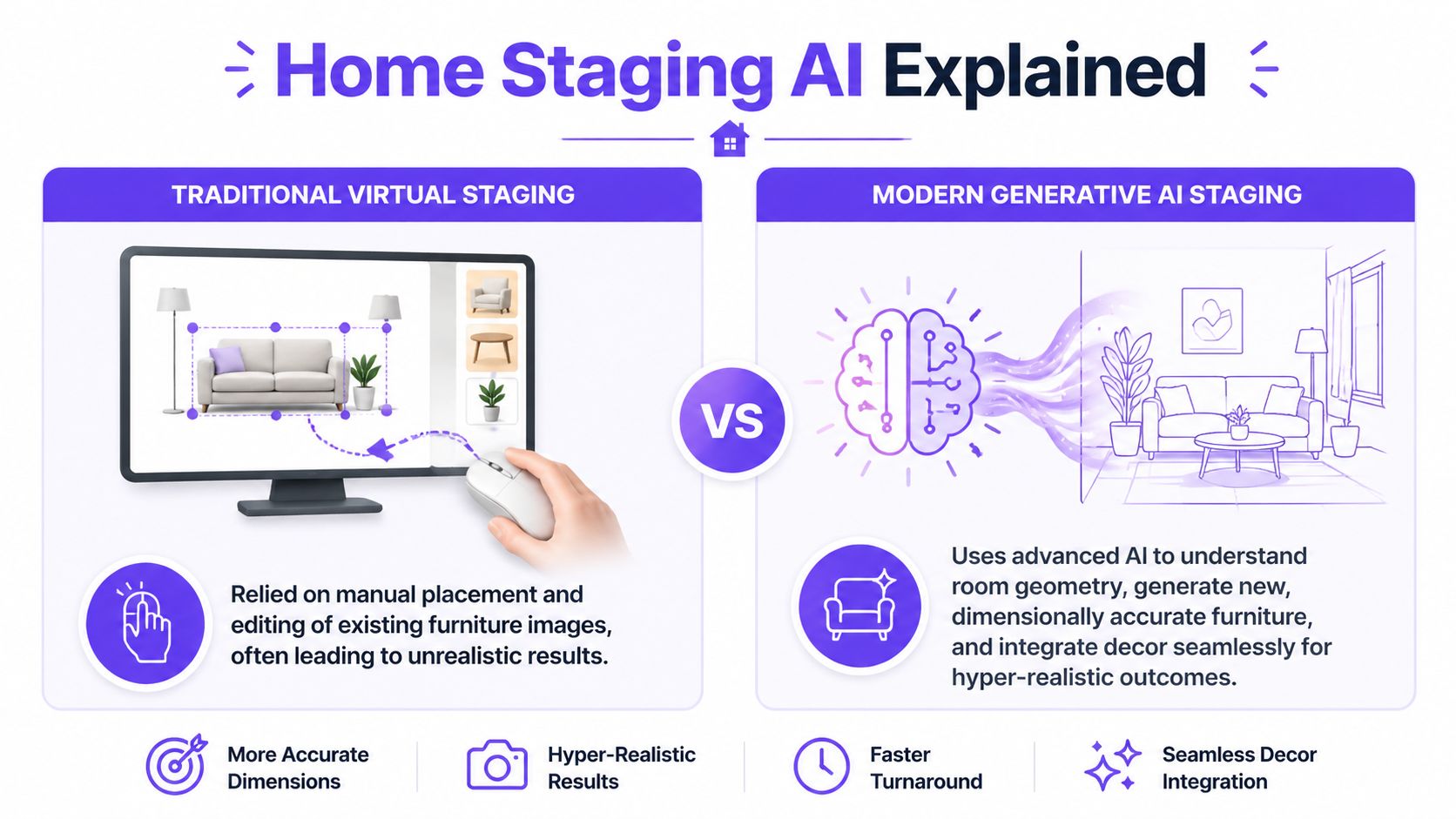
Manual virtual staging was a useful bridge. It let teams avoid movers and rentals, but it still depended on human editors placing assets and retouching details. The process resembled custom collage work. Skilled people could make it look good, but every revision took more time.
Modern AI staging is closer to giving a room photo to a fast, highly trained visual assistant that understands interiors. It can identify the space, infer depth, and generate a coherent furnished scene in one pass.
Why the new generation matters
The business case is what gets most professionals to pay attention. According to this overview of AI virtual staging, AI-powered virtual staging can cut costs by up to 97% and generate renders in about 30 seconds, compared with days for manual processes. The same source says virtually staged listings attract 40% more online views and 74% more buyer interest, with reported ROI in the 500% to 3,650% range.
That’s the headline advantage. But there’s another one that matters just as much in daily work: repeatability. If a client wants to see a room in coastal style, then in a cleaner contemporary look, then with a darker sectional, the system can produce options quickly instead of restarting a manual editing job.
What people often confuse
Many professionals hear “AI staging” and assume it means one of two things:
A faster Photoshop service
It isn’t only that. Good systems generate scenes, not just edits.A decorative toy
It shouldn’t be. The serious use case is decision support, not just visual flair.A closed catalog of fake furniture
Some tools work that way. Others are more flexible and can connect visuals to actual products and actual room dimensions.
That last point is where the category gets interesting. A decorative mockup can help marketing. A dimension-aware render can help marketing and decision-making.
If you want a broader view of how these systems are used beyond listing photos, this guide to AI for home design is a useful companion.
Practical rule: If the image looks good but can’t be trusted for fit, it’s a marketing image. If it looks good and respects real scale, it becomes a planning tool too.
How AI Magically Furnishes a Room
A listing agent uploads a photo of an empty living room at 9:12 a.m. By 9:20, the same room appears furnished with a real sofa from a retailer’s product page, scaled to fit the wall, aligned to the camera angle, and lit as if it had been there during the shoot. That speed feels magical. The process is mechanical.
The system is doing several visual tasks in sequence, much like a surveyor, merchandiser, and photo retoucher working from the same image at once. It reads the room, selects suitable objects, sizes them against the space, and blends them into the scene so the result looks believable.

Step one, the system reads the room
The first job is spatial understanding. As noted earlier, virtual staging systems estimate depth, identify surfaces such as floors and walls, classify the room type, and infer how light behaves in the photo. In plain terms, the software asks practical questions before it adds a single object:
- Where can furniture physically sit?
- Which surfaces are horizontal, vertical, or angled?
- What kind of room is this likely to be?
- Which direction is the camera facing, and where are the light sources?
A good input photo helps because the model needs evidence. Visible floor area, clean corners, and a normal camera angle give the system enough structure to place objects with fewer errors.
Step two, it selects furniture with a purpose
After the room is mapped, the software chooses what belongs there. That choice is part design judgment and part business logic. A compact guest room needs a different furniture plan than a staged primary bedroom. A rental listing may call for broad, neutral appeal, while a retail use case may center on one specific product.
This is why product control matters more than style labels alone. “Modern living room” can produce something attractive, but professionals often need to test an actual SKU, finish, or silhouette inside the photo. A low-profile sofa and a rolled-arm sofa send different signals about the room’s size, formality, and likely buyer.
Teams comparing tools usually start here, with feature sets and catalog options. A practical overview of home staging software for real estate and retail teams can help clarify what level of control different platforms offer.
Step three, dimensions decide whether the image is useful
This is the dividing line between a pretty rendering and a dependable preview.
Many AI staging images fail in subtle ways. The bed is too wide for the wall. The rug clips the room’s proportions. The sectional looks fine until you realize no one could walk around it. The viewer may not calculate the mistake, but they feel it. Trust drops fast when scale is off.
Next-generation platforms such as aiStager address that problem by using a product URL as input, then pulling the item’s dimensions so the furniture can be rendered at true scale inside the room. That changes the job the image can do. It no longer serves only as visual decoration. It becomes a fit check.
| Scenario | What the viewer sees | What the viewer can trust |
|---|---|---|
| Generic AI staging | An attractive furnished room | Mood and style |
| Dimension-aware staging | An attractive room with furniture sized to fit | Mood, style, and likely fit |
For real estate, that means fewer misleading visuals and stronger buyer confidence. For furniture sellers, it means fewer “it looked smaller online” surprises after delivery. Retailers and landlords thinking beyond cosmetics often pair staged previews with other smart upgrades for rental property owners because presentation works better when it reflects real usability.
Step four, the image has to obey the photo
The final step is integration. Furniture has to sit on the floor plane correctly, follow the room’s vanishing lines, and pick up the same lighting logic as the original image. Shadows need to fall in the right direction. Edges cannot look cut out. Materials have to match the softness or sharpness of the photo.
Poor virtual staging usually breaks here. The chair appears pasted on top of the image. The rug ignores perspective. The sofa looks lit from a different window than the room itself.
A convincing result follows the room’s rules. That is why the best systems do more than furnish an empty space. They simulate how a real object would exist in that exact photo, in that exact position, at that exact size.
That is the practical reason home staging AI matters. It helps people answer a better question than “Does this room look nice?” The stronger question is “Will this furniture work here, and can I trust what I’m seeing?”
Boosting Sales for Real Estate and Retail
The value of home staging ai changes depending on who uses it. An agent wants stronger listing photos and faster buyer understanding. A retailer wants shoppers to stop guessing and start picturing the product in their own home. The underlying technology is similar, but the business win is different.
For real estate teams
Empty listings are expensive in a hidden way. They often get fewer emotional reactions, weaker social posts, and less useful listing galleries. AI staging helps an agent create more than one visual story for the same space without arranging another shoot.
One room can be shown in different buyer-friendly directions:
- West Coast Modern with lighter woods, soft neutrals, and cleaner lines
- Cozy Traditional with warmer textiles and more familiar shapes
- Urban Minimalist with tighter furniture groupings and less visual noise
That flexibility matters because the same room can attract different buyers depending on how it’s framed. A spare room can read as a nursery, office, or guest room. A loft can feel cold in one version and highly livable in another.
For operators working across rentals and multifamily units, staging is only one part of the presentation puzzle. Practical upgrade planning matters too, which is why this resource on smart upgrades for rental property owners is useful alongside visual merchandising.
There’s also a workflow advantage. Teams that want to compare tools, output styles, and room-use options can review what modern home staging software now supports before standardizing a process.
For furniture retail and e-commerce
Retail has a different pain point. The shopper likes the product but doesn’t trust the fit. A product page can show dimensions, swatches, and styled photography, but the customer still wonders whether the piece will overpower their room or disappear in it.
That’s where URL-based room visualization becomes practical. A shopper can upload a room photo, paste a product link, and test alternatives quickly. They’re not just deciding between “blue sofa” and “green sofa.” They’re deciding between a slimmer frame and a deeper sit, between walnut legs and black metal legs, between linen texture and velvet finish.
A good example is comparing one sofa style against another from familiar brands. A shopper might test a Crate & Barrel silhouette against a more relaxed Article-style profile in the same living room photo. They can also swap the finish from cream to olive or from oak to espresso without rebuilding the whole scene.
Later in the buyer journey, a short demo helps people understand how interactive this has become.
Why dimensional confidence matters commercially
Retailers don’t only need attractive previews. They need previews that reduce uncertainty. If the visual is faithful to room scale, the shopper is less likely to order based on wishful thinking.
That same logic helps designers and showroom teams. A client approval conversation gets much easier when the proposed piece appears at believable scale in the actual room, with a finish that matches the current moodboard. The conversation shifts from abstract debate to concrete comparison.
The strongest sales image is often the one that removes doubt, not the one that adds the most decoration.
Your Guide to Implementing Home Staging AI
A lot of people assume the hard part is learning the software. It usually isn’t. The hard part is making disciplined choices so the output stays believable and useful.
The basic workflow is short. The judgment around that workflow is what makes the result professional.
A simple working process
Start with a clean room photo. That doesn’t mean the room has to be empty. It means the image should be easy to read. Strong daylight, visible corners, and an uncluttered floor plane make a big difference. If your source shot is weak, fix the photography problem first.
If the room is busy, remove distraction before you add design. Many users begin with a declutter pass, especially in lived-in homes, rentals, or showrooms where personal items are pulling attention away from the architecture.
Then move to product testing. In this phase, URL-based staging becomes more than a visual toy. You paste a product link and let the system pull the item into the room with its real dimensions. According to this explanation of aiStager’s URL-based pipeline, the system extracts 3D models and dimensions directly from retailer URLs and reconstructs room mesh with less than 5% error on standard benchmarks. The same source says true-scale visualization can reduce furniture returns by 15% to 25%, and that 70% of returns stem from size or fit issues.
What to test in practice
Don’t stop at one option. Compare product families, not just colors.
For example, if you’re furnishing a condo living room, test:
- A compact sofa for better circulation near a balcony door
- A deeper lounge sofa to see whether comfort reads better than openness
- Two finish directions such as ivory fabric versus camel leather
- Different leg tones such as matte black versus light oak
This is also where one mention is useful: aiStager’s empty room photo workflow is built around this kind of input, where a single room image becomes the base for staged variations and product-based comparisons.
A homeowner might compare an Article sofa against a Restoration Hardware-inspired look. A furniture retailer might test the same sectional in stone, rust, and forest green. A leasing team might style the same apartment for young professionals in one version and for a small family in another.
Best practices checklist
Checklist
Use a straight-on photo: Extreme wide angles make every room harder to read and can make furniture fit look less believable.
Leave visible floor area: The system needs spatial clues. If the floor is hidden by a low camera angle or heavy clutter, placement gets harder.
Match style to architecture: A sleek boucle sofa may feel off in a rustic cabin. The staging should support the bones of the property.
Keep circulation realistic: Don’t crowd doors, windows, or walking paths just because the render looks fuller.
Test finish changes intentionally: Compare walnut versus oak, linen versus velvet, or brass versus black hardware only when the difference matters to the decision.
Save side-by-side options: Clients make better choices when they can compare alternatives directly instead of reviewing isolated images.
Common mistakes
Some errors are easy to avoid once you know where people go wrong.
One is using AI to overfill the room. Another is choosing furniture that flatters the image but wouldn’t make sense for the target buyer. A downtown studio and a suburban family room shouldn’t be staged with the same instincts.
A third mistake is treating every generated image as final. Review the basics each time:
- Does the furniture scale feel right?
- Does the room still have usable circulation?
- Do shadows and perspective agree with the original photo?
- Would a buyer or shopper interpret this as plausible?
If the answer to any of those is no, regenerate. The advantage of AI is not that the first image is always right. It’s that iterations are fast enough to make quality control realistic.
Navigating Pitfalls and Ethical Guidelines
Home staging AI can make a room look better fast. That doesn’t mean every use is safe. Many articles often lack depth on this point, even though the professional risk is real.
A major gap in the current conversation is the lack of guidance around liability and disclosure. Real estate professionals work in regulated environments, and misrepresentation can lead to litigation and licensing penalties. That risk is especially relevant with AI-staged listing media.

The bright line
Ethical virtual staging helps viewers imagine use. Unethical virtual staging changes facts.
These are generally responsible uses:
- Furnishing an empty bedroom
- Showing a vacant dining area with a table and chairs
- Decluttering removable items that distract from the room
These are risky uses:
- Hiding damage
- Removing permanent fixtures
- Changing the size impression of the room
- Suggesting upgrades that the property doesn’t have, without clear labeling
If there’s a crack in the wall, water damage near a baseboard, or an outdated built-in, the AI image should not pretend the issue doesn’t exist. Marketing enhancement is one thing. Concealing material property conditions is another.
Disclosure should be standard practice
If you use AI-staged images in real estate marketing, label them. Don’t make the buyer guess.
Useful disclosure language can be plain:
Virtually staged image. Furniture and decor shown are digital representations for illustration only.
Or:
This photo has been digitally enhanced to show potential furniture layout and style.
You should also check your MLS rules, brokerage policy, and local regulations. Requirements can vary, and the burden is on the professional using the image, not on the software.
Quality is also an ethical issue
Low-quality staging can be misleading even when the intent is harmless. If a render is out of scale, ignores lighting, or places impossible furniture arrangements into a room, it creates the wrong expectation.
That’s why visual fidelity isn’t just a design concern. It’s part of compliance and trust. A hyper-realistic image that respects the room is safer than a flashy image that breaks obvious spatial logic.
Good disclosure protects the professional. Good realism protects the viewer.
A practical habit is to keep the original room photo on file and, when appropriate, include both the original and the staged version in your workflow review. That helps teams confirm that the staged version is illustrative rather than deceptive.
The Future of Property Visualization is Here
A buyer opens a listing on a phone while standing outside the property. Within the same viewing flow, they can switch between an empty bedroom, a staged office, and an AR view that shows a real desk from a retailer at true scale in the room. That is where property visualization is heading.
The next step is not prettier renders. It is a connected decision system.
Dimensional accuracy set the foundation. The bigger shift is what happens once accurate room understanding connects to live product data, AR walkthroughs, and buyer behavior signals. At that point, a staged image stops being a static marketing asset and starts acting more like a working prototype of the space. It can show what fits, what clashes, what blocks circulation, and what deserves a closer look before anyone spends money.
That changes the role of visualization. Real estate teams can turn a listing gallery into a planning tool. Retailers can reduce hesitation by showing not just style, but fit in context. Designers can use the same room image across presentation, sourcing, and client approval instead of rebuilding the concept in separate tools.
The long-term winner will not be the platform that adds the most decor the fastest. It will be the one that makes a room photo behave more like a measurable digital twin of the physical space, then connects that model to the products people can purchase.
If you want to try a workflow built around room-photo uploads and product-link visualization, aiStager lets you place real products into real rooms, compare colors and finishes, and generate hyper-realistic, true-to-scale scenes in just a few clicks.