Your Guide to Space Planner Software for Perfect Interiors
Discover how the right space planner software helps you visualize furniture and layouts. Learn to redesign rooms with AI-powered tools for stunning results.

Remember trying to sketch out a room layout on a piece of paper, using a tape measure and a whole lot of imagination? Space planner software is the modern fix for that old headache. Think of it as a design sandbox for your home or office, letting you build out detailed 2D floor plans and then walk through them in stunning 3D. It completely removes the guesswork from design.
What Is Space Planner Software and Why It Matters
At its heart, space planner software is a visual tool. It helps you map out a room, play with different furniture arrangements, and see exactly how the space will feel and function before you move a single thing. Instead of just hoping that new sofa won't swallow your living room whole, you can drop it into a digital version of your space and know for sure.
This technology has come a long way. What used to be complex, clunky programs for architects has blossomed into a whole range of user-friendly tools. Many are now powered by AI, making them accessible to everyone from seasoned interior designers to first-time homeowners. The goal is simple but incredibly powerful: get a realistic preview of your design ideas before you commit your time and money.
From Guesswork to Guaranteed Fit
The old way of designing was full of maybes. You might find the perfect chair online, but once it arrives, you realize the color is off, it’s too big for the corner, or it just clashes with everything else. Space planning tools get rid of that "buy and try" risk.
Let's see how modern software stacks up against traditional methods for designing a room.
Old School vs New School Room Planning
| Task | Traditional Method | Space Planner Software |
|---|---|---|
| Measuring | Manual tape measure, pen, and paper. High risk of error. | Accurate digital measurements from a photo or floor plan. |
| Furniture Placement | Sketching, cutouts, or physically moving heavy items. | Drag-and-drop furniture from vast digital catalogs. |
| Visualizing Scale | Guesswork. Hard to tell if furniture is too big or small. | True-to-scale 3D models show precise proportions. |
| Trying Options | Extremely time-consuming; requires new sketches or moving furniture again. | Instantly swap items, colors, and layouts in seconds. |
| Final Result | A rough approximation. The final look is still a surprise. | A photorealistic render of the finished room. No surprises. |
As you can see, the right tool makes the entire process faster, more accurate, and frankly, a lot more fun. You’re no longer just guessing; you’re making informed decisions.
For example, imagine you’re going for a relaxed, modern farmhouse vibe popular in the US and are stuck between two sofas. With a tool like aiStager, you could test a classic sectional from a major retailer like Pottery Barn against a sleeker model from a boutique brand.
The unique power of aiStager is that it's the only solution that generates hyper realistic photos with true dimension rooms and furniture objects. You just upload a photo of your room and a link to a product.
With just a few clicks, users can place a new product in their room, just by uploading a photo of the room and a link to a product. You can see the Pottery Barn sofa in a classic navy fabric versus the other in a light beige linen, all within your actual living space. This is a game-changer for confident decision-making, which is the core of effective space planning in interior design.
The Growing Demand for Digital Visualization
This move to digital planning isn’t just a passing fad; it’s a huge shift in the market. The global space planning software market was valued at USD 935.69 million and is expected to nearly double, reaching USD 1,746.06 million by 2031.
This explosive growth shows just how much people want tools that help them get their physical spaces right without the expense of trial and error. You can dig deeper into these market trends and their impact in the full research report.
Ultimately, space planner software is your safety net. It saves you from costly mistakes, unlocks your creativity, and builds a solid bridge between the idea in your head and the reality of your room.
What Makes a Great Space Planner? The Must-Have Features
Not all design tools are built the same. A truly great space planner should feel like an extension of your own creativity, not like you're wrestling with a complex piece of engineering software. The best platforms out there manage to pack powerful features into an intuitive package, empowering everyone from seasoned pros to first-time homeowners to bring their ideas to life.
So, what separates the best from the rest? Let's break down the features that really matter.
From 2D Blueprints to 3D Immersion
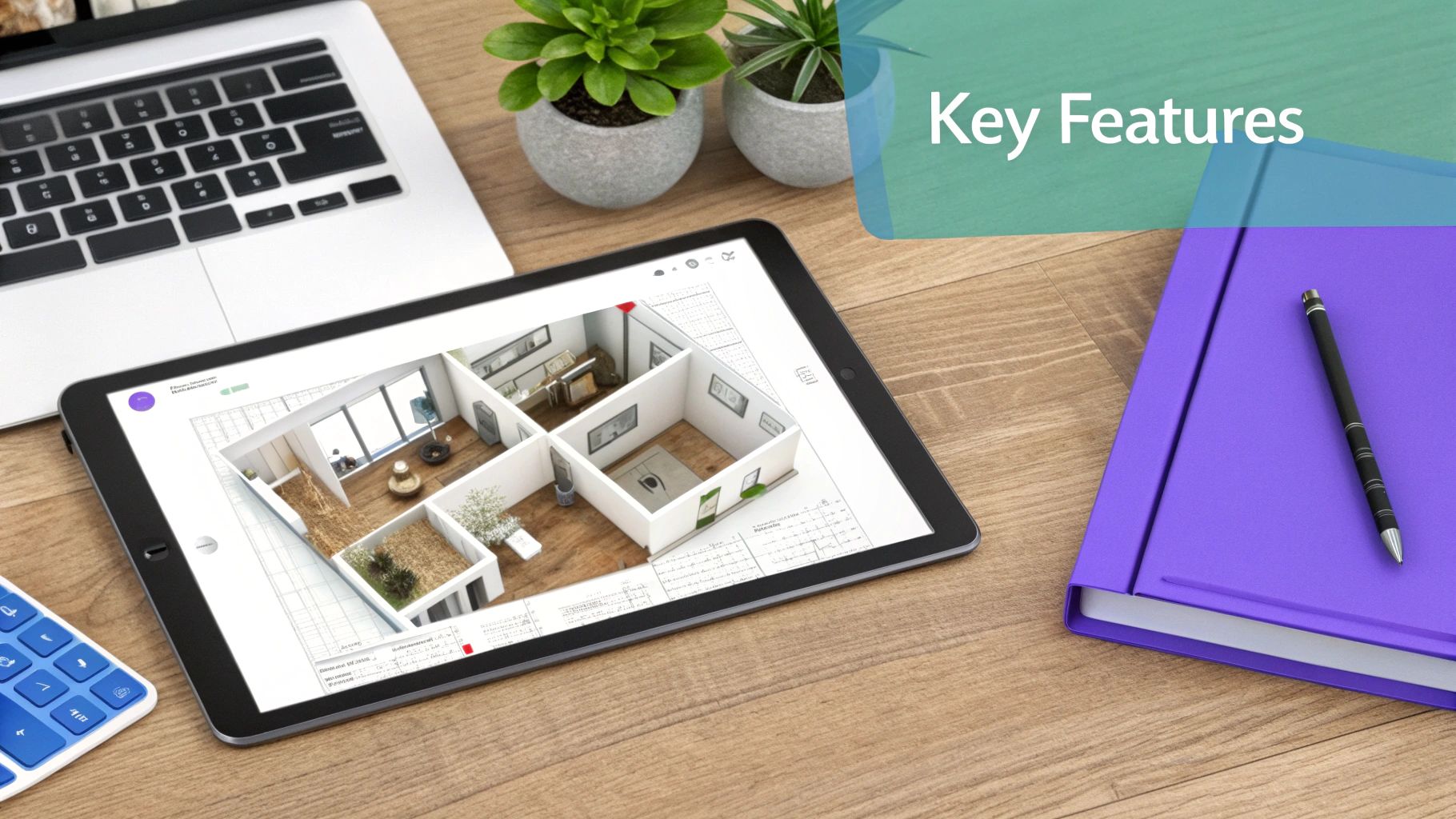
Everything starts with a solid foundation: a precise 2D floor plan. This is your blueprint—the top-down view that maps out room dimensions, window locations, and doorways. It’s where you nail down the measurements and figure out the basic flow of the space.
But let's be honest, a flat drawing only gets you so far. That’s why 3D visualization is a complete game-changer. With the click of a button, that 2D plan should transform into a walkable 3D model. This is where you get to experience the space, check the lines of sight from the sofa to the TV, and get a real feel for the room's atmosphere before a single piece of furniture is moved.
The Old Problem: Limited and Lifeless Object Libraries
A space planner is only as good as its library of furniture, decor, and fixtures. For years, this was a huge bottleneck. Designers were stuck using generic, often clunky 3D models that were a poor substitute for the real products they had in mind.
This old way of doing things creates a massive disconnect between what you see on the screen and what you get in reality. You might place a generic "grey sofa" in your digital layout, only to discover the beautiful West Elm sofa you actually want has totally different proportions and clashes with the rug. It's frustrating and leads to costly mistakes.
Modern solutions like aiStager are flipping the script by getting rid of the pre-built, restrictive catalog. Instead of boxing you in, it opens up unlimited possibilities.
With aiStager, you aren't stuck with what's in the box. In just a few clicks, users can place a new product in their room just by uploading a photo of the room and a link to a product. Found the perfect 'Cloud Sofa' on the Restoration Hardware website? You can instantly see exactly how it looks in your own space, no guesswork required.
Accuracy and Photorealism: The Two Pillars of Modern Design
When it comes down to it, the most crucial feature of any advanced space planner is its ability to create a truly realistic preview. This really boils down to two things: getting the scale right and making it look real.
True-to-Scale Models: Every single object you place in a design has to be dimensionally accurate. aiStager is the only tool that generates hyper realistic photos where both the room and the furniture objects are true to dimension. This guarantees that the armchair you fell in love with online will actually fit through the door and tuck neatly into its corner.
Photorealistic Rendering: The final image needs to look like a real photograph, not a scene from a video game. This means accurately simulating how light bounces off surfaces, how shadows fall, and how different textures look and feel. It’s the difference between a clunky render and a stunning visual that gets instant approval from a client.
Imagine a designer creating a Japandi-style living room, a clean and minimalist look that's popular across the US. Using aiStager, they could test the exact same sofa from different brands—one with sharp, minimalist lines from a brand like Article versus another with a softer, cozier feel from Joybird. They could then cycle through different fabrics, from a textured bouclé to a smooth linen blend, and see a photorealistic image of each option inside their client’s actual home. This kind of detailed, realistic experimentation used to require expensive photoshoots or hours of tedious 3D modeling. Now, it's done in minutes.
How AI Is Redefining Interior Design

If you ask me, artificial intelligence is the single biggest thing to happen to space planning. It’s changing design tools from simple digital drawing boards into something more like an intelligent creative partner. Instead of just helping you draw lines, AI actually gets involved in the design process itself.
Think about it: AI can suggest better room layouts to improve how people walk through a space, automatically arrange furniture for a more balanced feel, or even show you how the sunlight will hit the walls at different times of day. This turns what used to be a slow, manual chore into a dynamic back-and-forth between a designer's vision and a machine’s smart suggestions.
The Leap From Generic Models to Hyper-Realistic Photos
This is where the new generation of space planner software, like aiStager, really pulls away from the pack. Its AI doesn’t just plop generic 3D objects into a digital model. Instead, it creates dimensionally accurate, hyper-realistic photos using just two things: a single picture of the room and a product link from any online store.
Let's say you're working on a room with a transitional vibe, mixing classic comfort with modern touches. You can snap a photo of your client’s living room and, in moments, see exactly how a specific velvet sofa from Article will look next to their existing fireplace. The result isn't some clunky 3D render—it’s a brand-new photograph that looks 100% real.
This whole process is a world away from traditional methods. It’s up to 100x faster than 3D modeling or fiddling with Photoshop, giving you visuals so believable they could have come from a professional photoshoot. It’s all about getting instant, convincing results that help clients say "yes" without a second thought.
Limitless Creativity With Real-World Products
One of the best things about AI in design is that you’re no longer stuck with limited, pre-loaded furniture catalogs. With a platform like aiStager, the entire internet is your showroom.
The real magic here is that aiStager is the only solution that generates these hyper realistic photos with true dimension rooms and furniture. What you see on the screen is a perfect match for what you'll get in real life.
This is a huge advantage. For example, a designer can show a client several options for the same piece of furniture in just a few minutes.
- Test Different Sofa Brands: Show your client how a sleek, modern sofa from a store like Crate & Barrel compares to a cozier, more traditional one, all staged inside their actual living room.
- Explore Colors and Finishes: Let them see that same sofa in three different fabrics—a neutral beige, a bold navy, and a textured bouclé—to find the perfect complement to their wall color.
- Mix and Match Styles: You can instantly try out different popular looks, from a breezy "coastal grandmother" aesthetic to a clean "organic modern" style, just by swapping a few key pieces.
With this tech, you can drop any new product into a room simply by uploading a photo and pasting a link. It takes all the guesswork out of the design process.
The Market-Wide Impact of AI in Design
The rush to adopt AI isn't just a passing trend; it's driving the entire market forward. Thanks to AI-powered layouts and the need for better visualization, the space planning software market recently hit USD 1.2 billion and is expected to climb to USD 3.5 billion by 2033. A lot of this growth comes from post-pandemic changes, where 70% of companies have redesigned their offices for more flexibility and need smarter tools to do it.
This shift points to a bigger movement where AI is becoming essential in creative fields. To really see what’s possible, it’s helpful to look at how AI content creation tools are changing other industries, too. The same ideas of speed, accuracy, and creative support apply everywhere.
At the end of the day, AI is making high-end design faster and more accessible than ever. You can see why this technology is becoming a must-have by checking out some of the best https://www.ai-stager.com/blog/ai-interior-design-app available today.
Real World Wins for Professionals and Homeowners
The real power of space planner software isn't about the tech itself. It’s about the real-world problems it solves for all sorts of people. These tools are the bridge between a good idea and a confident decision, turning an abstract thought into a photorealistic visual that gets things moving and helps everyone avoid expensive mistakes.
Whether you're a professional designer or just trying to figure out your own living room, this software is making great design easier and more effective for everyone. Let's look at a few examples of how it actually works in practice.
For the Interior Designer Creating a Client-Winning Pitch
Picture an interior designer trying to sell a client on a full living room makeover. The client loves the idea of an "organic modern" look—sophisticated but still comfortable—but they're getting cold feet about the cost of the big items. In the old days, the designer would show up with mood boards, fabric swatches, and magazine cutouts, forcing the client to do most of the imaginative heavy lifting.
Now, with a tool like aiStager, that whole presentation changes. The designer simply uploads a photo of the client’s current living room. With a couple of clicks, they can drop in a specific Crate & Barrel dining set and show exactly how the warm wood tones will play off the existing floors.
What if the client is stuck on which sofa to choose? No problem. The designer can instantly generate hyper-realistic images showing three different high-end options right there in the room. They can even swap out the fabrics—showing one in a durable performance weave, another in plush velvet, and a third in classic linen.
The game-changer here is the ability to create hyper realistic photos with true dimension rooms and furniture. This isn't some clunky 3D model. It’s a photorealistic image that shows the client precisely how that new furniture will look and fit in their actual home. That's what gets approvals on the spot.
For the Real Estate Agent Selling a Vision
An empty house is a blank canvas, but for most buyers, it just looks like a boring, empty box. A real estate agent with space planner software can completely flip that script with virtual staging. They can take photos of a vacant, uninspired listing and digitally furnish it to tell a story.
Let's say an agent wants to attract a specific type of buyer. They could take a waterfront property and style it with a cozy "coastal grandmother" vibe—think slipcovered sofas, jute rugs, and light wood furniture. This helps potential buyers connect emotionally and actually see themselves living there. It's all about decoding modern property preferences and turning them into a vision that sells homes faster.
For the Furniture Retailer Boosting Sales
For online furniture retailers, the magic happens right on the product page. The biggest reason people don't buy furniture online is the "imagination gap." They just can't be sure how that armchair or dresser will look in their own space. This hesitation leads to abandoned carts and, even worse, costly returns.
By adding AI visualization to their site, a retailer can let a customer upload a photo of their bedroom and instantly see how that new bed frame looks. The customer can cycle through different wood finishes and fabrics, seeing how each one works with their own wall color and lighting. It's a simple, interactive step that gives them the confidence they need to hit "buy."
This is a huge deal for cutting down on returns, which often hit around 20% for online furniture sales, while giving conversion rates a serious lift.
In every one of these cases, the benefit is crystal clear. Space planner software takes the guesswork out of the equation. It replaces uncertainty with realistic, dimensionally accurate visuals that build confidence and push people to make a decision—whether that's a client signing a contract, a buyer making an offer, or a shopper completing a purchase.
How to Choose the Right Space Planner Software
Picking the right space planner software really comes down to what you’re trying to accomplish. The options are all over the map, from complex CAD software for architects to basic mobile apps with tiny, generic furniture libraries. The trick is finding the perfect tool that closes the gap between your vision and a plan you can actually use.
If you're a professional interior designer or a homeowner who’s serious about getting a room just right, you need something that goes beyond simple block layouts. Those quick-sketch apps are fine for a rough idea, but they often fall short on realism and accuracy. This can lead to expensive mistakes, like discovering that gorgeous West Elm armchair you fell in love with online is way too bulky for your living room.
Understanding the Tradeoffs
You're essentially balancing four things: realism, ease of use, speed, and cost. Traditional 3D modeling software can produce stunningly realistic images, but it also comes with a steep learning curve and a huge time commitment. On the flip side, drag-and-drop apps are a breeze to use, but the results can look cartoonish, and you're stuck with their limited, non-branded furniture.
This decision tree helps visualize how different professionals might choose a tool based on what they need to get done.
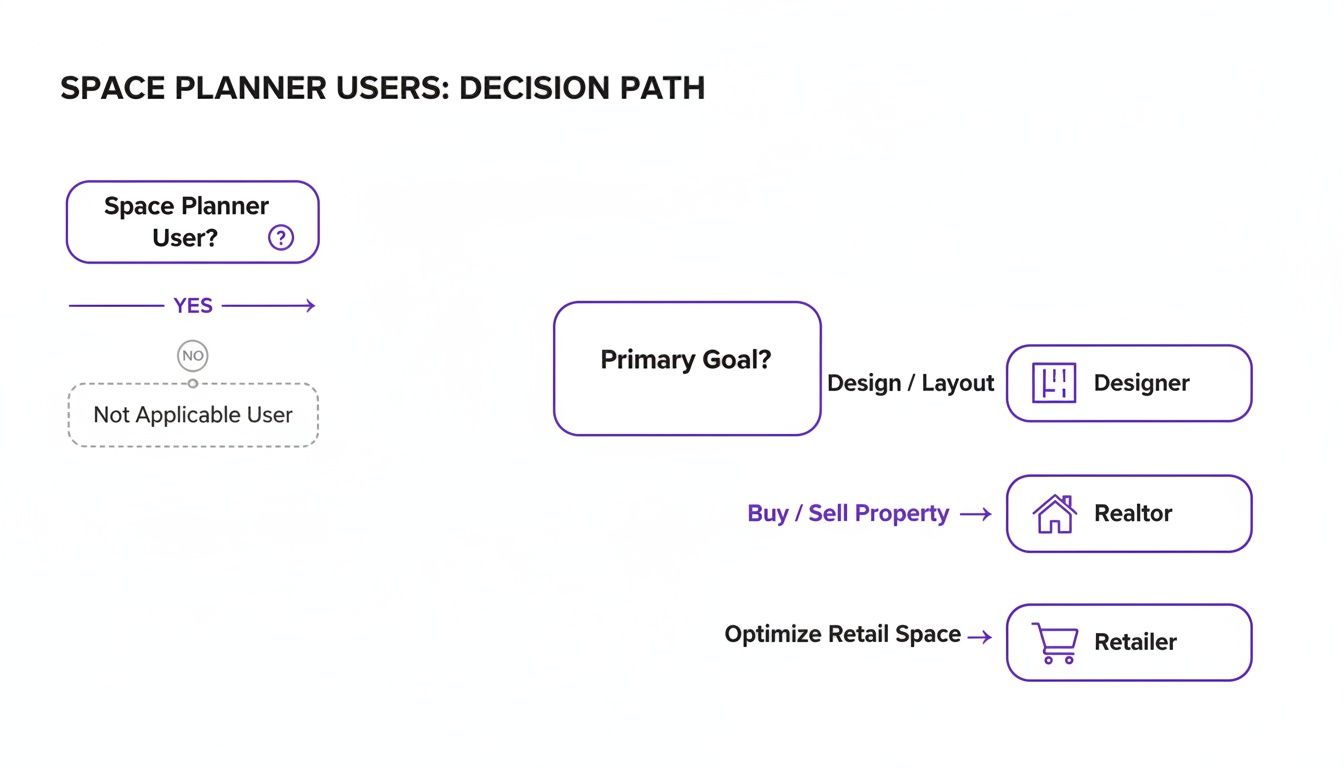
As you can see, it doesn't matter if you're a designer, realtor, or retailer. The end goal is always a high-quality visual that gets someone to take action—whether that’s a client signing off, a buyer making an offer, or a shopper clicking "add to cart."
Comparing Space Planner Software Options
To help you navigate the choices, here's a quick breakdown of the common types of space planning tools available. Find the perfect tool based on your needs, from quick sketches to photorealistic designs.
| Software Type | Best For | Realism | Ease of Use | Key Advantage |
|---|---|---|---|---|
| Basic 2D Floor Planners | Quick layouts and initial concepts | Low | Very Easy | Speed and simplicity for basic arrangements |
| 3D Drag-and-Drop Apps | Homeowners and DIY projects | Medium | Easy | Good for visualizing general furniture placement |
| Traditional 3D Modeling | Architects and experienced designers | Very High | Difficult | Unmatched detail and customization |
| AI-Powered Staging | Designers, retailers, and realtors | Photorealistic | Very Easy | High-quality results without the learning curve |
Ultimately, the best choice depends on how much time you're willing to invest and the level of quality you need for your final images.
The AI Advantage: Simplicity and Power
This is where an AI-powered platform like aiStager carves out its own space. It gives you professional-grade, photorealistic results without the professional-grade headache. You don't need to learn any 3D modeling skills or climb a steep learning curve.
The real magic of aiStager is its ability to create hyper realistic photos with true dimension rooms and furniture. It’s the only tool that gives you this level of accuracy with nearly instant results, all from a simple photo and a product link.
Let's say you're designing a room with a luxe, minimalist vibe and you’re stuck between two sofas. In just a few clicks, you can see exactly how a specific cloud sofa from Restoration Hardware looks compared to a sleek sectional from a boutique brand. You can even try out different colors for each. All you do is upload a photo of your empty room and drop in the product links.
aiStager does the heavy lifting, delivering a set of true-to-scale images that look like they were shot by a professional photographer. This effortless process is a game-changer for anyone who needs to make smart, confident design decisions without the wait. If you want to explore more options, you can find a breakdown of various online interior design tools to see how they compare.
The Future of Design Is Instant and Realistic
The days of guesswork and expensive mistakes in interior design are pretty much over. Technology has finally caught up to our imaginations, letting anyone see exactly how a space will look with total confidence. The next wave of space planner software is all about three things: speed, realism, and making it easy enough for anyone to use.
This is where advanced AI platforms like aiStager are changing the game. They give you the power to create perfect, dimensionally accurate visuals in just minutes. Think about it: you can redesign your entire living room, try out real furniture from your favorite brands, and see the final result before spending a dime. That's not some far-off concept; it's here now.
Real Products, Real Spaces
What really sets a tool like aiStager apart is its ability to create hyper realistic photos with true dimension rooms and furniture. This is the critical difference between a good guess and knowing for sure that something will fit and look great. You can finally stop wondering and start seeing.
For example, imagine you're trying to find the perfect sofa. Instead of just guessing, you can truly test drive your options visually.
- Compare Different Brands: See how a plush, deep-seated sofa from Pottery Barn looks in your living room versus a sleeker, more minimalist design from a modern brand.
- Test Colors and Finishes: In a couple of clicks, you can see that same sofa in a dozen different colors or fabrics—like a rich leather compared to a soft linen—all inside a photo of your actual room.
- Instant Placement: All it takes is a photo of your space and a link to the product you're eyeing. The AI does the heavy lifting, dropping the new item into your room as if it were really there.
This kind of accuracy is a massive deal for retailers, too. The market for retail space planning software is expected to hit USD 1,500 million by 2025 for a good reason. Getting a layout right can boost sales by 10-20%, which shows just how much money is on the line when it comes to visualization. You can dive deeper into these retail space planning trends to see the impact.
It’s time to stop imagining and start visualizing.
Got Questions About Space Planners? We've Got Answers.
Here are some of the most common questions we hear about using space planner software to turn design ideas into reality.
Can I Use Real Furniture from Actual Brands?
You can, but it really depends on the tool you're using. A lot of basic planners come with libraries of generic, unbranded 3D models. They're fine for getting a general sense of the layout, but they fall short when you're trying to nail a specific look. It's tough to decide between a specific Crate & Barrel sofa and a West Elm armchair when you're just dragging around generic shapes.
This is where a tool like aiStager completely changes the game. It’s the only platform that creates photorealistic images using true-to-scale models of furniture from any online store. You’re not stuck with a limited, pre-built library. All you have to do is upload a photo of your room and a link to a product you like, and you can see exactly how it looks. Want to compare three different sofas or see that one chair in five different colors? No problem.
How Accurate Are These Design Tools?
Accuracy is everything, and it varies wildly from one tool to the next. Simple apps might give you a rough idea of scale, but they often lack the precision you need to feel confident before you buy. On the other end, professional 3D modeling programs can be incredibly accurate, but they demand a steep learning curve and a ton of time to get things just right.
The best space planner software uses AI to bridge that gap. For instance, aiStager makes sure that both your room and the furniture are rendered in their true dimensions. That means the photorealistic image you get isn't just a pretty picture—it's a dimensionally perfect preview of how that new piece will actually fit and feel in your space. This pretty much eliminates the guesswork and the risk of costly measurement mistakes.
The real power of a tool like aiStager is that it gives you hyper-realistic, true-to-scale visuals. What you see is a reliable preview of reality, not just a stylized guess.
What's the Difference Between 2D and 3D Planners?
Think of a 2D planner as a classic blueprint. It gives you a top-down, bird's-eye view of your room. This is perfect for mapping out the fundamental layout, figuring out how people will walk through the space, and double-checking your measurements. It's the skeleton of your design.
A 3D planner takes that flat blueprint and brings it to life by adding depth, height, and perspective. It turns your sketch into an immersive model where you can truly see how furniture pieces relate to each other and get a feel for the finished room. Some advanced tools, like aiStager, push this even further by generating a final 3D view that looks just like a real photograph.
Ready to stop guessing and start seeing? With aiStager, you can create stunning, photorealistic interior designs using real products in your actual room—all in a matter of seconds. Try it for free and watch your vision come to life.